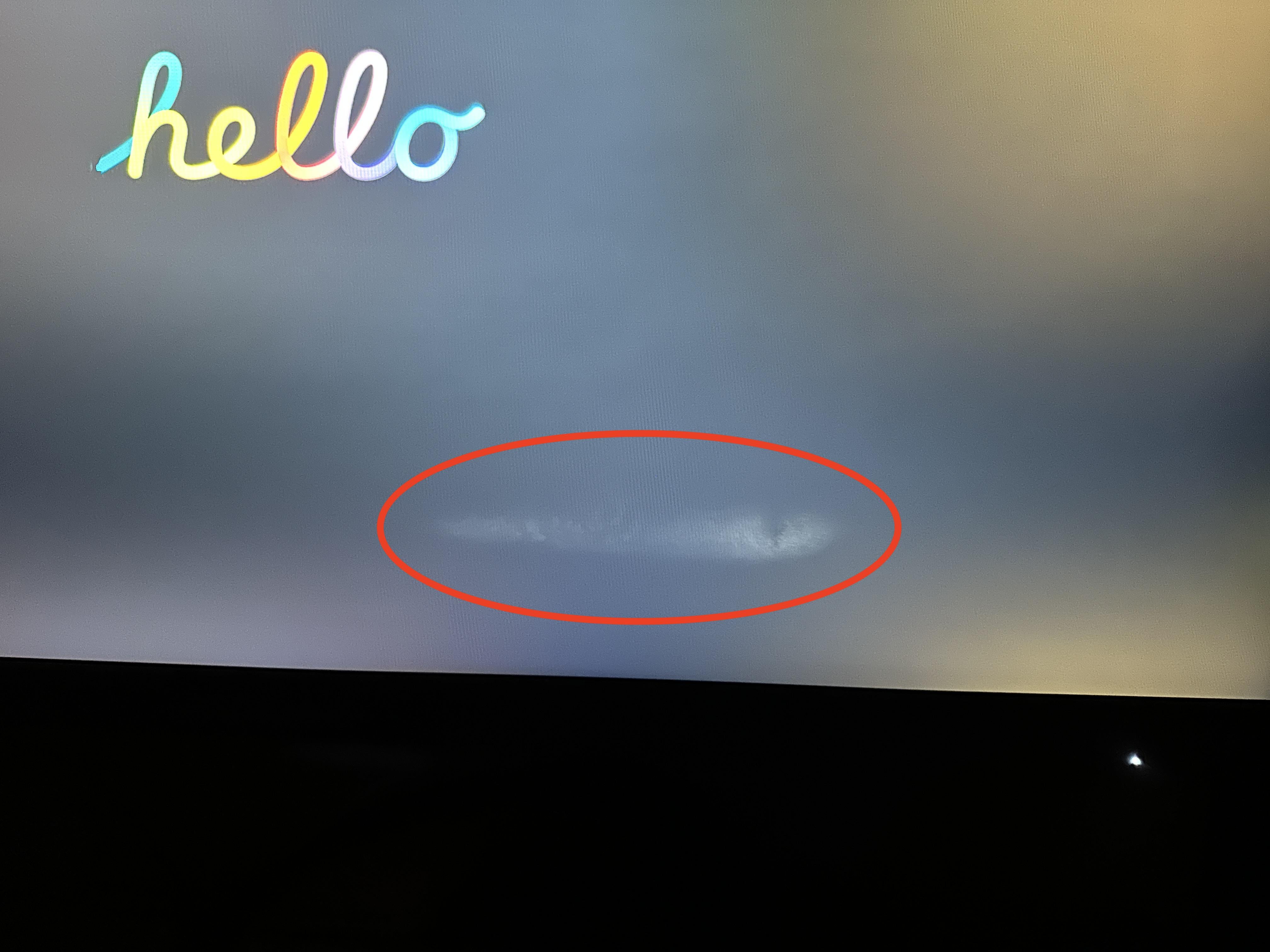
So I purchased a Gigabyte M27Q in the summer and it arrived with a smear similar to this but I got that one replaced by the third party seller, all good. Fast forward to today when I decided to pick up a second one in the sales for a dual monitor set up and it arrived with the exact same fault. I even let this one acclimatise to my flat this time round in case the issue was condensation last time but that obviously didn’t help.
Bobsofa
Looks to me like it’s delaminating. It’s a production issue when the panel layers aren’t fused together well enough and come apart. Either they weren’t properly evacuated or the material differences (Expansion and contraction especially) weren’t properly adjusted for.
Happytobutwont
That’s just a fish swimming across the screen nothing to worry about
BaconMeetsCheese
There is a fish in there
AandG0
I learned my lesson back in 2018 when I bought a cheap dell gaming monitor. Now, I invest in only Sony and Asus for monitors. That Dell died 2 weeks out of the box. I watched the magic smoke leave the top right corner of the monitor.
Neither_Dot4142
Use a tissue when finishing to prevent shooting on the screen
Snailydale
I was about to buy one of these in the black Friday sales. Anyone else had similar issues?

7 Comments
So I purchased a Gigabyte M27Q in the summer and it arrived with a smear similar to this but I got that one replaced by the third party seller, all good. Fast forward to today when I decided to pick up a second one in the sales for a dual monitor set up and it arrived with the exact same fault. I even let this one acclimatise to my flat this time round in case the issue was condensation last time but that obviously didn’t help.
Looks to me like it’s delaminating. It’s a production issue when the panel layers aren’t fused together well enough and come apart. Either they weren’t properly evacuated or the material differences (Expansion and contraction especially) weren’t properly adjusted for.
That’s just a fish swimming across the screen nothing to worry about
There is a fish in there
I learned my lesson back in 2018 when I bought a cheap dell gaming monitor. Now, I invest in only Sony and Asus for monitors. That Dell died 2 weeks out of the box. I watched the magic smoke leave the top right corner of the monitor.
Use a tissue when finishing to prevent shooting on the screen
I was about to buy one of these in the black Friday sales. Anyone else had similar issues?