
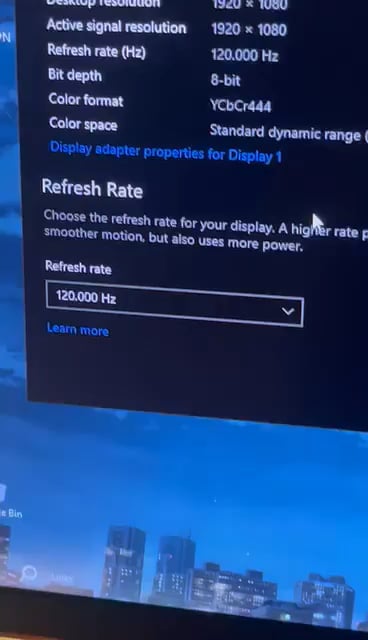
This has never happened before and has only happened recently. My pc specs are:
Ryzen 5 3500
16gb 2666mhz
RX 570
AOC 24G2W1G4 144hz
Ive tried changing cables, updating windows, reinstalling drivers using DDU, rolled back my drivers, and lowered my resolution. Also have artifacts on my monitor but very faint at 120hz yet crazy at 144hz which would sometimes cover my whole screen
44 Comments
What cable are you using? I think if you are using HDMI that would happend, but there are some work arounds but not entirely sure as you have an AMD gpu. You can try using a Display Port, that would actually be on 144hz.
​
EDIT: Grammar
Might be your monitor. Standard desktop monitors don’t always support the higher refresh rates. Given what you’ve tried so far, that would be my guess.
Look up your monitor specs and see if it supports the 144hz rate.
As far as I know HDMI is only able to do 144hz at 1080p. You would need to use a display port cable if your resolution is higher than that. What is your resolution set to?
Monitor is probably failing. I had the same thing start happening when I used the monitor at higher frame rates.
It could fix when it warms up a little, but it will probably slowly progress until its happening at lower and lower framerates.
The GPU isn’t exactly new, so I wouldn’t completely rule that out, but I’m pretty sure its the monitor.
Try disabling HDCP support in AMD graphics settings. Then restart pc.
For me its a sign of a dying monitor. You could give it a try with DP cables but I don’t think you will get this fixed.
Failing monitor. I have a 144hz viewsonic monitor and whenever I try to go above 60hz on my pc,Xbox, or ps5 the same exact issue happens.
I had this issue the reason was I was using a hdmi cable not a dp cable. I think hdmi doesn’t allow above 120 might be wrong about that but it’s definitely gonna need a dp cable.
Had the same issue with another AOC 144hz monitor, it will eventually do the same for the 120hz and you will have to go down to 60hz, it last me 2 weeks until it completely stopped showing anything even at 30hz. Just avoid the brand and go for something better like, gigabyte or lg.
PS: Replacing the motherboard wont do anything, i tried that so its either the panel or the board connected to the panel.
https://preview.redd.it/j4kr53p67y0c1.jpeg?width=1225&format=pjpg&auto=webp&s=ca2cec0c91c8e967c6b609a62bcd97df58e290e8
You need a DP cable.
It’s often bad cable… most cheap HDMI cables are designed to work on 1.4, but doesn’t match the requirement for HDMI 2.0. Same with DP cables, but on higher level, any DP cable should run 144hz on 1080p.
Also your monitor might have an option for output, choose highest HDMI output level. With one AOC monitor i had to manually choose better DP output.
EDIT: Looking at your monitor specs: [https://my.aoc.com/product/24G2](https://my.aoc.com/product/24G2)it only supports HDMI 1.4, so 144hz doesn’t work via HDMI. Need DP cable.
It’s even said in the description ” 1920 x 1080 @ 144Hz – DisplayPort”
i had a cheap HDMI cable that gave me option to pick more than 60 Hz but would have various issues on higher refresh rate, other HDMI cable i had was older and was only 60 Hz but after 2 days of wasting my time i got display port cable and i could go 144 Hz without any issue
Use Display Port cable.
This happened to me while on HDMI. Changed to Display port and it hasn’t happened since.
Cable
You have to use DP or hdmi 2.1
The wire, the GPU and the monitor can handle 144hz BUT the GPU HDMI Port cannot. That is the reason why this is happening. A lot of GPUs don’t have the HDMI ports to allow for 144hz, you have to use a display port. They are on sale for $10 on Amazon for a 2.1 DP [link.](https://www.amazon.com/gp/product/B0C54XR8YV/ref=ppx_yo_dt_b_asin_title_o01_s00?ie=UTF8&th=1)
Use a DisplayPort cable and that should clear it right up.
Display Port 2.1, motherfucker! Do you speak it?!
You have to wait for it to download
Try updating Mon Drivers?
DisplayPort for 144hz.
You need a dp cable
I’m pretty sure an RX 570 doesn’t have HDMI 2.1 ports. Get a DP cable.
get a 144hz specified hdmi cable
your cable is probably ass
display port 2.1 cable and all your problems will disappear 🤙
What the fuck is that on your wall????
Need display port cable
120 is the best tho, it is perfect
Try changing your color format to ycbcr422 in AMD software… I don’t know if the RX 570 can actually do full color 1440p at 144Hz over HDMI. The color format I’m suggesting is referred to as chroma subsampling, basically reducing the amount of color information to free up bandwidth for frame rate.
Switch to DP
Use it with 120. Solved. Next?
Cable issue.
Looks like an issue with the cable, imo.
cable
I had the same issue with my old MSI monitor. After a few hours of usage it started to work with 144 again. Something inside isn’t working anymore
The same issues happens in my ASUS TUF F15 laptop and I don’t know how to fix it, I use it now in 60 Hz. What could be the issue in my case?
Hi OP, ignore all these people saying it’s the cable, I’ve had the exact same issue with a AOC 144Hz 27G2/BK monitor and no amount of changing parts made it come back to me, I’ve tried on different cables, HDMI and DP both have the same issue, I’ve even bought new cables and tested on a friend’s PC to make sure.
It was at 144hz when it started shitting out, went down to 120hz and worked for a few weeks like that then same problem, then 100hz and now it’s at 60hz and only works if I have a secondary monitor connected to the PC for some weird reason.
Works completely fine in the BIOS options screen though. I still need to test if this happens on linux to help rule out some funky stuff talking to windows but this is 100% a monitor issue, I’d say AOC specifically.
I love how people are saying to go for a DP cable, especially the ones saying that his hdmi cable is not powerful enough for 144hz WHEN HE WAS USING THE SAME SETUP AT 144HZ PREVIOUSLY.
Probably the monitor is failing, most of the times these monitors are 120hz “native” and get to 144hz with overclock, you monitor is not able to handle it anymore
Hdmi can’t display 144hz. You’ll need to get a display port cable.
Display Port = Problem solved
Hdmi dont support 240 hz you need to use DP.
Human eyes can only handle 120hz