
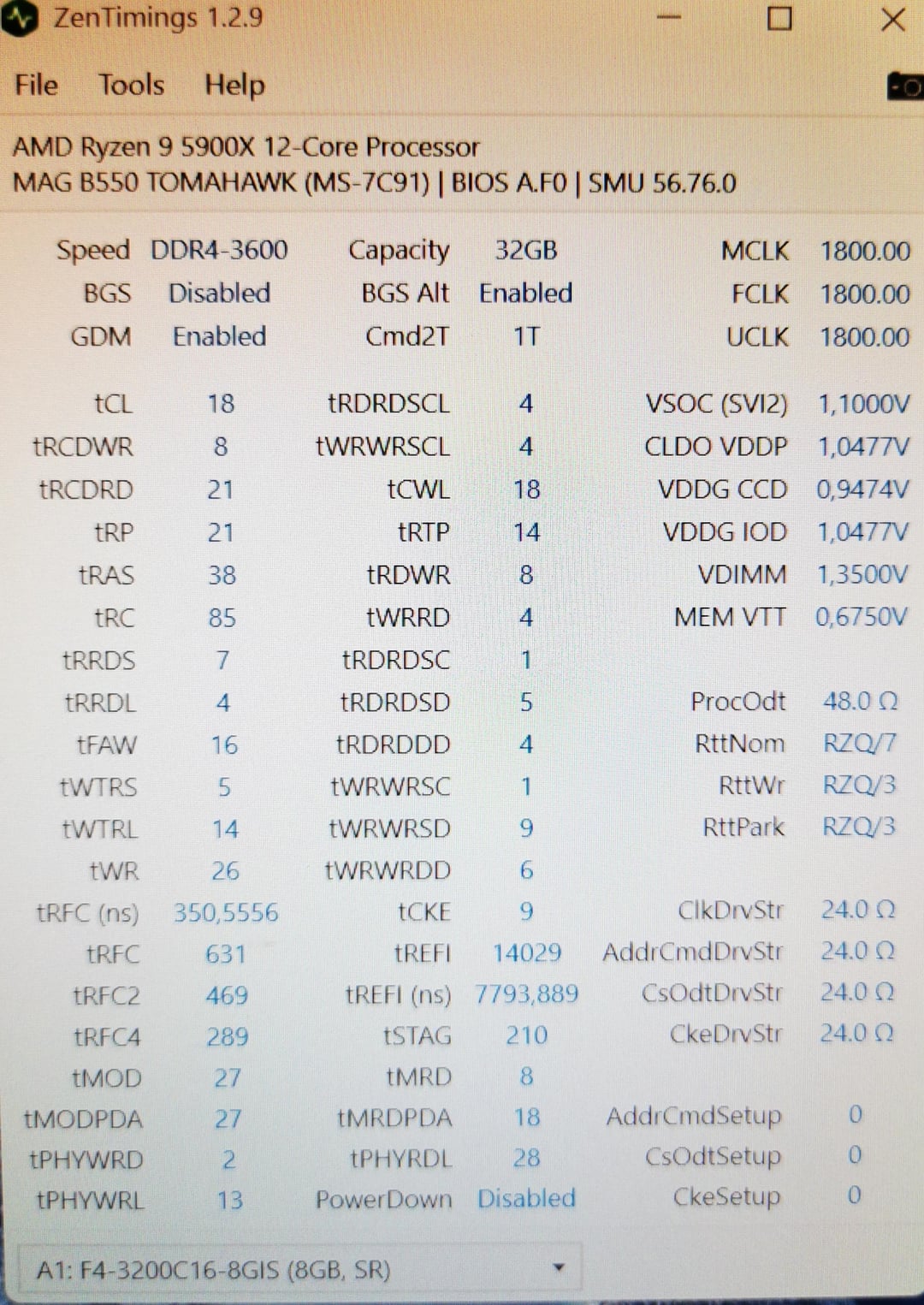
Hello, I have OC my RAM to 3600mhz but I can’t get it stable above 3600MHz. It boots at 3800 MHz, but then gets a green screen and the PC restarts. Now my question is the problem with the MB that only supports a frequency of 3600mhz for 4 RAM sticks or is the RAM the problem or the BIOS settings or the cpu?
Because I have heard that ram oc should work over the frequency specified by the manufacturer with this MB. The specifications specified by the manufacturer
1DPC 1R max speed 4866 MHZ
1DPC 2R max speed 3866 MHZ
2DPC 1R max speed 4000 MHZ
2DPC 2R max speed 3600 MHZ
I’ve also heard that the Ryzen 9 5900x can only run 3400mhz ram speed with Zen 3 and my 3600mhz is just luck that it runs with it. But I see so much of them running them at 3800 MHz and 4000 MHz that I think it’s wrong or?
Components:
Cpu: ryzen 9 5900x + 360mm aio
Gpu: xfx rx 7800 XT merc 319 black edition
Mb: msi mag B550 tomahawk
ram:
4x8GB, 2x 16GB G.Skill Aegis DDR4-3200 DIMM CL16 Dual Kit. One kit was purchased in 2020 and the second was purchased in 2022. (Settings see picture, the settings on the picture are designed for use with 3600mhz. With these settings, it runs stable and also through test like Prime 95 and occt and run them together or testmeme5 with PCBdestroyer )
slot 4: 1x 04266X8810C
slot 3: 1x 04266X8810C
slot 2: 1x 04266M8410C
slot 1: 1x 04266M8410C
tower: Inter-Tech C-701 Panorama with good to very good air flow from bottom to top, there are three fans at the bottom and three fans at the top, the aio sits next to the mb and draws the heat air out
Power supply: pure power 11 700W
1 Comment
OK I made a mistake. the mb is not the problem because it have 2DPC 1R = four single-rank modules as specification and I have four singel rank modules. with the amd Zen 3 it can Handel ram speed from 4000mhz and higher but the 4000mhz should be the sweet spot.
I don’t know what the problem is but I can say it must be the ram that it can’t handel this frequency or bios setting for the ram are wrong.