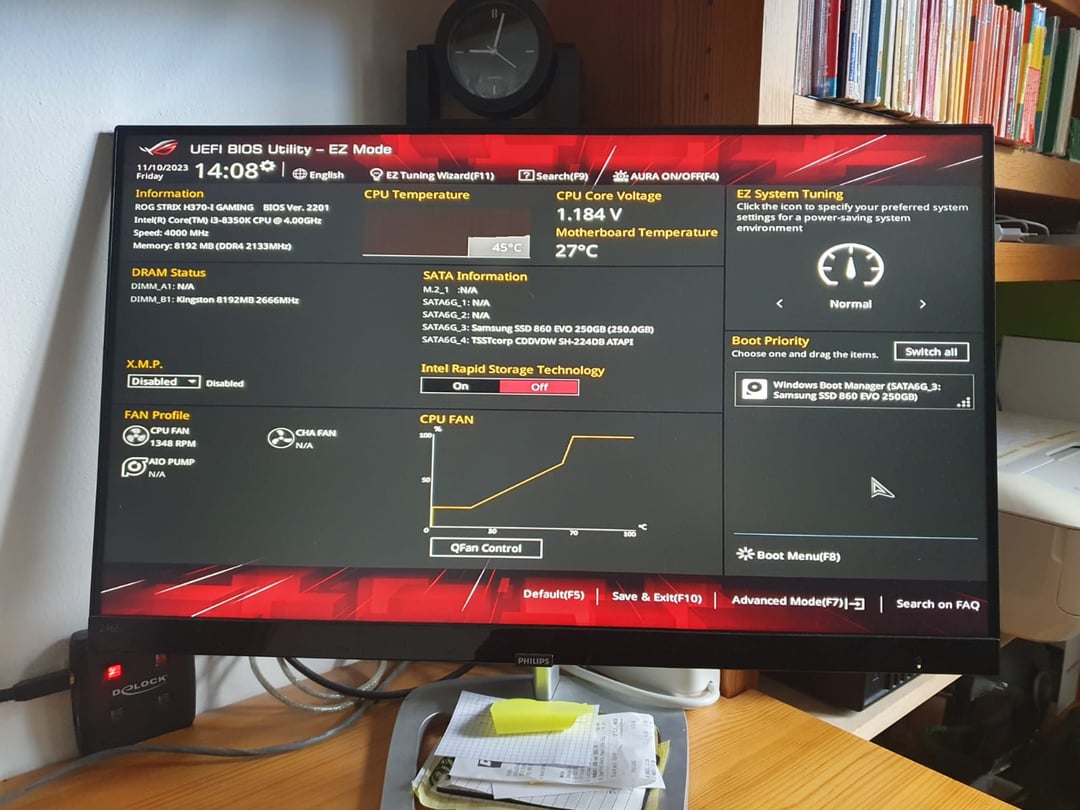
*not every time: it does that when we unplug the power cable after it is shut down. (Or turn the coupler strip off)

*not every time: it does that when we unplug the power cable after it is shut down. (Or turn the coupler strip off)
18 Comments
Note: this pc has been in use for many years and for the past 2 weeks it started doing this.
Change your Cmos battery. When its dead or uninstalled this will happen. It uses that little battery to store the config info in memory. With out it, the motherboard thinks new hardware is installed every time it loses power.
yeah, it’s a dead cmos battery, should be able to replace it with any CR2032 from the hardware store or whereever
I had this happen but it was the cable/connection to my SSD.
Somehow the locking sata cable had been gouging the plastic connection on SSD.
Buying a new cable fixed.
Check the time and date in the bios. That will tell you if it’s a case of dead cmos battery or not. If it thinks it’s in the past then you need to change it. That being said, changing it will not fix your problem. You need to change your boot settings back to the way they were in case something was changed from default before you installed your os. It might also be a defective cable or drive.
Replace CMOS battery and this should be fixed.
If this still persists after replacing the CMOS battery, check if the hard drive or SSD that has the windows installed , is recognised or found in BIOS, and also check the boot order.
Thanks for this, my VR racing sim also has this issue.
CMOS battery most likely is dead
Replace cmos battery and if it happens again restore to default settings (happened the same to me and it fixed that way)
Had same issue, got new Cmos 2032 battery, fixed.
Reset bios to default, make sure your boot hdd/ssd is selected correctly. If after that replace the cmos battery on the motherboard it looks like a watch battery. I think they are almost always cr2032 but the battery you pull out should have numbers on it and buy one from like Walmart for 5$ replace the battery and boot. You might have to reset the bios and then save whatever settings you change. Shouldn’t be anything to worry about easy fixes all around.
Btw after you fix the issue you should enable X.M.P
why do you unplug the powercable? or turn of the strip?
I assume that the problem is in the SSD drive, when the BIOS cannot find the boot sector, the BIOS automatically loads.
Change cmos. Same thing happened to me last week.
Don’t forget to enable xmp
Funny thing I used to get dead CMOS batteries all the time, today never. Maybe I used to turn off the PC. Haven’t seen it in like almost 20 years now.