
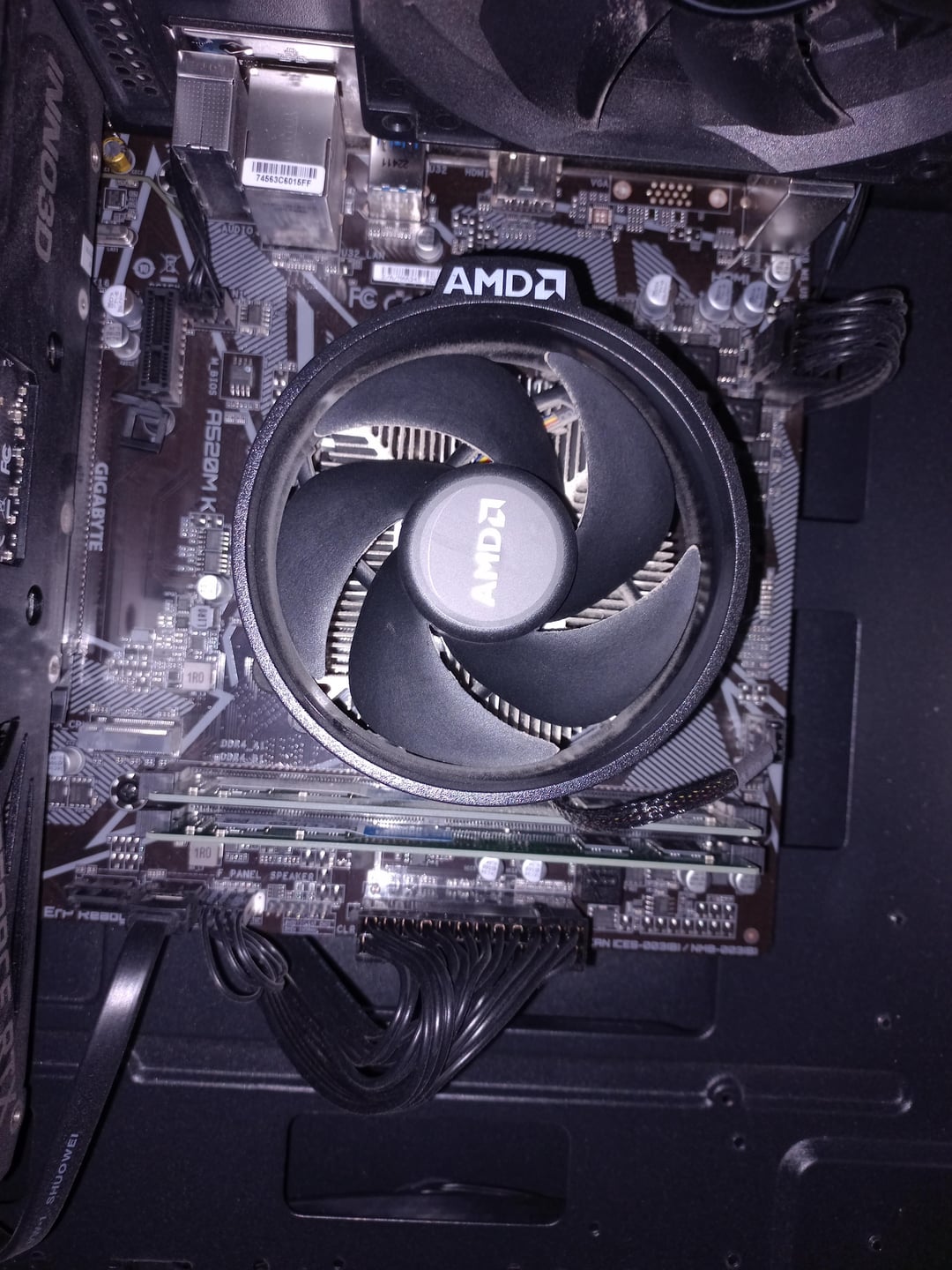
So my computer only came with about 500 gig storage and I want to add 1tb to it as I keep running out of space. I don’t have a lot of experience with computer building, so I am a bit confused as to where I need to put it on the motherboard or if I even can, so I figured I’d ask before purchasing an SSD lol.
The other option is an hdd or a sata ssd but that’d require me to open the side panel which has one of those warranty stickers, so I dont really wanna do that as I still got like 14 months of warranty.
16 Comments
Look under the cpu cooler
So there are „two“ kinds of ssds. Actually there are some more but to keep it simple lets just say to. One is the type mostly goes under the name nvme ssd which you can place in the slot you have on your last picture. The second one is the classic ssd which you Connect to the mb like any other internal hard drive with a SATA cable and a power cable. If you buy an nvme one, which are currently almost the sime price as the cable connected ones ( at least where i live), check your mb manual if you have to use a different sata port for your other harddrive :).
You have the nvme slot below the cpu cooler.
https://preview.redd.it/8572p2u2gpzb1.jpeg?width=1179&format=pjpg&auto=webp&s=6c36e7a5033f5dc5c7058e553554e7e18dca3029
i recommend you downloading your motherboards manual. In there you would find useful info on your mobos SSD support so you dont over expend. or buy the wrong size….
If you dont know what motherboard you have:
[What Kind of Motherboard Do I Have? (techguided.com)](https://techguided.com/what-motherboard-do-i-have/#:~:text=To%20find%20out%20what%20motherboard%20you%20have%2C%20follow,the%20name%2Fmodel%20of%20the%20motherboard%20will%20be%20displayed)
Also useful: [M.2 Connector Guide on Keys and Sockets for SSDs (atpinc.com)](https://www.atpinc.com/blog/m.2-connector-guide-for-SSDs)
It took me about 1 minute to find your mobo manual and 15 seconds to find the page with installation guide. Is it really that hard to look up manual? Stop it with that “I’m a man I dont need manual”, you ask for help in the internet anyway.
read the manual!
​
https://preview.redd.it/y6ffrpkyjpzb1.png?width=471&format=png&auto=webp&s=6d29ce61ac13572331b816730298e52fdb931c72
1 figure out what kind of mobo u have
2 read ur mobo’s manual (skip to nvme slot section.)
3 slap it in there
Literally RTFM. There appears to be an m.2 socket but I still suggest checking in the manual what kind of drive it supports
You just set it anywhere and it bonds on its own like neurons
Motherboards come with manuals that show things like this.
Only if the motherboard came with some papers with written words and diagrams that would tell all the specifications and their location on the board.
If you can’t identify an SSD slot. Please watch a video on how to slot it in before you do anything else
https://preview.redd.it/ou45vvolzpzb1.jpeg?width=1080&format=pjpg&auto=webp&s=9dace78c1c6a4552a9409053ebfab87093e8513c
I’m really starting to believe yall buy things blindfolded.
Picture 3. You have a slot for m2 ssd. Regular ssd? Use side port to the right in picture 2
If you gotta open the case, you can change the cooler as well.