it probably belongs to the inside of the IO shield
rudydj96
Back plate can probably be bent back inwards ?
farrell5149
You need to take your mother board out and reseat it making sure all the open bits on you io panel are sitting the right way
_vogonpoetry_
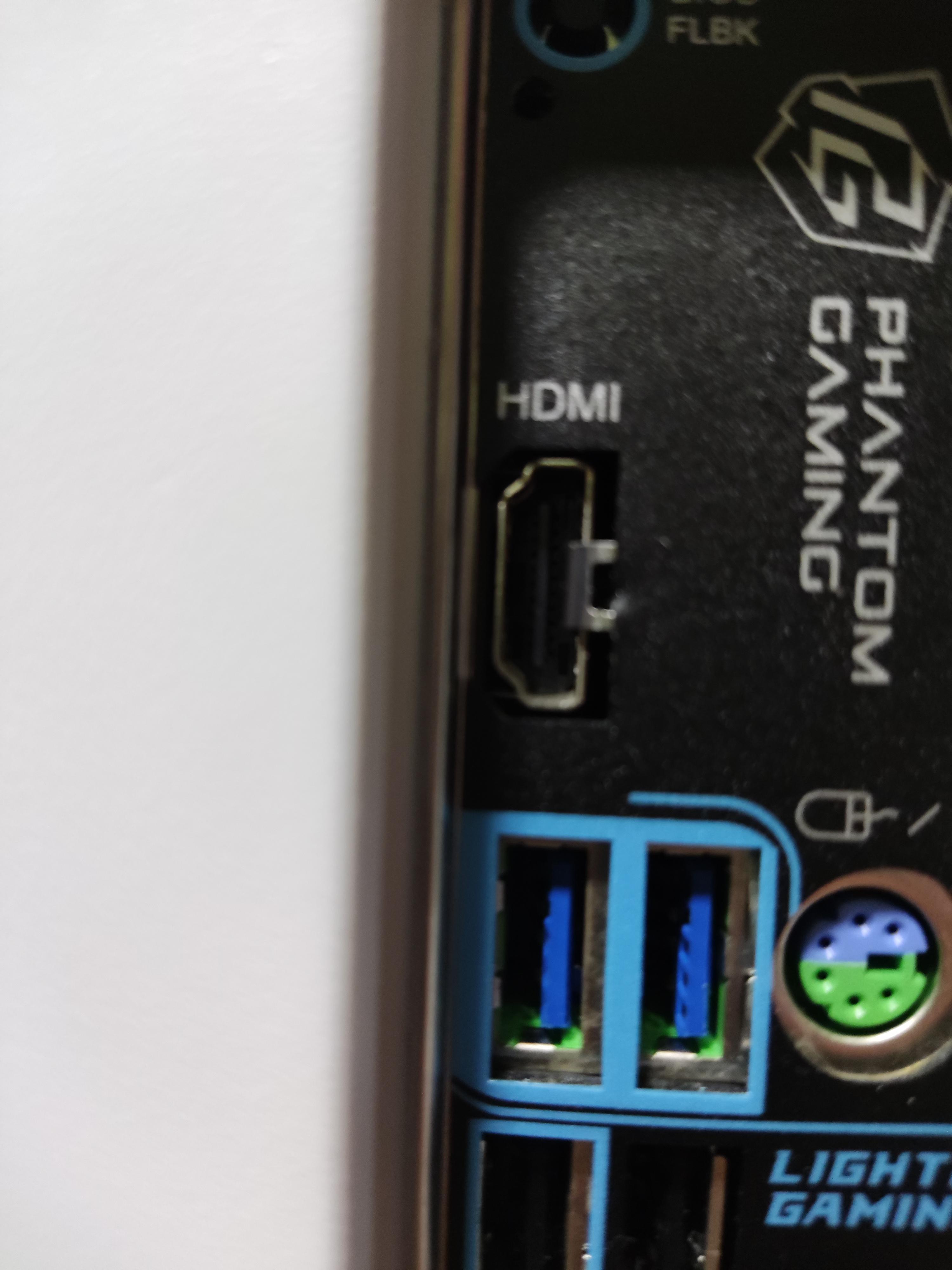
You installed the mobo or IO shield wrong and the tab got caught in front of the port instead of pushing down onto the side of it. You’ll either have to reinstall the motherboard and bend it back or just cut off the tab.
zeblods
Someone installed his IO shield wrong…
AaronTheElite007
IO shield wasn’t properly set
madeforthis_1984
Also, why are you trying to connect to that port. You plug in your video cord to your graphics card.
DasWandbild
…if you’re using a discrete GPU, you shouldn’t use that port, anyway.
t00lbawx
CUT IT OFF!@!@!@ what could go wrong …..
zulu52
Reinstall 🤣
Juice_231
Oof
Looks like IO shield wasn’t lined up quite right when it was put on. You might be able to wiggle it off but may have to make an afternoon project rebuilding the PC if you want to use that port.
starcube
It’s a spring-loaded grounding tab that’s supposed to touch the body of the port. You done goof’d and bent it out of place when you installed your motherboard.
korg64
It’s part of back plate. Bend it off carefully. It’ll be fine.
Classytagz
Just bend it backwards
Danvideotech2385
This one mistake is going to cost you a few hours lol
BaconMeetsCheese
Burn it down
Narmith
Bad assembly, get a screwdriver and gently push it inside (or reassembly your entire PC). That pin should “touch” the HDMI port from the outside of the golden/shiny border. You can also try and cut it away, not the best practice but that’s an option too if you don’t care about suden electrical static discharges. Take care.
JimJava
Remount the backplate, that’s not supposed to be like that.
_zir_
its part of the io shield, that’s supposed to be outside the connector. If you don’t want to unscrew your whole mobo just to fix that you can always cut it off or bend it enough to allow it to spring back behind the hdmi port.
DesastreUrbano
Oh shit! Like a month ago I bought a basic pc and has that. Totally didn’t pay attention to it. Reading the replies maybe I need to look at it…
wuffifluffy
To answer the question of why this thing exists:
It is meant to make contact with the metal of the hdmi socket. All the other holes in the IO shield have this latch too. This is supposed to shield electromagnetic waves from entering or leaving the housing.
In my opinion, it’s a relic of the past since modern components are quite immune to EMI and undergo EMI testing to check how much EMI is caused by the components and how much EMI they can handle (that’s a lot off EMI in one sentence). If you think about it, it does not make a lot of sense to seal a <1mm slit on the IO shield when most of us have a big hole in the case so we can admire our build.
regbeg
Its for dumb people that has a gpu port and wants to use the mobo one /s
tonykrij
There are also USB-C > HDMI cables nowadays if your PC supports it.
SleepZealousideal268
That is definetly a bad IO shield installation. If you bought the tower prebuilt: Either you don’t have integrated graphics meaning that port is rendered useless as it won’t give signal and the technitian installed it that way to prevent you from inserting a HDMI to it because it won’t give signal anyway or in the other case: he or she is dumb and didn’t properly installed it rendering it useless anyway.
​
the fix is pretty straight forward:
​
You have to just SAFELY pull it forward so it won’t sit in that position preventing the HDMI to insert with no further issue (it is pliable enough for you to do that even with your bare fingers but mind that the finishes might be sharp!), for that you will (most likely) have to dismount your GPU and unscrew the motherboard to gain access to the IO shield. More on that here:
Like everyone else is saying, it means you fucked up the IO shield, but frankly, it doesn’t matter. You’re better of plugging your monitor into your GPU anyways.
eddiekoski
The clip was supposed to go to the right of the connector not inside the connector F

27 Comments
It’s part of the plate that shouldn’t be exposed
it probably belongs to the inside of the IO shield
Back plate can probably be bent back inwards ?
You need to take your mother board out and reseat it making sure all the open bits on you io panel are sitting the right way
You installed the mobo or IO shield wrong and the tab got caught in front of the port instead of pushing down onto the side of it. You’ll either have to reinstall the motherboard and bend it back or just cut off the tab.
Someone installed his IO shield wrong…
IO shield wasn’t properly set
Also, why are you trying to connect to that port. You plug in your video cord to your graphics card.
…if you’re using a discrete GPU, you shouldn’t use that port, anyway.
CUT IT OFF!@!@!@ what could go wrong …..
Reinstall 🤣
Oof
Looks like IO shield wasn’t lined up quite right when it was put on. You might be able to wiggle it off but may have to make an afternoon project rebuilding the PC if you want to use that port.
It’s a spring-loaded grounding tab that’s supposed to touch the body of the port. You done goof’d and bent it out of place when you installed your motherboard.
It’s part of back plate. Bend it off carefully. It’ll be fine.
Just bend it backwards
This one mistake is going to cost you a few hours lol
Burn it down
Bad assembly, get a screwdriver and gently push it inside (or reassembly your entire PC). That pin should “touch” the HDMI port from the outside of the golden/shiny border. You can also try and cut it away, not the best practice but that’s an option too if you don’t care about suden electrical static discharges. Take care.
Remount the backplate, that’s not supposed to be like that.
its part of the io shield, that’s supposed to be outside the connector. If you don’t want to unscrew your whole mobo just to fix that you can always cut it off or bend it enough to allow it to spring back behind the hdmi port.
Oh shit! Like a month ago I bought a basic pc and has that. Totally didn’t pay attention to it. Reading the replies maybe I need to look at it…
To answer the question of why this thing exists:
It is meant to make contact with the metal of the hdmi socket. All the other holes in the IO shield have this latch too. This is supposed to shield electromagnetic waves from entering or leaving the housing.
In my opinion, it’s a relic of the past since modern components are quite immune to EMI and undergo EMI testing to check how much EMI is caused by the components and how much EMI they can handle (that’s a lot off EMI in one sentence). If you think about it, it does not make a lot of sense to seal a <1mm slit on the IO shield when most of us have a big hole in the case so we can admire our build.
Its for dumb people that has a gpu port and wants to use the mobo one /s
There are also USB-C > HDMI cables nowadays if your PC supports it.
That is definetly a bad IO shield installation. If you bought the tower prebuilt: Either you don’t have integrated graphics meaning that port is rendered useless as it won’t give signal and the technitian installed it that way to prevent you from inserting a HDMI to it because it won’t give signal anyway or in the other case: he or she is dumb and didn’t properly installed it rendering it useless anyway.
​
the fix is pretty straight forward:
​
You have to just SAFELY pull it forward so it won’t sit in that position preventing the HDMI to insert with no further issue (it is pliable enough for you to do that even with your bare fingers but mind that the finishes might be sharp!), for that you will (most likely) have to dismount your GPU and unscrew the motherboard to gain access to the IO shield. More on that here:
[https://tech4gamers.com/io-shield/](https://tech4gamers.com/io-shield/)
​
Hope I helped you!
Like everyone else is saying, it means you fucked up the IO shield, but frankly, it doesn’t matter. You’re better of plugging your monitor into your GPU anyways.
The clip was supposed to go to the right of the connector not inside the connector F