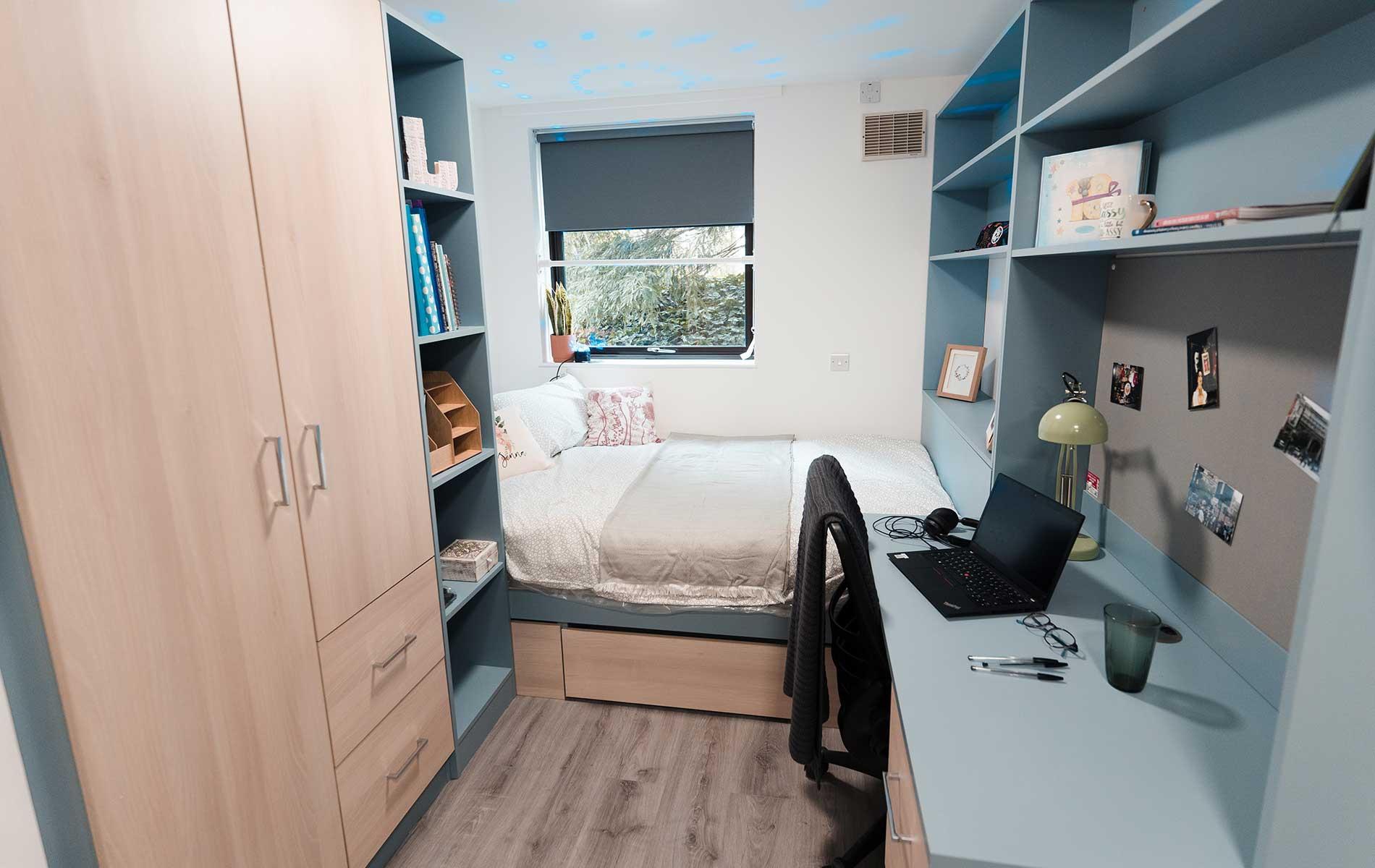
I’m moving into dorms tomorrow and was wondering what the most efficient way to have 2 monitors (one curved) for this type of desk. I ideally want ample room for my mouse and keyboard. Thanks!

I’m moving into dorms tomorrow and was wondering what the most efficient way to have 2 monitors (one curved) for this type of desk. I ideally want ample room for my mouse and keyboard. Thanks!
48 Comments
Either on the stands they come with or into the wall
Railing across the bookshelves, and attach vesa mount to that
put…them…on the desk? maybe?
next to each other?
Mount two monitors directly onto wall, pc on the right side of desk or under and boom baby
Ideally a nice VESA wall or desk mount, so you can set them up ergonomically.
But since you won’t be allowed to drill I’d use a dual monitor stand. I used this one in the office, worked very well.
https://preview.redd.it/4qf4xa2sf4zb1.png?width=574&format=png&auto=webp&s=fe0bdafddbb27b5d431581ff25063049d62a2e2c
[Neomounts D865D](https://www.neomounts.co.uk/desk/monitor-stands/fpma-d865dblack-neomounts-monitor-desk-mount/)
One vertical + one horizontal monitor would make the whole setup fit tighter spaces.
Monitor arm is a great way to have a lot of desk space. Mounting one on your desk seems difficult, unless you are able to move your desk forward.
You may want to consider wall mounting your monitors.
brother lives in a matchbox 😭😭
Honestly, I wouldn’t.
Id just use one monitor.
Yeah having a second is nice and all but personally, I basically almost never use the second one in any productivity context. For studying one monitor is perfectly sufficient
wall mounted Vesa arms if the wall is strong enough.
or drill through the desk
next to each other
Have one on the desk, the other on a desk mounted arm so that you can swivel it to watch whilst in bed
Small wall mount is only viable option in my opinion.
Its small as it is, and two stands would only make it more full.
Damn, this Norwegian prison cell is very cozy
I’d go side by side against the wall
On the desk. One left one right
i would invest in a nice ultrawide and hang it on the wall 🙂
What size is the desk? What size monitors do you desire? What about wall mounting to keep your desk space?
This dorm looks cozy as shit
Did screw a vesa mount right into the pinboard
I’d use a dual monitor arm as it could be used in the existing grommet hole
https://preview.redd.it/w26fl92us4zb1.png?width=1080&format=pjpg&auto=webp&s=395f4fb51775dce24859a51c4b78c2ed067a1174
Like this
Put one monitor on desk
Put second monitor on desk
Plug both in
What are the dimensions of the bed? It doesn’t look usable
Position them to the left side. Main monitor is straight in front of chair and then the second one is off to the left and probably hanging over the bed a little. This makes it so the second monitor is taking up minimal desk space. Like others have said, a wall mount may be necessary, or a a monitor desk mount that and screw into the desk.
This will leave the rest of the desk for art things! Plus you could rotate the second monitor for movies in bed 🙂
one next to another possibly
Mounted on the wall with configurable holders to turn both monitors to you. Ideal by me… Or some long lengs or T shaped holder for two monitors
I had to switch one of my monitors to be vertical when I moved into a dorm last year. I actually really like opening two different windows on top of each other on that monitor.
Vertical vesa mount.
If possible I wouldn’t. I would get one single larger monitor
On or around the desk area preferably.
Do you need two monitors or can you settle for one? I feel like one alone looks nicer and better in that riom
Go widescreen babe. Embrace and enjoy the 21:9 life. You won’t regret it.
Can we just take a moment to admire how nice of a dorm that is
Dual wall mount
One next to the other
Thönkpad
Just get the Samsung Odyssey
Wall.
Wallmount?
Very carefully
Just use one monitor and a laptop
Buy a quest 3 and use immersed.
It could just be because of the camera’s perspective, but that desk looks pretty big to me. Maybe not huge, but it definitely doesn’t seem small. So I don’t see the issue?
Wall mount if the dorm allows it. Two arm stand with flat base if not.
You always could wall mount them
Is that a challenge?
I would place the monitors on the desk, plug them in, and use them. If I placed them under the desk or somewhere else like on the bed, not only would it be difficult to get them working and uncomfortable to use, but I would have failed in my task to set up 2 monitors on the desk.