
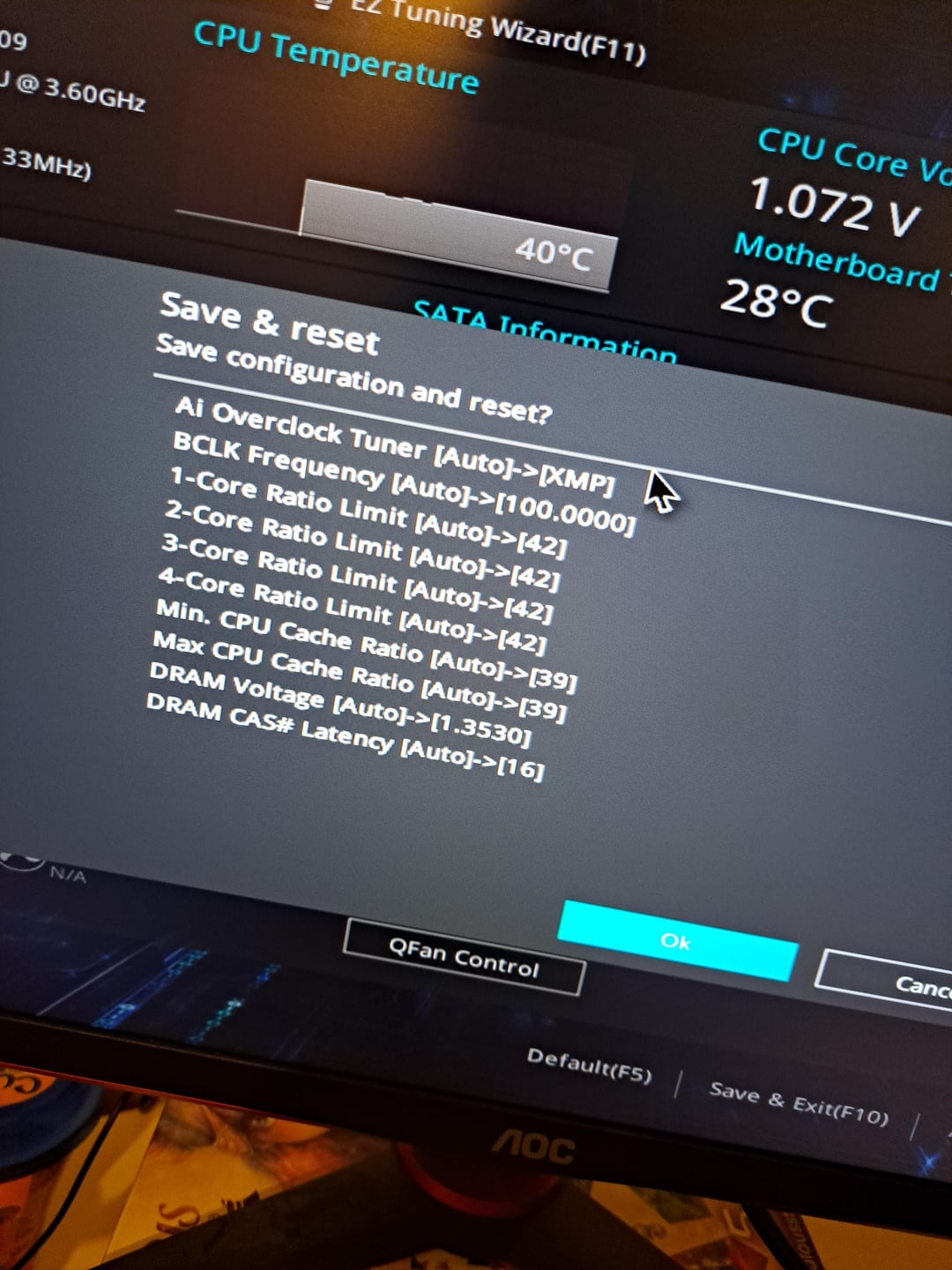
Hello. I just upgraded from 16gb to 32gb ram, 3600 mhz cl 16. When i booted up my pc however, task manager aswell as a cmd command both say that my ram is running st 2400 mhz.
Im using an intel i7700 CPU and a asus motherboard. I’ve seen people saying that to run the ram at its full 3600 mhz, I need to turn on XMP in the bios. Im just posting this here to double check if the setting in the picture is the right one?
It also changes some things about the CPU, not just the RAM speed, so I didnt want to turn it on and damage something before asking. I tried keeping the setting mode above to auto, changing just the DRAM speed to 3600 with everything else on automatic aka the same i suppose, and the pc didnt boot even when using the MeMOK! Feature.
Is this the right XMP setting? Can the changes to other components other than ram damage my stuff somehow? I havent reallx overclocked before.
Thank you for the read 😀
3 Comments
Click on XMP below not AI Overclock Tuner.
I7 7700. 2400mhz will be the max for that CPU. Locking the cores isn’t going to do much either. Not a K series. 3600mhz would never work on Kaby Lake. You could try 2666mhz but I doubt it would work.
I’ve had a bug in my bios with ram changing itself. It’s very frustrating.