Unplug it from GPU and use motherboard to see if still happens. If yes then try removing ram one by one.
You are most likely to found your issue in just these 2 steps.
Once the problems been found, i suggest you do not become 5 minutes craft and instead send the defective part to the manufacturer assuming all the products (most likely) have warranty if they are less than an year old.
Equivalent_Gas_3809
Looks like the GPU is dying. I may be wrong though.
FoodTiny6350
Not very fucked, usually the limited hardware warranties last 2 years for most products or more so just rma that bad boy and get another
WalterWhite084
When that happens is usually due to the ram sticks try placing them in other ports and if it’s still not working search a tutorial on the internet and if still it’s not working you’ll have to replace them
Wundussy_Lover
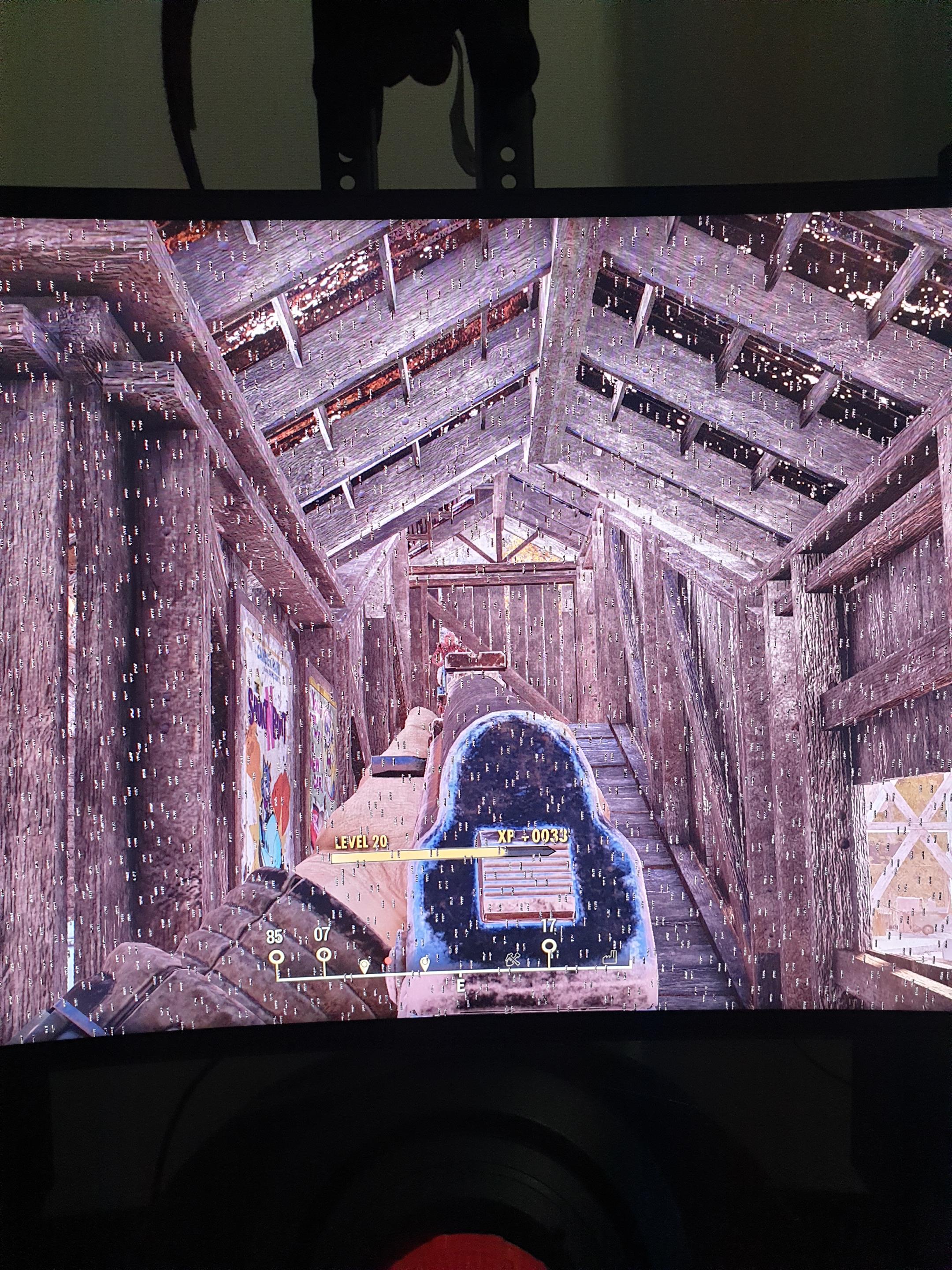
What are the numbers mason?
twitchthewaffle
Your pc is crying because you’re forcing it to run fallout 76
xxdibxx
Paint by numbers game map?
le_stuka_pilot
You play fallout 76 instead of fallout 4, you deserve to suffer
Funky-Fresh
had similar issue which Nvidia support was able to fix by having me do a clean uninstall and then downgrading driver to an older version until a new driver was released. Call nvidia
scharmlippe
Play space invaders like your pc wants you to
Swendsen
All games or only Fallout 76? F76 has a lot of weird graphics bugs that could be mistaken for a dying gpu, though i haven’t seen that particular one. If it’s only f76 make sure you’re playing in fullscreen and consider using an ini tweaker.
sowhiteithurts
Check your cables. Try swapping them if you have spares. I had a similar problem with a bad DP cable
CxFusion3mp
Looks like a driver issue honestly. Try upgrading to newer drivers or roll back a version
difused_shade
Less than 1 year? RMA then
Panzerv2003
Yes
ThRvrnd
That depends on how much you like errors and display artifacts. This could be great for you if you have the right attitude.
ponakka
i think your videoram is glitchy.
noodleguy12
Could be a faulty cable
ZetoMorphic
I’ve had this multiple times (almost the exact same pattern) and it was fixed every time by either clean reinstalling the graphics drivers or downgrading them until the next version came out.
Rennsenseii
You just lost your GPU, rip. Try to make your warranty work.
davidgoldstein2023
Neo…
Symmitrius
Must be those damn AMD GPUs! The drivers never work properly!! Buy nvidia guys
/s
penis_pensi
its just cos your playing fallout 76 this only happens on that game with the current drivers you should be fine
ShadowedNinja21
Could be drivers?
paulerxx
Could be the cable / input or output jack or the monitor /gpu
Petarthefish
What is the gpu?
kholetroll
It doesn’t mean your screwed. It could be many things from bad GPU to a bad stick of Ram or an out of date driver. Before unplugging anything I would download DDU (Display Driver Uninstaller) and reinstall your video card drivers.
SilentReavus
Very, seeing as you seem to be playing fallout 76
Noxious89123
All new and under 1 year old? Not screwed in the slightest.
This is what warranties are for.
In_hindsight666
He’s beginning to believe
MikemkPK
If you bought your GPU from ASUS or Gigabyte, good luck.
MikeE21286
It’s likely a a GPU hardware or software issue.
VrPillow
The ones and zeros Mason what do they mean
ItsMrDante
Try DDU and reinstall the driver. If that doesn’t work then update all drivers, make sure all your Windows updates are installed as well. That’s all
Wicked_Wolf17
Try reseating your GPU, if it doesn’t do the trick, then the GPU is on its way out..
MecheSlays
RMA IT. Now
Xitherax
Oh no, you have the NoNo stars. Big sad
Li3ut3nant_Dan
Too many Rads. Shouldn’t have ate that meat to gain health back.

38 Comments
Unplug it from GPU and use motherboard to see if still happens. If yes then try removing ram one by one.
You are most likely to found your issue in just these 2 steps.
Once the problems been found, i suggest you do not become 5 minutes craft and instead send the defective part to the manufacturer assuming all the products (most likely) have warranty if they are less than an year old.
Looks like the GPU is dying. I may be wrong though.
Not very fucked, usually the limited hardware warranties last 2 years for most products or more so just rma that bad boy and get another
When that happens is usually due to the ram sticks try placing them in other ports and if it’s still not working search a tutorial on the internet and if still it’s not working you’ll have to replace them
What are the numbers mason?
Your pc is crying because you’re forcing it to run fallout 76
Paint by numbers game map?
You play fallout 76 instead of fallout 4, you deserve to suffer
had similar issue which Nvidia support was able to fix by having me do a clean uninstall and then downgrading driver to an older version until a new driver was released. Call nvidia
Play space invaders like your pc wants you to
All games or only Fallout 76? F76 has a lot of weird graphics bugs that could be mistaken for a dying gpu, though i haven’t seen that particular one. If it’s only f76 make sure you’re playing in fullscreen and consider using an ini tweaker.
Check your cables. Try swapping them if you have spares. I had a similar problem with a bad DP cable
Looks like a driver issue honestly. Try upgrading to newer drivers or roll back a version
Less than 1 year? RMA then
Yes
That depends on how much you like errors and display artifacts. This could be great for you if you have the right attitude.
i think your videoram is glitchy.
Could be a faulty cable
I’ve had this multiple times (almost the exact same pattern) and it was fixed every time by either clean reinstalling the graphics drivers or downgrading them until the next version came out.
You just lost your GPU, rip. Try to make your warranty work.
Neo…
Must be those damn AMD GPUs! The drivers never work properly!! Buy nvidia guys
/s
its just cos your playing fallout 76 this only happens on that game with the current drivers you should be fine
Could be drivers?
Could be the cable / input or output jack or the monitor /gpu
What is the gpu?
It doesn’t mean your screwed. It could be many things from bad GPU to a bad stick of Ram or an out of date driver. Before unplugging anything I would download DDU (Display Driver Uninstaller) and reinstall your video card drivers.
Very, seeing as you seem to be playing fallout 76
All new and under 1 year old? Not screwed in the slightest.
This is what warranties are for.
He’s beginning to believe
If you bought your GPU from ASUS or Gigabyte, good luck.
It’s likely a a GPU hardware or software issue.
The ones and zeros Mason what do they mean
Try DDU and reinstall the driver. If that doesn’t work then update all drivers, make sure all your Windows updates are installed as well. That’s all
Try reseating your GPU, if it doesn’t do the trick, then the GPU is on its way out..
RMA IT. Now
Oh no, you have the NoNo stars. Big sad
Too many Rads. Shouldn’t have ate that meat to gain health back.