What graphics card is it? What brand and how old is it?
RetnikLevaw
Does it do it in other games or just this one? It could be a driver issue with this particular game or game incompatibility with the GPU’s architecture.
It could also be certain game settings.
Dangerous-Amount9853
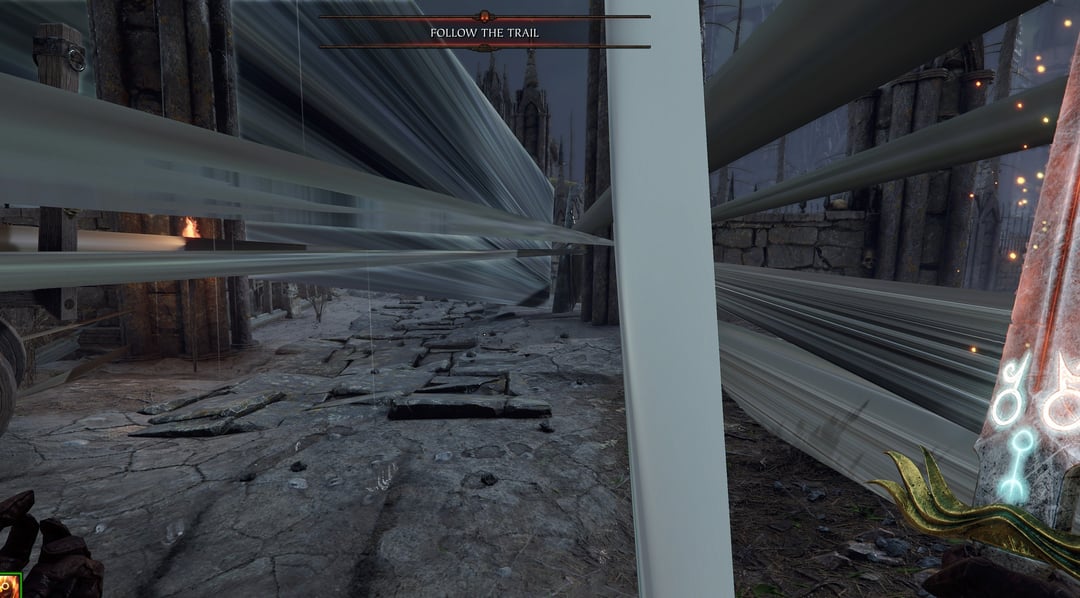
So my fried bought a prebuilt (i7-10700, RTX 3070, 16BG DDR4, some cables, a case, and a 550W PSU). He started having issue with graphics after a while, but it varies a lot across different game. For example, the screenshots show the worst of the issue while playing Vermintide 2, but in other games like Darktide he crashes out frequently as well. We were fine running Heaven and Furrmark as stress tests though.
The only warning we saw was a power limit warning, and if I’d built this myself I’d have definitely gone for more than 550W, but he doesn’t get any system crashes which I’d expect from power related issues.
I’m just looking to sense check my thought that his GPU is on it’s way to the big e-waste fire in the sky before he heads off to get a new GPU. Could this all be solved with some nice clean power, or more RGB?
TIA
Toad-Toaster
I got bad texture artifacts like that on an old dell xps laptop that ran so hot it cooked itself. I can’t say if it was the videocard or something else but about a month after stuff like that started it just died. It would run so hot the built in keyboard keys edges had started to melt and were all uneven from the heat. This thing would leave burn marks on jeans if you actually placed it on your lap for more than 20 mins.
My guess it’s a precursor to something important dying.
Xx_Majesticface_xX
I had screen stretching when I updated my drivers to the latest driver that wasn’t supported. Maybe it’s that?
TheRealJellona
Are you sure this is a hardware problem and not a software one?
LSD-Enjoyer1
No his gpu just took a few tabs of lsd, it should go back to normal in 8-12 hours
Revo_Int92
Looks to be a software problem. If the GPU was dying, the actual pixels would look weird, like white dots on the screen, black rectangles, a purple strip…. fuck, this is giving me bad memories
demien_88
Its software issue not hardware
KYO297
Looks more like a software than a hardware problem
Apopololo
It could be a driver problem, use DDU to uninstall the driver and download the driver from Nvidia site.
Bobsofa
This looks like driver or game problems to me. A usual hardware defect would “artifact normally”, not stretched like this.
MildPanicPerson
Ah brings me back to my 550 and then 550 TI times. Ah to be 14-15 again, buying the cheapest competent gaming PC, with horrible case which I thought was cool back then, actually shitty parts on my limited budget, 18″ screen because I had lost the 50€ I had calculated to add to the Monitor price pool and some 12€ headset that hurt ears after 2h of gaming. Things were so much cooler back then when everything was new.
BertMacklenF8I
Also we don’t need any specs or info lol
Nope change the paste n pads.
Rogue_Moon_Boy
Looks more like a shader issue. Update GPU drivers (perform a clean re-install).
lithander
I’ve seen artifacts like with overclocked cards a long time ago. Resetting to factory clock rates helped in that case. If your friends card isn’t overclocked go a bit below default clock rates and see if it helps.
Bright-Efficiency-65
My laptop did this. It started after I fell asleep with a game running and a blanket slipped over the laptop. It was at 110° C for like 6 hours and ruined the thermal paste. At the time I didn’t know anything so I just kept playing games but it would overheat horribly.
Anyways, check the temperatures if you are lucky it might just need new pads / paste
Nero_x3
Not the GPU, had something similar when I was playing COD Cold war zombies. It’s just the GPU saying “im getting milked to the fullest extent”
Additional_Ad_7126
It’s kinda dead already!
Dj_nOCid3
Nah its a feature
Paciorr
That’s 99% not hardware issue. He should try reinstalling the game or drivers or both.
hsredux
use ddu
NiceCunt91
Looks like a buggy arse game tbh
_Auxerre
Yesn’t
NorthernMonk3y
A lot of other people seem to be confidently saying this is a software issue, but seemingly without having ever experienced this themselves.
However, I have experienced this issue almost exactly (especially the textures stretched to a point) and it was caused by my GPU.
This started in one game (tomb raider iirc) and progressively got worse, before happening in other games. Tarkov was one, where the textures of some player gun models would be stretched into points in the sky (quite amusing for a bit as it gave away their positions!)
This got worse to the point that everything was unplayable, including all the random artifacting / colouring you have posted.
The cause was hardware, specially bad memory on my GPU (a 3090 FE which was only a couple of months old).
Nvidia replaced it for a new one via RMA and the issues were immediately resolved; with no changes in software or anything else between taking out the old GPU and replacing it with the new one when it arrived.
MrStereomaniac
Similar thing happened to me when I was playing KOTOR. When I disabled grass, shadows etc. these lines or whatnot completely disappeared. If it’s a older game maybe thats it.
msgkar03
u/Dangerous-Amount9853 what game is this?
Dismal-Mobile-2053
Software issue.
Mumuskeh
Those are temperature issues.
I remember playing minecraft on my shipwreck back in 2016.
Invreased the render from 4 to 6 chunks and i experienced hell
Illustrious-Ant-6700
Unrelated, what game is this?
Michaleq24
nah the gpu is ok, it’s just how gaming in 2023 looks like

31 Comments
What graphics card is it? What brand and how old is it?
Does it do it in other games or just this one? It could be a driver issue with this particular game or game incompatibility with the GPU’s architecture.
It could also be certain game settings.
So my fried bought a prebuilt (i7-10700, RTX 3070, 16BG DDR4, some cables, a case, and a 550W PSU). He started having issue with graphics after a while, but it varies a lot across different game. For example, the screenshots show the worst of the issue while playing Vermintide 2, but in other games like Darktide he crashes out frequently as well. We were fine running Heaven and Furrmark as stress tests though.
The only warning we saw was a power limit warning, and if I’d built this myself I’d have definitely gone for more than 550W, but he doesn’t get any system crashes which I’d expect from power related issues.
I’m just looking to sense check my thought that his GPU is on it’s way to the big e-waste fire in the sky before he heads off to get a new GPU. Could this all be solved with some nice clean power, or more RGB?
TIA
I got bad texture artifacts like that on an old dell xps laptop that ran so hot it cooked itself. I can’t say if it was the videocard or something else but about a month after stuff like that started it just died. It would run so hot the built in keyboard keys edges had started to melt and were all uneven from the heat. This thing would leave burn marks on jeans if you actually placed it on your lap for more than 20 mins.
My guess it’s a precursor to something important dying.
I had screen stretching when I updated my drivers to the latest driver that wasn’t supported. Maybe it’s that?
Are you sure this is a hardware problem and not a software one?
No his gpu just took a few tabs of lsd, it should go back to normal in 8-12 hours
Looks to be a software problem. If the GPU was dying, the actual pixels would look weird, like white dots on the screen, black rectangles, a purple strip…. fuck, this is giving me bad memories
Its software issue not hardware
Looks more like a software than a hardware problem
It could be a driver problem, use DDU to uninstall the driver and download the driver from Nvidia site.
This looks like driver or game problems to me. A usual hardware defect would “artifact normally”, not stretched like this.
Ah brings me back to my 550 and then 550 TI times. Ah to be 14-15 again, buying the cheapest competent gaming PC, with horrible case which I thought was cool back then, actually shitty parts on my limited budget, 18″ screen because I had lost the 50€ I had calculated to add to the Monitor price pool and some 12€ headset that hurt ears after 2h of gaming. Things were so much cooler back then when everything was new.
Also we don’t need any specs or info lol
Nope change the paste n pads.
Looks more like a shader issue. Update GPU drivers (perform a clean re-install).
I’ve seen artifacts like with overclocked cards a long time ago. Resetting to factory clock rates helped in that case. If your friends card isn’t overclocked go a bit below default clock rates and see if it helps.
My laptop did this. It started after I fell asleep with a game running and a blanket slipped over the laptop. It was at 110° C for like 6 hours and ruined the thermal paste. At the time I didn’t know anything so I just kept playing games but it would overheat horribly.
Anyways, check the temperatures if you are lucky it might just need new pads / paste
Not the GPU, had something similar when I was playing COD Cold war zombies. It’s just the GPU saying “im getting milked to the fullest extent”
It’s kinda dead already!
Nah its a feature
That’s 99% not hardware issue. He should try reinstalling the game or drivers or both.
use ddu
Looks like a buggy arse game tbh
Yesn’t
A lot of other people seem to be confidently saying this is a software issue, but seemingly without having ever experienced this themselves.
However, I have experienced this issue almost exactly (especially the textures stretched to a point) and it was caused by my GPU.
This started in one game (tomb raider iirc) and progressively got worse, before happening in other games. Tarkov was one, where the textures of some player gun models would be stretched into points in the sky (quite amusing for a bit as it gave away their positions!)
This got worse to the point that everything was unplayable, including all the random artifacting / colouring you have posted.
The cause was hardware, specially bad memory on my GPU (a 3090 FE which was only a couple of months old).
Nvidia replaced it for a new one via RMA and the issues were immediately resolved; with no changes in software or anything else between taking out the old GPU and replacing it with the new one when it arrived.
Similar thing happened to me when I was playing KOTOR. When I disabled grass, shadows etc. these lines or whatnot completely disappeared. If it’s a older game maybe thats it.
u/Dangerous-Amount9853 what game is this?
Software issue.
Those are temperature issues.
I remember playing minecraft on my shipwreck back in 2016.
Invreased the render from 4 to 6 chunks and i experienced hell
Unrelated, what game is this?
nah the gpu is ok, it’s just how gaming in 2023 looks like