
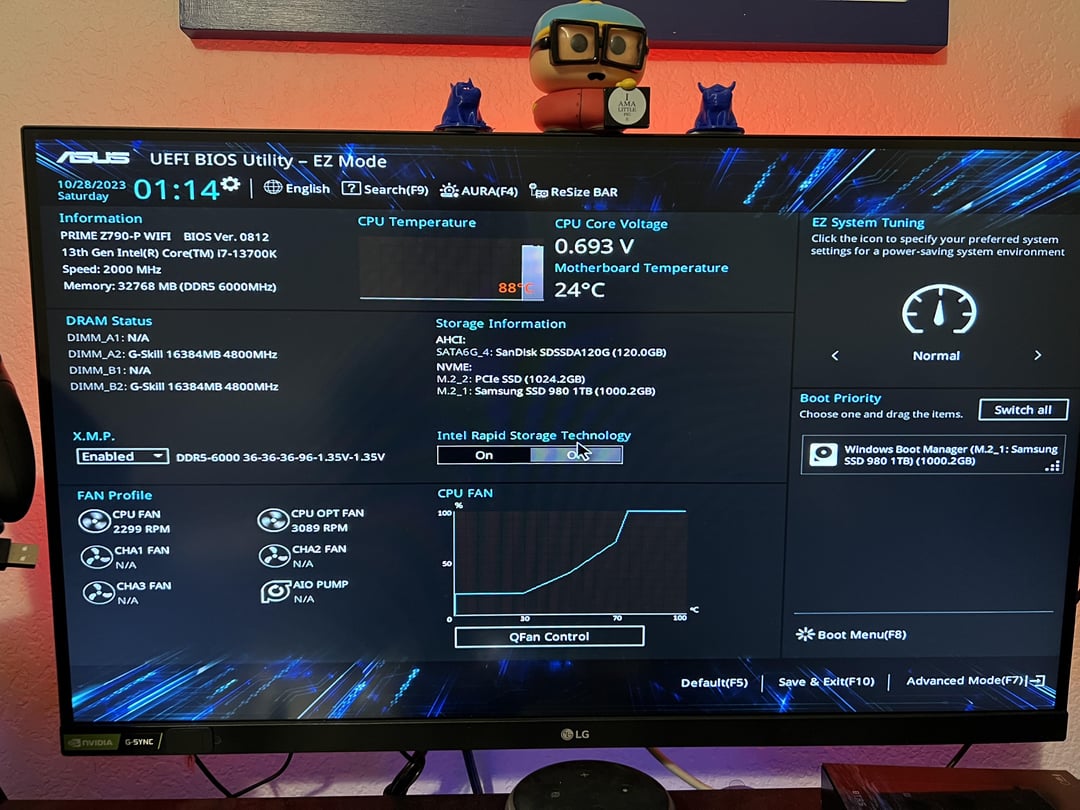
Update from my last post here:
I opened up the mount and found that all of the thermal paste was on the lower half of the IHS on my CPU and that’s why I was getting 100c in cyberpunk.
I clean everything off and I 3d printed a thermal paste spreader spatula and manually spread it evenly throughout the entire IHS and now I am getting 90 Celsius into the bios. So something is definitely up.. I thought about turning up the pump setting, but that didn’t really help. I may have a faulty AIO but I am curious as to how I got through all this way, like a solid two months into Gaming with a faulty AIO, so that might not be the case either. Not really sure what to do from here. I’m going to take it off after work tomorrow and see what the thermal paste did again but if it still looks pristine like it was when I put it on then I’m gonna ask you guys again.
1 Comment
Try the tubes, one of them should be warmer, not sure if it will be detectable when the CPU is already throttling with BIOS power draws. If they have identical temperatures, it may be faulty pump.
But considering only half of the IHS had thermal paste applied, it seems like a very bad pump block pressure. Make sure your standoffs are correctly mounted. How did you install the pump? Screwing the screws all the way one by one? This might be it. You need to screw them evenly and in cross order (upper left -> bottom right -> upper right -> bottom left – gradually repeating turn by turn).