
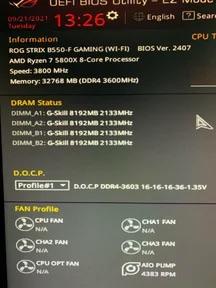
I write this as a cautionary tale, even though your motherboard, ram, and CPU support 3600mhz ram, it does not mean you can just plug and play, you’ve got to put your MB in Xmp/DCMP mode and select 3600mhz.
Don’t be an a-hole like me. Seriously, why the heck doesn’t it just default to your ram speed? You have to “overclock it” to get to your ram speed.
Do yourself a favor, hot ctrl alt dlt, go to performance and click on your ram. Make sure it’s at the right clock speed.
9 Comments
Congrats on the free upgrade.
>Seriously, why the heck doesn’t it just default to your ram speed?
Because its not going to be stable on every system. Especially with 4 sticks. For example, if you had a Zen1 CPU in this system it would not be able to run at 3600.
Please tell me you’re not still at 60hz on a monitor that can do 120+hz. Windows doesn’t automatically give you your max refresh rate either.
Don’t feel bad, I had my ddr4,10850k system’s memory in single channel for nearly 3 years….
Congratulations on your extra half a fps.
DD or DDR?
It happens. It took me six months and a random video from Jayztwocents for me to check mine and realizing that I was doing the same. Now you know for future builds.
Worth noting perhaps that it’s not necessarily been 3 years, but maybe just since your last BIOS update?
No, you’re not an idiot.
You’re just learning the lesson that there’s a difference between performance by the numbers and performance by experience. That’s an important lesson.
If you didn’t notice, then you didn’t need 3600 mhz RAM. Enjoy the free upgrade now that you’ve found out, but pay special attention to the difference in quality of experience between before and after you changed the setting. See how much it means to you. Consider that in your next build.
every bios update resets all the settings on my pc