in order to connect, you must be logged into the same account as your PC.
​
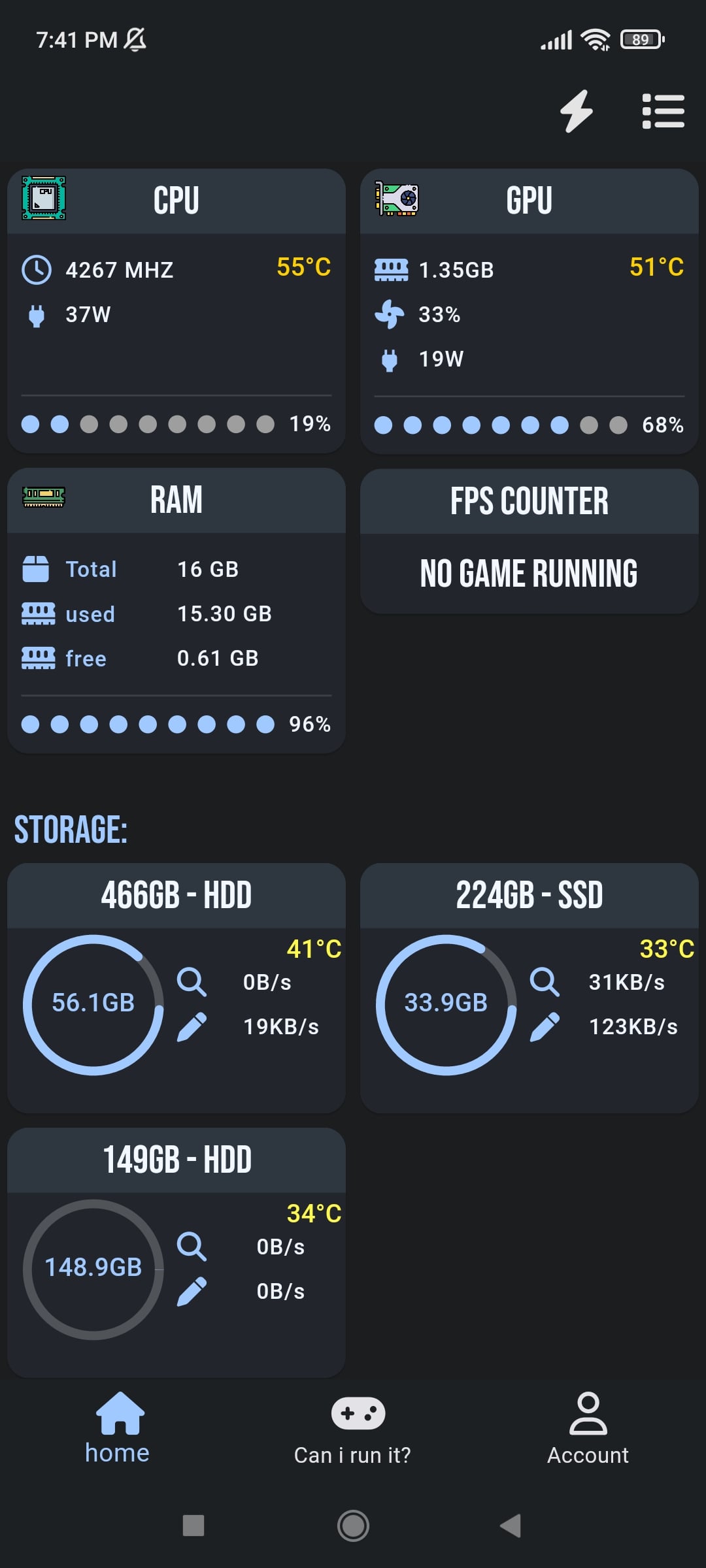
this is an early stage of the App, your feedback is extremely appreciated
gigantic-girth
Look useful to me, nice work so far, but needs polishing
MrSloppyPants
Looks nice. If you are interested in doing an iOS port, let me know. Been an iOS developer for 12 years.
zakabog
Can you publish the source for the app or are you trying to keep it as a closed source commercial product?
Rough-Turnip-4513
The UI is fine, just needs size ratio adjustments, if you could add network monitoring too, speed – status etc that would be helpful – you have a skill I desire.
ronronthekid
I wish you the best OP and hope to see ads about this app being the next big thing!
Xemulated
Only 3 issues I found:
1. You can make the download for windows and android buttons the same using a framework like Bulma.
2. It needs a Linux version and a cli to authenticate it.
3. The Windows setup is hosted on Dropbox instead of on a CDN.
Good software, wish you the best.
Corevegaa
Looks cool but no iOS app?
ZestyRanch1219
Do you have any plans for an iOS release?
Clemming2
I would use it, lmk when it’s on iOS.
xXShadowGravesXx
Damn. What are you running that’s taking up all the RAM?
Sweet_Bat_7516
I would love to download but my ram just died and I need to repair it. Does it come with a download status monitor, that way I can see if my downloads are working while I’m away
Camboi696969
tfw android users get the cool pc apps before apple guys
GoldenGamer175
Looks sick
GumGuts
Amazing! The options for these kind of things has been extremely limited! Glad to see someone who seems to know know design give it a go!
My suggestion (without having yet tried the app) would be to rush Landscape mode. Lots of people want their old phones sitting on a holder, so they can see the stats. You might have already implemented this.
Second suggestion is customization! Really put in some effort to make it look good!
Also, make sure you have an always-on mode.
Great job! Really looking forward to trying this!
milehighurbanist
This is awesome! Wish it was for iPhone too.
TheStarWanderer-235
Yo this is sickkkk!
Well done!
harborsealwithacrush
This looks like exactly what I need. Open Hardware Monitor hasn’t been updated in years and looks like Android Open Hardware Monitor hasn’t updated in even longer! I really miss being able to control fan/pump speeds. Hopefully something like that can be implemented.
Edit: Any way to connect via network instead of a login?
OddlySexyPancake
catppuccin theme :3
Broad_Rabbit1764
Not trying to be a b-hole, but what use is this software? What does it do better than the currently available solutions?
Mezmo300
Does it have the same issue task manager does where it doesn’t always register correct gpu usage in some games
trif-0
Definitely needs some grammar fixes but otherwise looks great. Any future possibility of a battery feature, like being able to see laptop battery % on the phone and vice versa? So you could be playing a game and quickly see if your phone needs charged or something
IWontFukWithU
Looks interesting upvoted 👍
FourzeroBF
Name checks out
Dead-Ninja

unusedtruth
!remindme 1 month
MercuryMelonRain
Oh wow, a novelty for gamers, but I would totally use this as a professional to check on my 3D renders while away from the machine. Sometimes you set them up for a 6 hr render, leave the machine, then come back to find it failed on the 10th frame. In the past I have had to take my ipad with me and remotely access the screen to check. With this app I could just check the GPU (cuda) utilisation or CPU is still at 100% depending on the type of render
You could even set up an alert where if utilisation stops for more than a minute or 2 it pings a notification on your phone (utilisation does dip when saving the frame and setting up the next).

27 Comments
you can get the app and the PC program here [https://zalapp.com/download](https://zalapp.com/download)
in order to connect, you must be logged into the same account as your PC.
​
this is an early stage of the App, your feedback is extremely appreciated
Look useful to me, nice work so far, but needs polishing
Looks nice. If you are interested in doing an iOS port, let me know. Been an iOS developer for 12 years.
Can you publish the source for the app or are you trying to keep it as a closed source commercial product?
The UI is fine, just needs size ratio adjustments, if you could add network monitoring too, speed – status etc that would be helpful – you have a skill I desire.
I wish you the best OP and hope to see ads about this app being the next big thing!
Only 3 issues I found:
1. You can make the download for windows and android buttons the same using a framework like Bulma.
2. It needs a Linux version and a cli to authenticate it.
3. The Windows setup is hosted on Dropbox instead of on a CDN.
Good software, wish you the best.
Looks cool but no iOS app?
Do you have any plans for an iOS release?
I would use it, lmk when it’s on iOS.
Damn. What are you running that’s taking up all the RAM?
I would love to download but my ram just died and I need to repair it. Does it come with a download status monitor, that way I can see if my downloads are working while I’m away
tfw android users get the cool pc apps before apple guys
Looks sick
Amazing! The options for these kind of things has been extremely limited! Glad to see someone who seems to know know design give it a go!
My suggestion (without having yet tried the app) would be to rush Landscape mode. Lots of people want their old phones sitting on a holder, so they can see the stats. You might have already implemented this.
Second suggestion is customization! Really put in some effort to make it look good!
Also, make sure you have an always-on mode.
Great job! Really looking forward to trying this!
This is awesome! Wish it was for iPhone too.
Yo this is sickkkk!
Well done!
This looks like exactly what I need. Open Hardware Monitor hasn’t been updated in years and looks like Android Open Hardware Monitor hasn’t updated in even longer! I really miss being able to control fan/pump speeds. Hopefully something like that can be implemented.
Edit: Any way to connect via network instead of a login?
catppuccin theme :3
Not trying to be a b-hole, but what use is this software? What does it do better than the currently available solutions?
Does it have the same issue task manager does where it doesn’t always register correct gpu usage in some games
Definitely needs some grammar fixes but otherwise looks great. Any future possibility of a battery feature, like being able to see laptop battery % on the phone and vice versa? So you could be playing a game and quickly see if your phone needs charged or something
Looks interesting upvoted 👍
Name checks out

!remindme 1 month
Oh wow, a novelty for gamers, but I would totally use this as a professional to check on my 3D renders while away from the machine. Sometimes you set them up for a 6 hr render, leave the machine, then come back to find it failed on the 10th frame. In the past I have had to take my ipad with me and remotely access the screen to check. With this app I could just check the GPU (cuda) utilisation or CPU is still at 100% depending on the type of render
You could even set up an alert where if utilisation stops for more than a minute or 2 it pings a notification on your phone (utilisation does dip when saving the frame and setting up the next).