I think thats Onedrive. You should disable that shit
justlns
shortcut was saved in onedrive
zozodj2
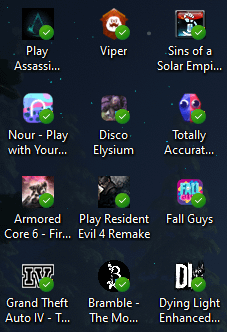
That’s onedrive saying “I have successfully backed up all your shortcuts to the cloud for some reason”
FAILNOUGHT
they are safe to play
Catomic123
Could be a shitty antivirus, Norton does something similar
PrA2107
Your icons have successfully synched with one drive
chronictrauma
Check sync center in control panel as well. Go to manage offline files in the left pane, and make sure the button says “enable offline files”, indicating that it is currently disabled.
StormFireTwister
Most likely dropbox doing it. You can make it go away by restarting windows explorer in task manager.
frogmicky
Theyre checking you out lol.
Hannes406
✅
CareAbit
I hope for your sake, it’s not a family shared drive
xfi1010
could be onedrive installed by itself again, in another topic a friend of mine lost half of its stuff due to one drive basically saving it automatically and one day it was wiped up……… so that’s why i dont trust cloud saving stuff
tvuj_generator
Onedrive bug. Refresh desktop with F5 key
RageOfNemesis
You synced it to some sort of cloud probably
Loading0525
I believe this means your desktop isn’t local but rather on/synced to drive? If you create a random file (say a .txt) on your desktop and then check the location of that .txt in its properties, does the path contain onedrive?
It’s a setting you agree or disagree to when installing windows, that’ll make your desktop, pictures and documents **on** onedrive instead of local. Changeable in the registry.
MinorVandalism
An annoying malware called OneDrive.
browniesboy17
PLAY WITH YOUR WHAT?!?
anbun
Looks like OneDrive or Dropbox. Means the file is in sync or on your device
TheMRB8
Your games look cool m8
mkv_r32
Just press F5 and it goes away.
Uzbek23
It’s so nice to see anyone still playing Sins of the Solar Empire!
Heatsreef
My man out here playing northstar o7
Jericho417
Do you use hibernation or standby a lot? I use hibernation a lot, and get green check marks, and sometimes other symbols thrown on icons. I nuked one drive ages ago.
In my case, it’s probably corruption of cached data. Updating that data will get rid of it, in that case. I create a new document on the desktop, then rar it, delete it, and the icons all return to normal.
Just another possibility, since everyone else is assuming it’s one drive doing its thing as opposed to a windows glitch thing.
thomas_smith55
Is bramble the mountain king worth it?
New_Routine2237
A fellow titanfall 2 northstar enjoyer? You have my everlasting respect
SandorMate
Fuck onedrive i have used it only once but never again

27 Comments
I think thats Onedrive. You should disable that shit
shortcut was saved in onedrive
That’s onedrive saying “I have successfully backed up all your shortcuts to the cloud for some reason”
they are safe to play
Could be a shitty antivirus, Norton does something similar
Your icons have successfully synched with one drive
Check sync center in control panel as well. Go to manage offline files in the left pane, and make sure the button says “enable offline files”, indicating that it is currently disabled.
Most likely dropbox doing it. You can make it go away by restarting windows explorer in task manager.
Theyre checking you out lol.
✅
I hope for your sake, it’s not a family shared drive
could be onedrive installed by itself again, in another topic a friend of mine lost half of its stuff due to one drive basically saving it automatically and one day it was wiped up……… so that’s why i dont trust cloud saving stuff
Onedrive bug. Refresh desktop with F5 key
You synced it to some sort of cloud probably
I believe this means your desktop isn’t local but rather on/synced to drive? If you create a random file (say a .txt) on your desktop and then check the location of that .txt in its properties, does the path contain onedrive?
It’s a setting you agree or disagree to when installing windows, that’ll make your desktop, pictures and documents **on** onedrive instead of local. Changeable in the registry.
An annoying malware called OneDrive.
PLAY WITH YOUR WHAT?!?
Looks like OneDrive or Dropbox. Means the file is in sync or on your device
Your games look cool m8
Just press F5 and it goes away.
It’s so nice to see anyone still playing Sins of the Solar Empire!
My man out here playing northstar o7
Do you use hibernation or standby a lot? I use hibernation a lot, and get green check marks, and sometimes other symbols thrown on icons. I nuked one drive ages ago.
In my case, it’s probably corruption of cached data. Updating that data will get rid of it, in that case. I create a new document on the desktop, then rar it, delete it, and the icons all return to normal.
Just another possibility, since everyone else is assuming it’s one drive doing its thing as opposed to a windows glitch thing.
Is bramble the mountain king worth it?
A fellow titanfall 2 northstar enjoyer? You have my everlasting respect
Fuck onedrive i have used it only once but never again
You have OneDrive enabled