Change cables. If that doesn’t work update graphics drivers. If that doesn’t work buy a new GPU.
DJ_Cas
Buy a new GPU
Ok_Error_5835
Panic and hyperventilate
XXJCSYD
This looks like a cool mouse pad
Deepfire_DM
When I had this it was the laptop cable to the screen
travelator
Relic is malfunctioning. Take some omega blockers.
LightSpeedYT
Try new cable first but also try a different pci-e slot for your gpu. Strangely, that fixed this issue for me once.
frogmicky
Get a new gpu.
Ok_Carrot9413
It’s the monitor, pray it’s the monitor and that it’s not the gpu.
nix80908
First change the cable, or even the port it’s plugged into. Use a known good cable, or alternatively, plug your monitor into another device using the same source and see if it works. If you’re still getting these issues on another device, it’s the cable or monitor itself.
Once you’ve eliminated the cable/monitor and are still having issues, open your PC, (GROUND YOURSELF) – and remove the GPU, then place it back in the same slot. Sometimes chip creep can happen, or contacts get a little wonky, so this could help eliminate that as an issue.
If this fixes it, great! It’s a common thing that can happen, especially when these machines go hot, then cold, then hot, and / or vibrations from fans, etc. Most Modern MoBos have locks (little latches) that try to help prevent that, but it can still happen. Worth a shot.
If you’re still having troubles, see if there’s another PCI slot for your GPU, and see if the results change.
If it does, consider a Motherboard replacement soon. One PCI slot failing indicates you’re close to a complete MoBo Failure and are working on borrowed time until the next (or entire) thing breaks.
If it does not fix it, you’ll likely need another GPU, as this one is toast.
Chance-Cod2000
that GPU just died
Kaaczmy
I have the same problem when my monitor run in 140hz, but when I switch to 60hz it disapear, I was told that it could be something about my electric network, and to disconect everything for a little moment. It solved the problem for like an hour and then it came back, do you guy know what could it be ?
Margot-hates-me
Oh no. GPU flatline
Djkiller21
Find a towel! Your gonna need one
user-nt
Go to your nearest Republic of Gamers City-hall
sankto
Cri
JoReckit
When this happens to me I just use the driver uninstaller and reinstall the drivers. If this doesn’t fix your problem then it’s probably a hardware issue like others have mentioned.
MemerOrAmI
Seems fine? Is this not how your PC boots up everytime? If not I’d be concerned.
rayquan36
That’s what an expensive fix looks like.
Beastmind
Cry
Intelligent-Draft292
Cry
Stonks-Overflow
Check Motherboard -> Test ur gpu in another one
Check PSU
Check cables
CharonXI
Check for bios updates
Utilize DDUs program to do a wipe of prior drivers

26 Comments
Change cables. If that doesn’t work update graphics drivers. If that doesn’t work buy a new GPU.
Buy a new GPU
Panic and hyperventilate
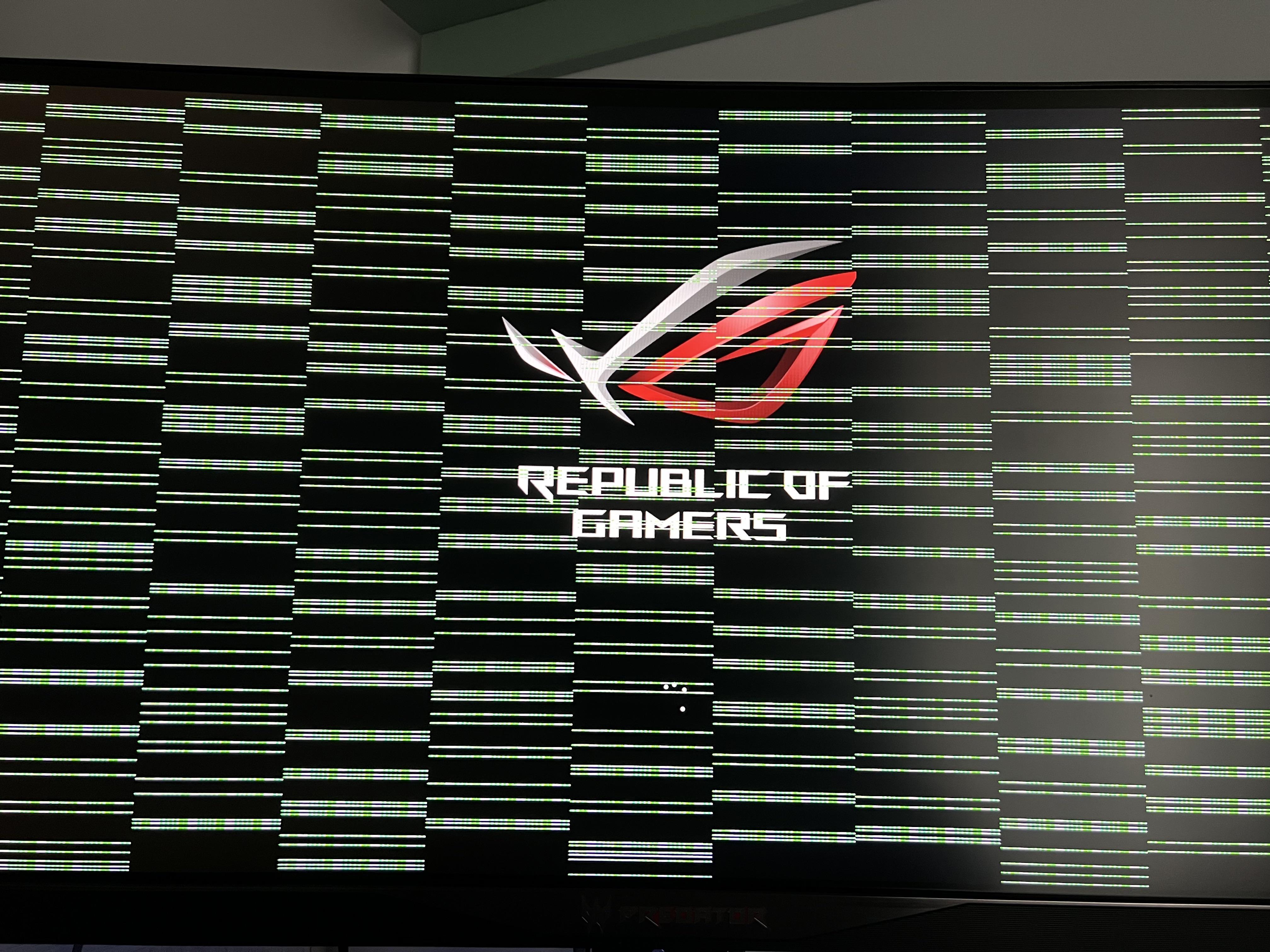
This looks like a cool mouse pad
When I had this it was the laptop cable to the screen
Relic is malfunctioning. Take some omega blockers.
Try new cable first but also try a different pci-e slot for your gpu. Strangely, that fixed this issue for me once.
Get a new gpu.
It’s the monitor, pray it’s the monitor and that it’s not the gpu.
First change the cable, or even the port it’s plugged into. Use a known good cable, or alternatively, plug your monitor into another device using the same source and see if it works. If you’re still getting these issues on another device, it’s the cable or monitor itself.
Once you’ve eliminated the cable/monitor and are still having issues, open your PC, (GROUND YOURSELF) – and remove the GPU, then place it back in the same slot. Sometimes chip creep can happen, or contacts get a little wonky, so this could help eliminate that as an issue.
If this fixes it, great! It’s a common thing that can happen, especially when these machines go hot, then cold, then hot, and / or vibrations from fans, etc. Most Modern MoBos have locks (little latches) that try to help prevent that, but it can still happen. Worth a shot.
If you’re still having troubles, see if there’s another PCI slot for your GPU, and see if the results change.
If it does, consider a Motherboard replacement soon. One PCI slot failing indicates you’re close to a complete MoBo Failure and are working on borrowed time until the next (or entire) thing breaks.
If it does not fix it, you’ll likely need another GPU, as this one is toast.
that GPU just died
I have the same problem when my monitor run in 140hz, but when I switch to 60hz it disapear, I was told that it could be something about my electric network, and to disconect everything for a little moment. It solved the problem for like an hour and then it came back, do you guy know what could it be ?
Oh no. GPU flatline
Find a towel! Your gonna need one
Go to your nearest Republic of Gamers City-hall
Cri
When this happens to me I just use the driver uninstaller and reinstall the drivers. If this doesn’t fix your problem then it’s probably a hardware issue like others have mentioned.
Seems fine? Is this not how your PC boots up everytime? If not I’d be concerned.
That’s what an expensive fix looks like.
Cry
Cry
Check Motherboard -> Test ur gpu in another one
Check PSU
Check cables
Check for bios updates
Utilize DDUs program to do a wipe of prior drivers
Install new graphics driver’s
Reseat cables / test new ones
Check for various other firmware updates
Reseat GPU if it’s not a laptop
—–
Worst case pull gpu clean / paste & reverify
You may be SOL could be artifacting could not be.
Best of luck 🤞
Farm for karma
Gpu is probably fried
fuckin die i guess