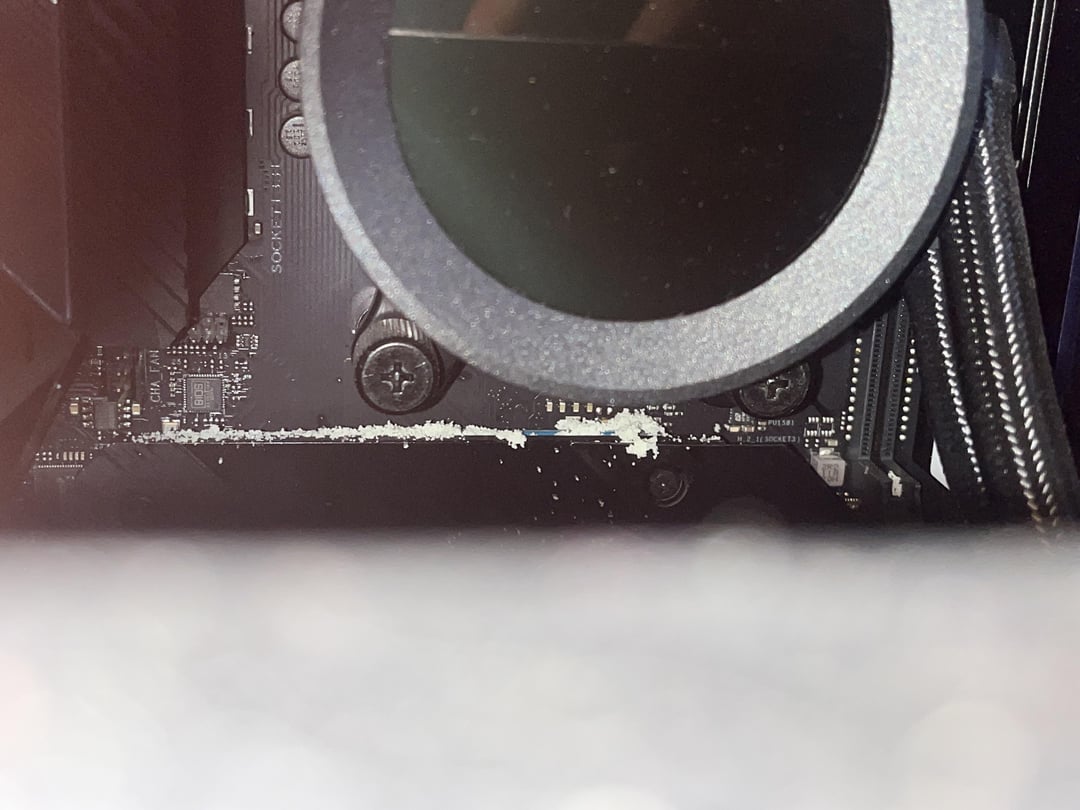
I just checked my computer today and there’s this white fluffy like stuff all over the motherboard. It has no taste (yes I tasted it) and it will meld together like a play dough…. Please any help
thatfordboy429
Wow, rare.
Pull your AIO, now.
Check it.
Dre9872
looks like a slow leak, when the liquid dries it leaves behind this deposit.
Sol1dshot
Nice of you to share your Colombian nose candy with your mobo.
DJ_Cas
Take a brush and clean it, but yeah it’s a leak and you need to deal with it
Looks like salt. You live on the shore? Could also be residue from a leaky water cooler. Keep everything powered off, remove water cooling and use a noctua with heatsink instead. Clean off the “salt” with a rag and some 80% isopropyl. Let everything dry thoroughly.
All in ones will all eventually leak. Best to just replace with a Noctua or Zalman.
orcs_must_die_
I think the thermal pads for your SSDs are disintegrating somehow. Looks like its oozing out from under both of them. Unscrew the heatsinks and see what it looks like. Shouldn’t be harmful to your pc, but annoying. Never seen that before.
ecktt
Aluminium Oxide.
Your AIO water cooler is leaking.
moxzot
It’s either the AIO as some have said or you had/have ants and they chewed up the nvme thermal pads.
babakundeawtaka
That’s a rare occurance of dandruff from all the stress your GPU is feeling.
I fixed this issue by applying some head and shoulders to the GPU.
LazeyM
No its not leaks, its your thermal pads. Ive seen this quite commonly happen. Remove your ssd heat shield and you’ll find a mess, dont worry about “oil” stains it’s from the thermal pads too.
I recommend you to brush them off and clean it with isopropyl alcohol, and get new thermal pads. You have to get the right thickness
faverodefavero
Check all thermal pads and paste. And check your AIO for leaking. Replace AIO, pads and paste immediately. Disassemble and clean everything up carefully.
wisdomoftheages36
Do you have a salt lamp in the same room?
CharacterGur5614
I was wondering, like everyone else, this might be from AIO.
But, that’s too much area but then I saw the SSD under the AIO. Is it the Thermal pads of the SSD? I would unscrew that first and verify whether or not it’s the culprit before I unscrew the AIO.
the3dfer
It’s a beautiful phenomenon, they’re spores, your Mobo is reproducing, and soon there will be a new socket around.
ArtoriasBeaIG
Woah, they look like insect eggs, did you drop food in there?
If they are eggs then you need to draw them away, leave an apple nearby and clean the case out

18 Comments
I just checked my computer today and there’s this white fluffy like stuff all over the motherboard. It has no taste (yes I tasted it) and it will meld together like a play dough…. Please any help
Wow, rare.
Pull your AIO, now.
Check it.
looks like a slow leak, when the liquid dries it leaves behind this deposit.
Nice of you to share your Colombian nose candy with your mobo.
Take a brush and clean it, but yeah it’s a leak and you need to deal with it
https://imgur.com/gallery/T41ZwdH
What it looks like under GPU and AIO heatsink
Which AIO? NZXT?
Looks like salt. You live on the shore? Could also be residue from a leaky water cooler. Keep everything powered off, remove water cooling and use a noctua with heatsink instead. Clean off the “salt” with a rag and some 80% isopropyl. Let everything dry thoroughly.
All in ones will all eventually leak. Best to just replace with a Noctua or Zalman.
I think the thermal pads for your SSDs are disintegrating somehow. Looks like its oozing out from under both of them. Unscrew the heatsinks and see what it looks like. Shouldn’t be harmful to your pc, but annoying. Never seen that before.
Aluminium Oxide.
Your AIO water cooler is leaking.
It’s either the AIO as some have said or you had/have ants and they chewed up the nvme thermal pads.
That’s a rare occurance of dandruff from all the stress your GPU is feeling.
I fixed this issue by applying some head and shoulders to the GPU.
No its not leaks, its your thermal pads. Ive seen this quite commonly happen. Remove your ssd heat shield and you’ll find a mess, dont worry about “oil” stains it’s from the thermal pads too.
I recommend you to brush them off and clean it with isopropyl alcohol, and get new thermal pads. You have to get the right thickness
Check all thermal pads and paste. And check your AIO for leaking. Replace AIO, pads and paste immediately. Disassemble and clean everything up carefully.
Do you have a salt lamp in the same room?
I was wondering, like everyone else, this might be from AIO.
But, that’s too much area but then I saw the SSD under the AIO. Is it the Thermal pads of the SSD? I would unscrew that first and verify whether or not it’s the culprit before I unscrew the AIO.
It’s a beautiful phenomenon, they’re spores, your Mobo is reproducing, and soon there will be a new socket around.
Woah, they look like insect eggs, did you drop food in there?
If they are eggs then you need to draw them away, leave an apple nearby and clean the case out
Good luck!