At least yours wake up. My monitor takes an eternal rest every time I put pc to sleep. After trying every troubleshooting methods, I now use hibernate instead of sleeping. (Yes I know it wears SSD faster, but in practice it’s negligible)
Ninlilizi
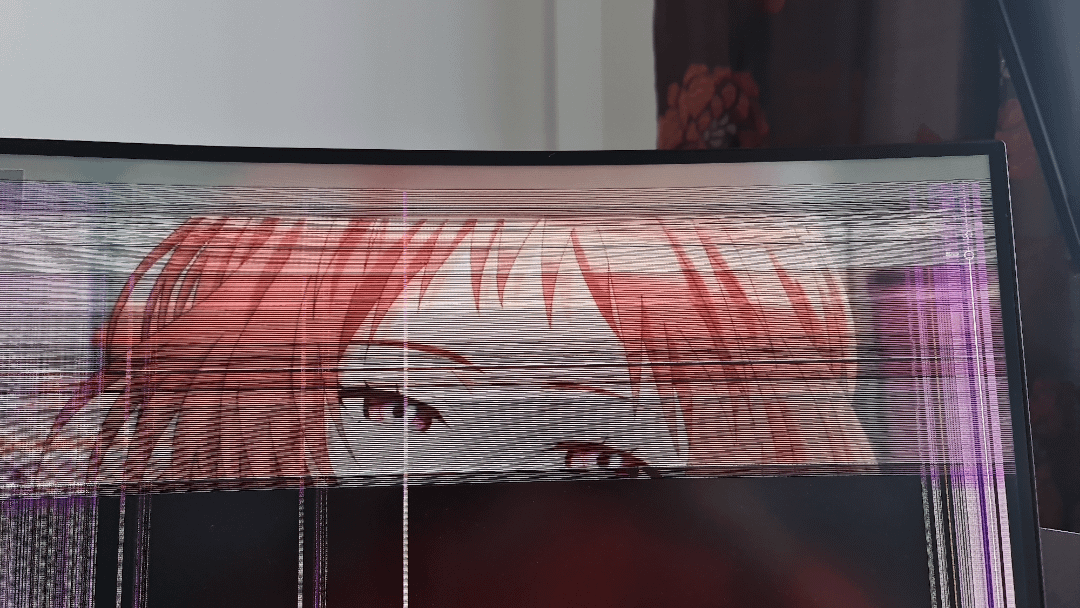
You have what are known as ‘dry joints’ somewhere within the circuitry inside your monitor.
When the monitor has been up for a couple of minutes, the circuit warms up, which causes the joints around the faulty connection to expand slightly and close the circuit.
This is a manufacturing defect, and you should have the monitor replaced under warranty, as these problems become worse in time until the monitor eventually fails entirely.
Jam14ie1
Bro was watching the 🟧⬛️ And nutted so hard they broke their computer
therealmitchconner
Samsung monitor? My 32 inch curved samsung does this sometimes too, worse in the winter.
IuseArchbtw97543
might be a bug in the display driver
YoCodingJosh
looks like your monitor forgot it’s glasses lmao
blacck__
She telling you she need proper sleep gang
kiesp
My monitor does the same (Curved Samsung monitor) if I’m at 144hz. Just turn it down to 120 and it seems fine. If you still wanna play with 144hz, just wait 10 minutes after boot and switch it back 😅
hotthrowawaywheels
Hey you’d do the same for 2 minutes every time someone wakes you up from sleep too.
ARedditor397
I had the same issue, I swapped my GPU’s PCIE cable with another one that came with the PSU and my artifcating or bars on the monitor are gone ever since
Reddit_slayer123
My. Samsung 27 inch curved does this when it’s cold. Works fine in the summer but once winter hits it has lines for a few minutes
Cocotr26
I have same problem. When monitor is cold this is happening :/
linuxares
Samsung have really lost their quality control on their curved monitors is what I get out of this thread…
SadMaths
Same thing has happened to my asus rog monitor for years, when its turned off for a long time and is cold it takes longer.
It just needs to warm up 😀
mordecai135
“I’m tired boss…”
Tanawat_Jukmonkol
Good anime.
hendman112
What u watching my dude. Seems kiiinda sus
Seffuski
Your monitor forgot its glasses
Hothottot
I had an Xbox that would work after being plugged in all night. Wouldn’t boot up if it wasn’t warm from sitting there plugged in. Once I got it to boot up, I turned it off and put it in the freezer for a few minutes. This fixed the solder connection and I used the Xbox a ton after that without any problems. I don’t know if you have a big enough freezer, but if your monitor isn’t under warranty it might be something to try?
iambic_paddler
It’s rubbing the sleep from it’s eyes
Swift_Scythe
Your wife needs her eyeglasses because she keeps forgetting them hence the fuzzy screen upon wakeup.
“AI Mie”
Snakker_Pty
It’s probably just sleepy and waking up. Give it some coffee
OpposedScroll75
Ah yes, I have that issue too when the temperature gets cold.
synergy1154
Your computer is trying to kill itself so it doesn’t have to project anymore cringy ass incel content.
tethered_end
I had 3 samsung 27 inch curved monitors, did it on all running 3 of them, never buying Samsung again
TheZahrGaming
Samsung QLED monitor. Mine does the same
PixelMage
mine does this too! it gets worse the longer the monitor has been left off, so if I get back home after a week, it can sometimes take over an hour before it fixes itself.
Amy_Bell97
Because you touch yourself at night.
Shimitzu1
VA panel problems. You can lower the hz rate but if that is on warranty – just replace the sucker.

33 Comments
The waifu effect.
At least yours wake up. My monitor takes an eternal rest every time I put pc to sleep. After trying every troubleshooting methods, I now use hibernate instead of sleeping. (Yes I know it wears SSD faster, but in practice it’s negligible)
You have what are known as ‘dry joints’ somewhere within the circuitry inside your monitor.
When the monitor has been up for a couple of minutes, the circuit warms up, which causes the joints around the faulty connection to expand slightly and close the circuit.
This is a manufacturing defect, and you should have the monitor replaced under warranty, as these problems become worse in time until the monitor eventually fails entirely.
Bro was watching the 🟧⬛️ And nutted so hard they broke their computer
Samsung monitor? My 32 inch curved samsung does this sometimes too, worse in the winter.
might be a bug in the display driver
looks like your monitor forgot it’s glasses lmao
She telling you she need proper sleep gang
My monitor does the same (Curved Samsung monitor) if I’m at 144hz. Just turn it down to 120 and it seems fine. If you still wanna play with 144hz, just wait 10 minutes after boot and switch it back 😅
Hey you’d do the same for 2 minutes every time someone wakes you up from sleep too.
I had the same issue, I swapped my GPU’s PCIE cable with another one that came with the PSU and my artifcating or bars on the monitor are gone ever since
My. Samsung 27 inch curved does this when it’s cold. Works fine in the summer but once winter hits it has lines for a few minutes
I have same problem. When monitor is cold this is happening :/
Samsung have really lost their quality control on their curved monitors is what I get out of this thread…
Same thing has happened to my asus rog monitor for years, when its turned off for a long time and is cold it takes longer.
It just needs to warm up 😀
“I’m tired boss…”
Good anime.
What u watching my dude. Seems kiiinda sus
Your monitor forgot its glasses
I had an Xbox that would work after being plugged in all night. Wouldn’t boot up if it wasn’t warm from sitting there plugged in. Once I got it to boot up, I turned it off and put it in the freezer for a few minutes. This fixed the solder connection and I used the Xbox a ton after that without any problems. I don’t know if you have a big enough freezer, but if your monitor isn’t under warranty it might be something to try?
It’s rubbing the sleep from it’s eyes
Your wife needs her eyeglasses because she keeps forgetting them hence the fuzzy screen upon wakeup.
“AI Mie”
It’s probably just sleepy and waking up. Give it some coffee
Ah yes, I have that issue too when the temperature gets cold.
Your computer is trying to kill itself so it doesn’t have to project anymore cringy ass incel content.
I had 3 samsung 27 inch curved monitors, did it on all running 3 of them, never buying Samsung again
Samsung QLED monitor. Mine does the same
mine does this too! it gets worse the longer the monitor has been left off, so if I get back home after a week, it can sometimes take over an hour before it fixes itself.
Because you touch yourself at night.
VA panel problems. You can lower the hz rate but if that is on warranty – just replace the sucker.
shes waking up can’t u see the sleepy eyes
I think your waifu is yandere
My Samsung did this, I fixed it by removing a tiny cap.
https://youtu.be/AAZ9UlcAoNA?si=Qz5lj4lyEHyND73m