
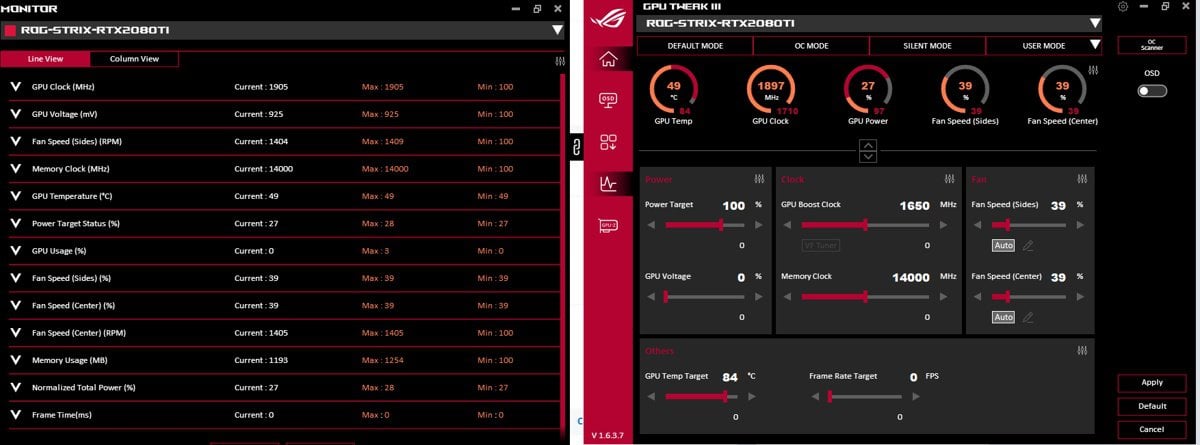
Hi Guys! No Idea if this is the correct place for this but I’m using MSI Afterburner and I’m trying to do the opposite of overclocking. I’ve posted this on multiple sites/ threads/ forums etc and no one seems to know what to do or even reply so please help 🙁
My RTX 2080 TI is overheating and I’m trying to use MSI Afterburner and ASUS GPU Tweak to stop this but I can’t for the life of me figure out how to and watching videos doesn’t seem to help either. I’m forced to set my fps and hz at 60 otherwise the card gets super hot and instantly gets to 83C+, it can sometimes crash the game I’m playing or force my computer to turn off. If I set my hz to 120 or 144 the card can sometimes reach 90C and it’ll be instant. Also I’m forced to play every game on medium to low graphics settings too.
I’ve just bought myself a Corsair 7000D airflow so there’s no dust build up and all the fans are currently working.
TLDR how to I stop my graphics card from getting super hot super fast to allow me to use it for its intended purpose. I didn’t buy an RTX 2080 TI to play at 60 fps on medium to low graphics settings, if I wanted to play with those settings I would have stuck with my GTX 1050 TI.
Currently my computer is idling at [GPU Tweak III (gyazo.com)](https://gyazo.com/0d6a11c849b906709441234190bc50ef)
2 Comments
have you tried repasting the card?
Drop the power limit and then lower the voltage til you crash in games. I’m not sure if Nvidia gives voltage control anymore though. You should look at repasting your card