
I did a 5800X and 5900X before and they were a breeze. The 5800X simply did -30 on all cores. The 5900X would throw rounding errors if I ran CoreCycler and I could just lower said core until it was stable.
But here comes this 5950X. All stable and great on default, 0 value. So the CPU is fine I suspect. But it’s the weirdest behavior if I try to Curve Optimizer.
**It always just reboots.** The 5900X would throw rounding errors in P95. This one? Reboot.
I thought, I’d just go one by one with values, and then test with CoreCycler + Prime95. Core by core. Easy enough. And I did just this. I found some values using this method. It is \_kinda\_ stable too. But as soon as there is some single threaded stuff running and the stars align, it’s a reboot.
More info:
\- Ram is the same as it was on 5900X.- Same ram profile, same ram voltage (I put the lowest + above profile default).- The CPU is cool.- I tried to set ASUS’s Duty Control to Extreme, no dice.
So why can’t I find the stable values?!
\- It does not throw errors, it does a reboot most of the time.- I ran CoreCycler on each core for the longest time and nothing. No errors.- One core (C1) threw like a weird error with Prime95, CoreCycler. But no rounding errors like with 5900X, just full reboots. Until I fixed the values and voila’ no more reboots. But it’s not stable.
How did I test?
\- I tried OCCT (the paid version), I ran the Beta.- I ran CoreCycler on each core one-by-one then let it cycle through as well. I changed the config to use AVX, to not use AVX, everything.
And nothing.**Please recommend me some apps, tips.**
These are the values I found:
1 Core 00 -17 second fastest CCD02 Core 01 -24 FASTEST CCD03 Core 02 -304 Core 03 -305 Core 04 -306 Core 05 -307 Core 06 -308 Core 07 -309 Core 08 -22 FASTEST CCD110 Core 09 -22 second fastest CCD111 Core 10 -3012 Core 11 -2112 Core 11 -2113 Core 12 -2114 Core 13 -3015 Core 14 -2516 Core 15 -30
Update 1:
So I had a few ideas; only one yieled results so far.
2) If I could just lower max boost clock, I could easily avoid the super high boost scenarios. Not only that, this behavior actually drives me nuts, because I often run a single thread load but I’d also need power on the other cores. Well, for some reason the single threaded task will get all priority and the rest will suffer.
But, no way to set this. Some motherboards let you, but on my **ASUS X570**, it only lets me adjust in a positive direction. So I can only put up to +200, but no way to go negative sadly. 🙁
2) Using Safe Mode + CoreCycler.
This worked, it did reboot on Core 12, but again, it’s not throwing random errors like with the 5900X, only full reboots. Like it was running for hours now too, and it just rebooted and that’s it. No errors ever.
Thanks for the input guys, I’ll update my post if anything proves helpful. But, the safe mode seems like a nice one. Then again if I could just lower max boost by like 200mhz, I’d avoid all edge cases lol.
Update 2:
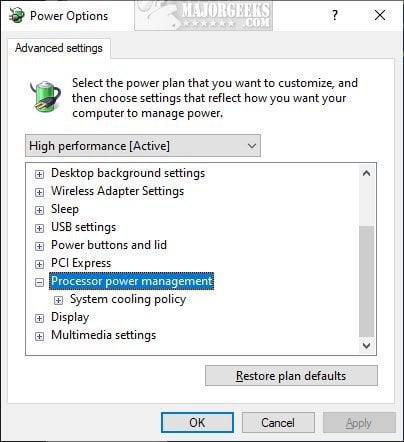
Apparently you CAN lower max boost via Windows:
[https://www.majorgeeks.com/content/page/how\_to\_add\_or\_remove\_maximum\_processor\_frequency.html](https://www.majorgeeks.com/content/page/how_to_add_or_remove_maximum_processor_frequency.html)
But why is this not in the AMD portions of the BIOS? Why is this not an option there? Come on. 🙁
2 Comments
Those are dream scenario numbers tho. I haven’t gotten a single of my cores stable at -30.
Right now I’m pushing my best cores to see how well they do and one doesn’t seem to go past -14. Prior to this I’ve had both my best cores running at -6 for half a year with most others around -10 to -25.
I did increase the value by two eveytime it crashed and I also always use my computer at the same time as core cycler is running.
I go with with -5 to -15 CO values. I have tuned two 5950Xs and both always had WHEA errors or hard restarts when going past -20 on all cores (if tuned per core I could get a few that low, but not all).
My bench numbers were always higher when I tuned my best cores to have a closer to 0 CO value rather than going towards -30. The better cores like more voltage and perform better with more voltage. This biggest issues Ive found when going lower than -15 CO (towards -30) is that when idle and then doing even something simple the voltage would drop too low, often causing a crash. The -15 to -30 values did give decent performance numbers if I had sustained testing going on, but if I let it idle too long then going from idle to any task would always be where the crashes were happening.
For stability I tuned per core using -5 (best cores) down to -15 (worst cores) Then got most of my performance from upping power limits. For my best bench runs I was near -15 (best cores) to -25 (worst cores) but it wasnt stable.