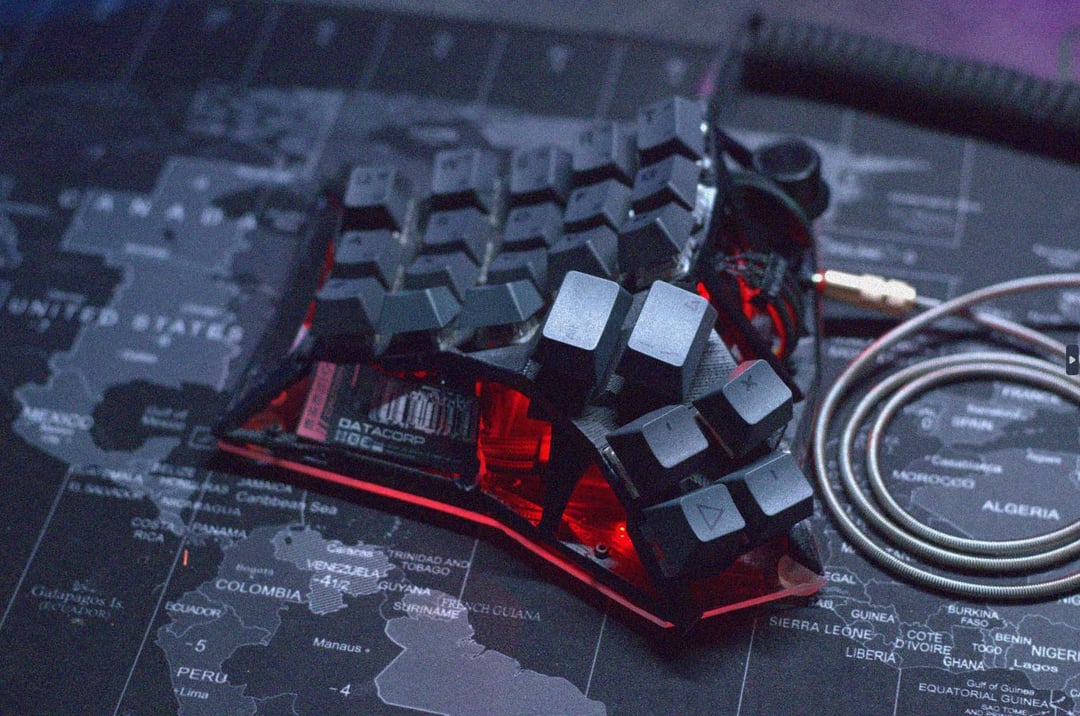
Designed this in Blender and 3D printed it on my Voxelab Aquila. The matrix is wired with 24 AWG speaker wire and 1N4148 switching diodes, connected to a $4 Tenstar Robot promicro. A lot of the parts were just things I had laying around, GPU extension cable for some of the wiring, PC case intake filter, RGB strips, encoder knob pulled off a 3D printer.
Those unfamiliar with split keyboards might think ‘how would you even type on that?’ but the layout is referred to as a Dactyl and it’s actually very ergonomic. It’s sculpted to fit the variable length of your fingers and the modifiers (shift, enter, control, backspace) are on the thumb cluster, which I find more intuitive than the pinky location on typical keyboards. There are also a multitude of toggle-able layers for access to a perfect numpad, mouse control, function keys, etc. There are 4 layers for a total of 184 keys and since I designed the layout myself, it’s all pretty intuitive to access.

4 Comments
Designed this in Blender and 3D printed it on my Voxelab Aquila. The matrix is wired with 24 AWG speaker wire and 1N4148 switching diodes, connected to a $4 Tenstar Robot promicro. A lot of the parts were just things I had laying around, GPU extension cable for some of the wiring, PC case intake filter, RGB strips, encoder knob pulled off a 3D printer.
Those unfamiliar with split keyboards might think ‘how would you even type on that?’ but the layout is referred to as a Dactyl and it’s actually very ergonomic. It’s sculpted to fit the variable length of your fingers and the modifiers (shift, enter, control, backspace) are on the thumb cluster, which I find more intuitive than the pinky location on typical keyboards. There are also a multitude of toggle-able layers for access to a perfect numpad, mouse control, function keys, etc. There are 4 layers for a total of 184 keys and since I designed the layout myself, it’s all pretty intuitive to access.
Freaking love it!
Holy shit, that is amazing work of art!
Extremely late joke: Don’t send it to Linus!
Beautiful keyboard.