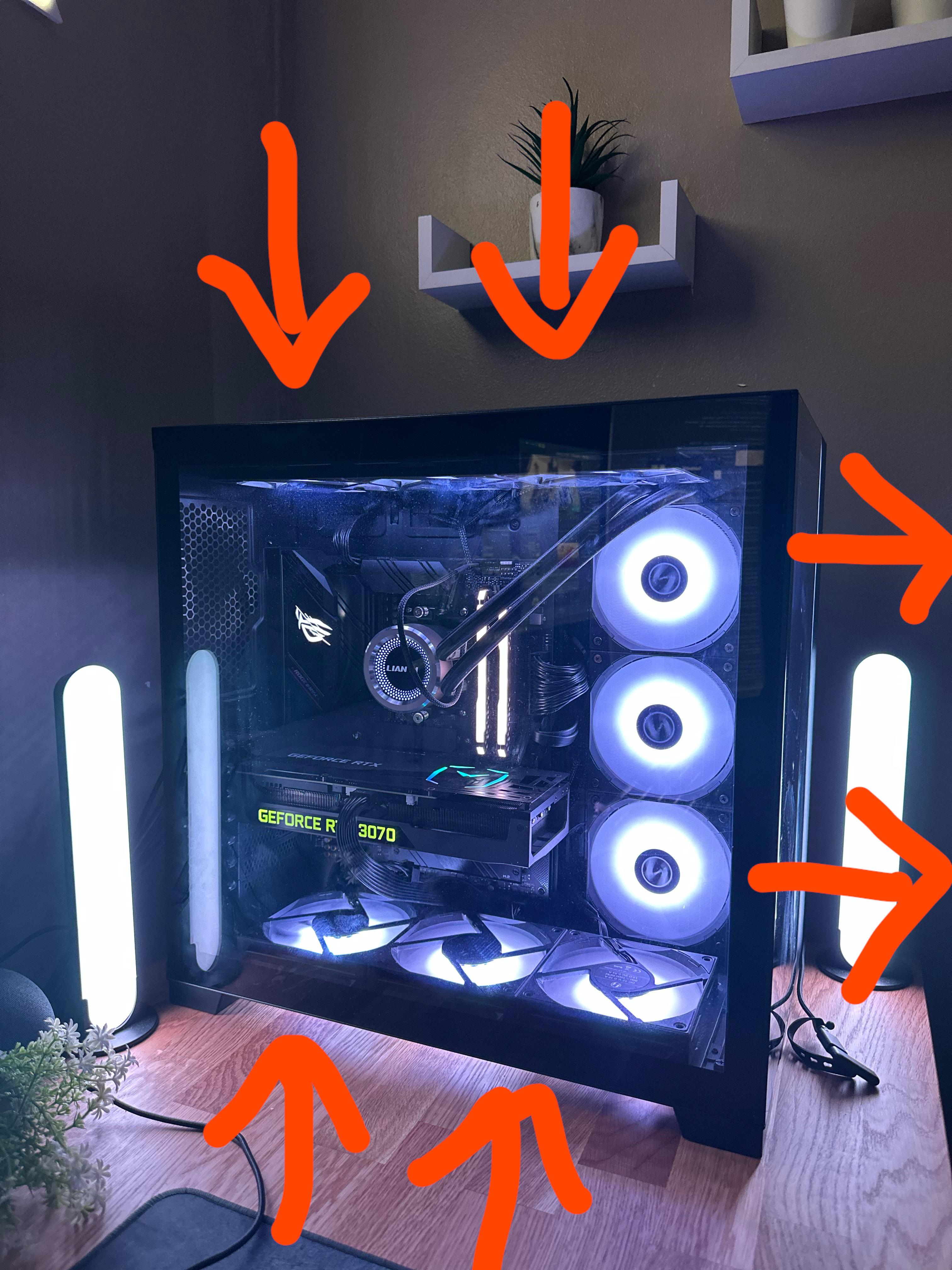
This is my current fan layout in my pc, but my GPU still gets quite hot, so I have ordered another fan to see if that helps, which way do I put the fan on the rear of the case to optimise airflow?

This is my current fan layout in my pc, but my GPU still gets quite hot, so I have ordered another fan to see if that helps, which way do I put the fan on the rear of the case to optimise airflow?
32 Comments
Hello Round_Warthog8486, and thank you for your submission to Gaming PC! If you are new please check out our rules over at the wiki [here](https://www.reddit.com/r/gamingpc/wiki/rules)!
We have recently added the useful feature of Title Flair! You can set this manually by clicking Flair under your post once you have submitted your post, but if you missed it in the rules there is a much better way that will automatically flair your post!
To do this simply add what your post is about in brackets before your title. For example for a Build Log you can type [Build Log] before your post so that it looks like this; [Build Log]My new awesome build!, and the bot will automatically set your flair to Build Log! This works for Build Log, Build Showcase, News, Hardware News, Hardware Release, Discussion, and Miscellaneous!
Also remember that this is a place for discussing and sharing our love of Gaming Computers! This is NOT the place for help building or determining what parts you should buy, that is better suited for /r/buildapc. Troubleshooting questions should be directed to /r/techsupport. Thank you again!
*I am a bot, and this action was performed automatically. Please [contact the moderators of this subreddit](/message/compose/?to=/r/gamingpc) if you have any questions or concerns.*
Reverse the top and front fans
You want your exhaust fans on top, as heat rises toward the top of the case. I would do intakes on the bottom and side, and exhaust on top.
Can I ask what case this is? 😬
I still dont understand how my super small pc GPU doesnt get super hot but you with a big case and alot og fans having temp issues??
I agree with those saying swap your top and front fans around.
Let me explain.
Right now, you’re actively fighting the fans.
The top and bottom are pushing at each other. They collide and the front exhaust it out: Why?
Bottom and front intake, top exhaust. Heat rises, bottom fan will push air into GPU, hot air will be expelled from the top- which is objectively the best way to manage it in most cases.
Also, that GPU doesn’t look super high quality. Adjust fan speed, get a better GPU.
Anything short of 89c is fine for that card.
Looks like a Lian Li 011. There are a few YouTube videos showing the best fan config. Aio as intake, bottom fans as intake, top fans as exhaust, and if you are adding one to the back, it should be exhaust as well. Have this same case. Works great.
This is the downside of the YouTube making everybody think they need water cooling and 12 fans in their case. I’ve had a 3090 and Ryzen 5900X air-cooled for two years and have never had any temp issues. With 3 case fans running at med-low speed and a simple Noctua CPU air cooler.
Simplify, my brutha.
Bruh this fan config is no good 💀also add an exhaust at the back
So back 3 are expelling? Are there 3 on the top intaking?
Since your best option for a cross flow of air is from bottom to top, expell from the top. My case is different, but that part makes the most sense to me.
You could have the bottom back fan intaking and add the rear fan as intaking. Then you would have 5 intaking, 5 expelling. Intaking on the lower half plus the left and expelling on the upper half favoring the right. Or something like that.
Its all about the flow. Imagine them all working together and visualize the air movement.
Just my $0.02 – I have a nearly identical setup, and have the top intake through the AIO reservoir, then the 3 sides and 3 bottom fans all exhaust. Runs super-cool with a 4090 (even Portal RTX). I know everyone says “hot air rises, gotta have exhaust on top”, but it’s working well for me.
You check the pump settings in the bios? When I built a pc, I couldn’t for the life of me figure out why my cpu temps shot up so quickly and my computer would shut down. After hours and days I was about to open a new aio before trying one more time to see if I could get it to work, I fiddled with some pump settings in the bios and it immediately started controlling the temps and runs great now.
I have the same case and you want to use the top for exhaust and the side for intake.
So many “thermodynamics experts” in here lmao. Let’s say it together people: CONVECTION DOESN’T EXIST IN A PRESSURIZED SYSTEM.
OP, your current setup is perfectly fine, especially considering you’re not experiencing poor temperatures. Personally I like how your setup is as it’s visually more appealing and again, thermally fine. People love to preach convection (hot air rises) but it simply isn’t a factor inside a pc case.
If you really want to add the rear fan, I would put it as exhaust like your side fans are set as you really don’t need any more intake. Though considering the top fans set to intake, that rear fanrear fan would really only be exhaust “fresh” air from the top fans more than anything. You could really just leave it without a fan and it’d be just fine.
Same case here, here’s my setup.
Top- exhaust
Back(1 fan)- exhaust
Bottom- intake
Side- intake
10 fans.
Remove the filter, I discovered that the dust filter obstructs the air flow quite a lot.
That’s a thing, you need a type of fan to pull air trough those dust filter called “static pressure fans” they move less air but they are able to pull it with resistance (the dust filter, cables and radiator fins) as well the GPU 30xx gets hot by nature, mine does.
What I did and you should is to remove the lower dust filter and undervolt the GPU = ~15C off
Reverse top and front. Put one in rear exhausting out
That AIO tubing looks like its holding on by its last thread
Edit: I zoomed in, it looks like the one tube is kinked, that cant possibly be good for flow.
Hey 🙂 watch this: it will explain everything you need to know and answer all your questions: https://youtu.be/tAeoVEY5JRk
He tried each fan config and benchmarked it 🙂
Top and rear fans exhausting, side and bottom fans intaking, this is my configuration, very happy about tempo i got
bottom is great
right side make the side intakes as well as the 3 next to the mobo
top always as exhaust is just the only efficient way of dissipating heat as well as the rear one
Sorry noob question but where’s the power supply for that case at?
Well your gpu is being cooled by the warm air coming from the cpu. Take your pick with this configuration. A cool cpu or a cool gpu
if you vertical mount your gpu will get much cooler I ‘ve used this case before
You’re blowing hot air back into the system with that top fans
It would probably be cooler if you flipped the side exhaust to be side intake, and then set the liquid cooler’s fans to be exhaust. The potential rear fan would also work well as exhaust. This will likely help by changing airflow, as it is pulling in heated air from your CPU cooler to fill your case before being exhausted, creating a sort of hot box for your components.
No need of other funs.. your layout is way out
Front = intake
Bottom = intake
Top = exhaust
Back = exhaust
Generally you want a bit more intake than exhaust. And you want the bottom fans to feed air into the graphics card.
Don’t complicate it more than that. 😄
dude why just make front and bottom intake and top exhaust
Needs more fans.
I have the o11 dynamic xl. Bottom and side are intakes. The top and back are exhaust. This creates positive airflow (google it) since more fans are pushing in than out. My aio was moved to the top from the side due to gamer nexus’s video.
You can also get a vertical gpu mount to lower the temps a little more (helps since the gpu will push air sideways and not push hot air down against the bottom intake fans.
4 intakes and 2 exhausts. Yea not surprised it’s hot. Plus your top and bottom fan orientation are fighting against each other.
This configuration has always given me excellent cooling performance
Front – intake, Top – exhaust, Rear – exhaust