
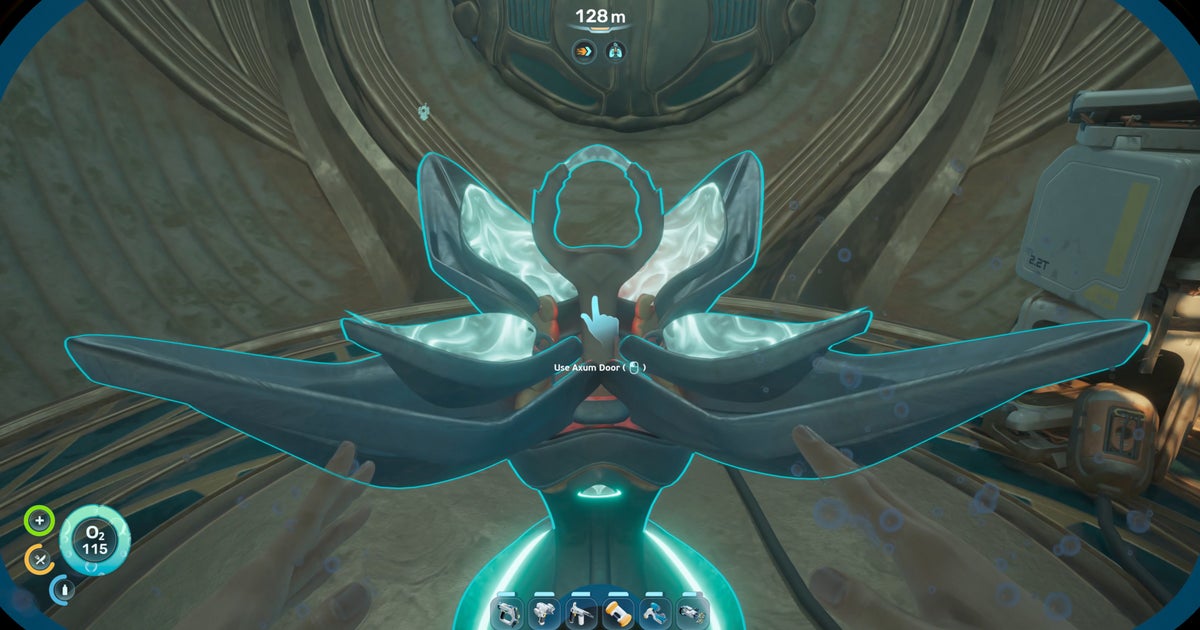
The Axum Observatory is a massive, towering underwater structure found far to the east of Subnautica 2’s map. To reach it, you need to brave first the scorching temperatures of the hot biome, and then the entrance to the Karakorum regions, which is guarded by a terrifying Collector Leviathan.
Once you do reach the Observatory, you’ll find it to contain an intriguing puzzle. Inside the Observatory there is an Axum Door which you cannot yet open. But the game gives you very little direction about what you need in order to open it. That’s where we come in.
In this guide, I’ll walk you through how to open the Axum Door in the Observatory in Subnautica 2, and what you must do inside the Observatory itself. The quest involves gaining a new upgrade to your Sonic Resonator, cleansing various Bloom infestation sites, acquiring the game’s final Adaptation, and interfacing with alien technology. Let’s go through it all step by step.
To see this content please enable targeting cookies.
Manage cookie settings
How to open the Axum Door
In order to open the Axum Door, you first need to repair and restart the Axum Power Plant located to the east of the Observatory. This massive alien Power Plant has long since stopped working, but you can repair it once you unlock the Axum Vision Adaptation.
Once the Power Plant is back online, you can return to the Observatory Door and open it, allowing you entrance to the final part of the game (in its current Early Access state, that is!).
Follow these steps to open the Observatory Axum Door:
Scan two Feedback Resonator Fragments.
Craft the Feedback Resonator.
Destroy the first Bloom Site.
Destroy the second Bloom Site.
Destroy the third Bloom Site.
Obtain the Axum Vision Adaptation.
Activate the Lower Control Room.
Activate the Upper Control Room.
Scan the Power Plant Turbine.
Acquire 10x Titanium Ingots, 10x Mangalloy Ingots, and 10x Strontium.
Repair the Power Plant Turbine.
Activate the Power Plant.
Open the Axum Door in the Observatory.
Scan the Orrery.
Activate the panel upstairs.
Return home and speak with NoA.
Recommended – Unlock the Tadpole Depth Module first!
While not strictly necessary, I highly encourage that you unlock the first Depth Module for your Tadpole vehicle. This will allow you to pilot your Tadpole at depths up to 450 metres, making it much quicker and easier to go where you need to go.
The Depth Module recipe data card can be found at the bottom of the Needler Nest cave, around 300 metres from the Research Outpost, bearing 165 degrees (depth 295m). Once you have it, you can craft it at a Modification Station out of 3x Celestine, 2x Enameled Glass, and 1x System Chip.
1. Scan two Feedback Resonator Fragments.
Before setting off on this journey, you need to unlock the Feedback Resonator. This is an upgrade to the ordinary Sonic Resonator, and you’ll need it in order to destroy the Bloom Cankers in the Karakorum region, because unlike the Bloom Cankers nearer the Lifepod, these Karakorum Bloom Cankers are invulnerable to the basic Sonic Resonator.
Image credit: RPS/MapGenie/Unknown Worlds
Image credit: RPS/Unknown Worlds
To unlock the Feedback Resonator, you need to find and scan two Feedback Resonator Fragments. The first Fragment is found inside the Cicada Wreck (Therapy Room), 760 metres east-southeast from the Research Outpost. Descend to 200m depth and you’ll find the wreckage, with the Feedback Resonator a short distance inside.
Where is the Research Outpost?
The Research Outpost, also known as the Alien Base, is an abandoned base located on the northeast side of the Observatory. It’s unique among the bases and wreckages on the map, because – once you’ve supplied it with power via the Battery Terminal on the wall – it has a fully functional fabricator and Biobed inside, along with useable lockers for storage. It’s a great pitstop while you’re exploring the Karakorum region.
The second Feedback Resonator Fragment is located 900 metres east of the Research Outpost, on the cliff wall near the entrance to the Metal Farms. As you approach, you’ll see a large cluster of Silver deposits in one section of the cliff wall. The Fragment is nestled on the ledge here, at around 420m depth.
2. Craft the Feedback Resonator.
Once you’ve found and scanned both Feedback Resonator Fragments, return to your base and craft the Feedback Resonator upgrade at your Modification Station. You need the following materials:
1x Sonic Resonator
2x Enameled Glass
2x Conduit Crystal
2x Strontium
Enameled Glass requires Enamel, which you can mine using the Sonic Resonator from the toothy enamel husks around the Needler Nest south-southeast of the Research Station.
Conduit Crystals can be scavenged from the strange, twisting greenish crystal-like growths found at great depths (350m+) in the Karakorum region – particularly around and below the Power Plant.
Finally, Strontium can be crafted in the Processor out of 2x Celestine – a spiky blue crystalline resource found all over the Karakorum region.
Don’t yet have a Modification Station?
You only need to scan a single Modification Station in the world in order to create one for yourself, and there’s actually one inside the Research Outpost itself! After you’ve scanned it, you can create your own in your base out of 2x Titanium, 2x Celestine, and 2x Copper.
Image credit: RPS/Unknown Worlds
Your Sonic Resonator will automatically transform into a Feedback Resonator in your inventory. It charges up like before, but now it releases a sphere of energy which travels a good distance before detonating.
Essentially, you’ve just transformed the Resonator from a melee weapon into a ranged weapon. This makes it perfect for dealing with the Bloom Cankers in the Karakorum region, which furl up into a protective coccoon if you get too close.
3. Destroy the first Bloom Site.
Image credit: RPS/MapGenie/Unknown Worlds
Now you need to unlock the Axum Vision Adaptation, and to do that, you need to destroy the various sites of Bloom infestation in the Karakorum region.
The first Bloom Site is located in a cave beneath the Observatory itself. You can easily access the cave from the east side of the Observatory, very near the Research Outpost.
Image credit: RPS/Unknown Worlds
If you’ve dealt with the Bloom sites back in the west (the ones which unlock the Heat Tolerance Adaptation) then you’ll know what to expect. The two Bloom Cankers on either side of the central infected Juvenile Angel Comb will periodically spawn Parasites that will charge you if you get near them. Fortunately, with your new Feedback Resonator, it’s far easier to kill them before they reach you.
Target the Bloom Cankers with your Feedback Resonator to destroy them. The Angel Comb in the centre will open, indicating that the Bloom infestation has been cleared from this site.
4. Destroy the second Bloom Site.
The second Bloom Site is located 1500 metres from the Lifepod, bearing 105. You can easily find it by following the pathway of purple Titan Rockbore on the seabed, stretching back out of the first Bloom Site cave. Exit the cave and follow the Titan Rockbore root east, then take the right-hand route when the path splits. This will lead you straight into the next Bloom Site.
Image credit: RPS/Unknown Worlds
Deal with the two Bloom Cankers here in exactly the same way as before, so that the central Comb opens up and the infection clears from this site.
5. Destroy the third Bloom Site.
The third Bloom Site is the most well-hidden. Head to the Cicada Wreck (EVA Prep), 600 metres from the Research Outpost, bearing 120 degrees (at depth 90m). Head through the wreckage interior, using your Repair Tool to fix any damaged doors along the way.
Image credit: RPS/Unknown Worlds
Follow the path through the wreckage and you’ll exit out into a secluded cave on the underside, where the final Bloom Cankers and Juvenile Angel Comb can be found. Destroy them with your Feedback Resonator, and then exit back up through the Cicada Wreck.
6. Obtain the Axum Vision Adaptation.
With all three minor Bloom Sites now dealt with, the Bloom Core is now available to cleanse. You can find it directly below the massive Power Plant which dominates the region, 450 metres from the Research Outpost bearing 105 degrees.
If you visit the Bloom Core in advance…
If you visit this central Bloom Site ahead of destroying the other three sites, then the Bloom Cankers will be closed and invulnerable (even to your Feedback Resonator). But with all three of the other Bloom Sites destroyed, you can now destroy the two Bloom Cankers in the same way as all the others.
Image credit: RPS/Unknown Worlds
Destroy the two Bloom Cankers around the Bloom Core itself. With every Bloom Canker in the region now destroyed, the Bloom Core will be cleansed and open up, revealing an Angel Comb.
Interact with the pink centre of the Angel Comb to gain the Axum Vision Adaptation. This Adaptation allows you to read and understand the alien Axum language. This is what will enable you to repair the Power Plant and open the Observatory Door.
Image credit: RPS/Unknown Worlds
7. Activate the Lower Control Room.
From the Angel Comb, turn and look to the southeast, and you’ll see a small alien structure built into the cliff wall in front of you, at 400m depth. This is the Lower Control Room.
Image credit: RPS/Unknown Worlds
Enter the Lower Control Room from the left-hand side, and approach the terminal inside. Click on the handprint to turn the terminal on, and then click on the red light beside it to activate it.
Image credit: RPS/Unknown Worlds
8. Activate the Upper Control Room.
Exit the Lower Control Room, and swim immediately upwards, looking at the cliff wall until you see another very similar structure at around 195m depth. This is – you guessed it – the Upper Control Room.
Image credit: RPS/Unknown Worlds
This room has three terminals. Turn on all three by interacting with the red handprint icons again. After that, go to the left-hand terminal, and switch all of the dials and knobs until each one turns green. Then click the screen itself.
Now go to the right-hand terminal, and again, switch all the dials and knobs until they’re all green. But this time, clicking the screen does nothing; you first need to scan the Power Plant Turbine outside.
Image credit: RPS/Unknown Worlds
9. Scan the Power Plant Turbine.
Exit the Upper Control Room, and you’ll see immediately in front of you is a section of the massive Power Plant Turbine. Head to the nearest part of it (where the crates are on top of it), and scan it with your Scanner tool.
Image credit: RPS/Unknown Worlds
You’ll gain a new Databank entry, and also the knowledge of what materials you need to fix the Turbine. Brace yourself – it’ll likely take a while to collect all the materials.
10. Acquire 10x Titanium Ingots, 10x Mangalloy Ingots, and 10x Strontium.
To repair the Power Plant Turbine so you can open that Observatory Axum Door, you need an array of quite expensive and hard-to-find materials:
10x Titanium Ingots (30x Titanium)
10x Mangalloy Ingots (10x Titanium Ingots, 10x Atacamite, 10x Troilite)
10x Strontium (20x Celestine)
All three materials are created in the Processor. You need a whopping 60x Titanium in total, but rich Titanium deposits can be found all over the map, so this isn’t much of an issue.
Atacamite can be found on the seabed around the Power Plant, with the richest deposits existing in a north-to-south line between the Power Plant and the Observatory.
Troilite is found exclusively in the Metal Farms, in the very northeast corner of the map. You can get there by heading directly northeast from the Power Plant – but stay as low as you can, because there’s a Collector Leviathan prowling far above the Metal Farms.
Finally, you can get Celestine in abundance in the Karakorum region, as mentioned before.
Not enough inventory space to carry it all?
If you don’t have enough space in your inventory to carry all 30 materials to the Power Plant, fear not! Use your Habitat Builder to craft a simple Portable Locker. Then grab the Locker, and move up to the back side of your Tadpole. Hover over the hardpoint on the Tadpole, and you’ll get the option to affix the Portable Locker onto the Tadpole itself, giving you a quick and easy storage solution on the go!
11. Repair the Power Plant Turbine.
With all 30 materials in hand, return to the Power Plant Turbine, exactly where you scanned it opposite the Upper Control Room. Equip your Habitat Builder, and hold left-click to build (or rather, repair) the Turbine.
Image credit: RPS/Unknown Worlds
12. Activate the Power Plant.
Now, all that remains to activate the Power Plant is to flick a few more switches. Return to the Upper Control room, and approach the right-hand terminal once again. Click the screen, and this time the light will change from red to green, as it did with the left-hand terminal.
Image credit: RPS/Unknown Worlds
Image credit: RPS/Unknown Worlds
Now head to the central terminal and click the red light, as you did with the Lower Control Room terminal. That’s it – the Karakorum Power Plant is now working again, for the first time in centuries.
13. Open the Axum Door in the Observatory.
With the Power Plant now working, return to the Observatory back to the west, and enter through its main door on the west side. This time, when you approach the terminal to open the Axum Door in front of you, it will open up in readiness.
Image credit: RPS/Unknown Worlds
Interact with the terminal to at long last open the Observatory up and allow you passage inside!
14. Scan the Orrery.
The main room of the Observatory is dominated by an Orrery, a large mechanical model of the star system. Approach the Orrery and scan it, prompting your PDA to calculate for the first time which star system you’re in.
Image credit: RPS/Unknown Worlds
She feeds the information back to NoA, to tell you once you’re home. You can also approach the various Axum glyphs around the Orrery for some extra lore tidbits.
15. Activate the panel upstairs.
There’s one more thing to do inside the Observatory, and – considering its importance – it’s surprisingly easy to miss. Swim up one of the three egg-shaped holes in the ceiling, and you’ll enter an upper level of the Observatory.
Image credit: RPS/Unknown Worlds
This upper floor contains nothing except a pedestal in the centre, and a terminal. Approach the terminal and activate it. I won’t spoil the story here, but suffice it to say that you’re given some crucial context, and an idea of next steps to take in the main story.
However, at this point, this terminal is the limit of all the story content currently in Subnautica 2. After the terminal cutscene plays out, a message will pop up, explaining that you have completed Subnautica 2 in its current Early Access state. You can keep playing, of course, but there will be no more main story to follow until future updates arrive.
Image credit: RPS/Unknown Worlds
16. Return home and speak with NoA.
One final step will round off this whole Observatory quest. Return back to your base (or your Lifepod), and interact with the NoA Terminal. You can then choose to receive the information that the PDA parsed concerning your current distance from Earth.
Image credit: RPS/Unknown Worlds
Again I won’t spoil the story for you, but you can converse with NoA about it and then check the new Databank entry for more information if you wish.
That brings us to the end of this expansive, puzzling questline surrounding the Axum Door in the Observatory. If you’re still working on progressing through the game in order to complete some of the above steps, we’ve got additional helpful guides on topics such as where to find Silver, Lead, and Lithium, as well as a guide on how to increase your max Oxygen supply.