
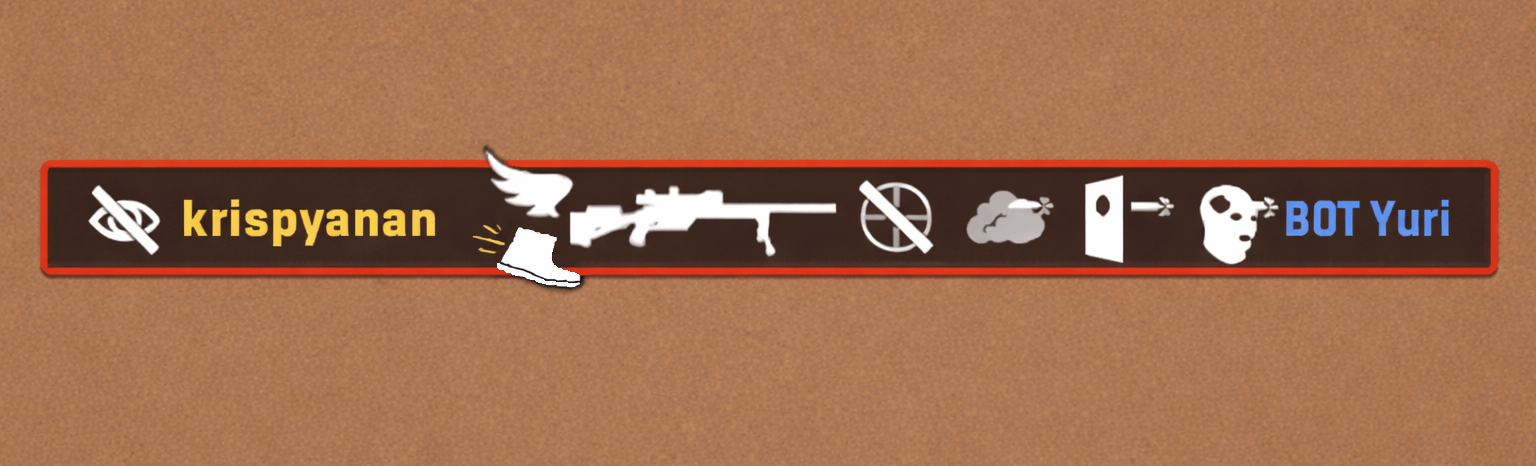
At higher levels, you constantly hear people complain that they got killed by someone who was full sprinting on their screen, with no visible counter-strafe. Whether it’s actually true or just how animations/networking look, it still feels bad.
I’ve had an idea for a while to help with this:
Add a “running kill” icon to the kill feed
- Similar to how the wing icon shows airborne kills
- This would show when a player gets a kill while moving at high velocity (close to max speed)
- Not for small steps or micro-adjustments — only for actual high-speed movement (e.g. MAC-10 running someone down, wide-swing AK 1-tap at full speed, etc.)
Why this would help
- Clarity / Reduce frustration
- A lot of “I got running 1 tapped” complaints come from animation + networking perception
- This would make it clear whether the player was actually moving fast or not
- Even if it still feels bad, at least there’s visual confirmation instead of guessing
- Helps newer players improve
- Newer players sometimes hit lucky shots while moving and think they’re doing it right
- Seeing a “running kill” icon could reinforce: “That wasn’t proper counter-strafing”
- It gives subtle feedback without needing a tutorial
Design logic (keeps kill feed clean)
- Icon: simple boot symbol (matches CS2 style)
- Placement: bottom-left of the weapon, similar to how wings sit above/behind
- You would never see boot + wings together
- Boot = grounded movement
- Wings = airborne
- Keeps the kill feed from getting cluttered
Why it fits CS2
- CS already uses icons to explain “special” kills (airborne, wallbang, etc.)
- This just adds another layer of readability + feedback
- Doesn’t affect gameplay — purely UX improvement
Honest thoughts?