
I started getting into overclocking a couple months ago and I’ve been given so much conflicting information lol, I need a few things cleared up — I have yet to get a very satisfying score in cinebench, and my OCCT scores have only hit slightly above average. I’ll start by listing my build
• Ryzen 9 9950X3D (it’s a really good sample too. SP 119 overall, my golden core is SP125. I know silicone rating isn’t super relevant, just wanted to mention that I’m pretty sure I’m not limited by any of my hardware, I just don’t really know what I’m doing probably)
• Lian LI GA II LCD 360mm AIO (very good at its job, cpu idles around 45 Celsius and that’s with fairly aggressive pbo)
• Rog Strix X870E-E Gaming WiFi (latest bios)
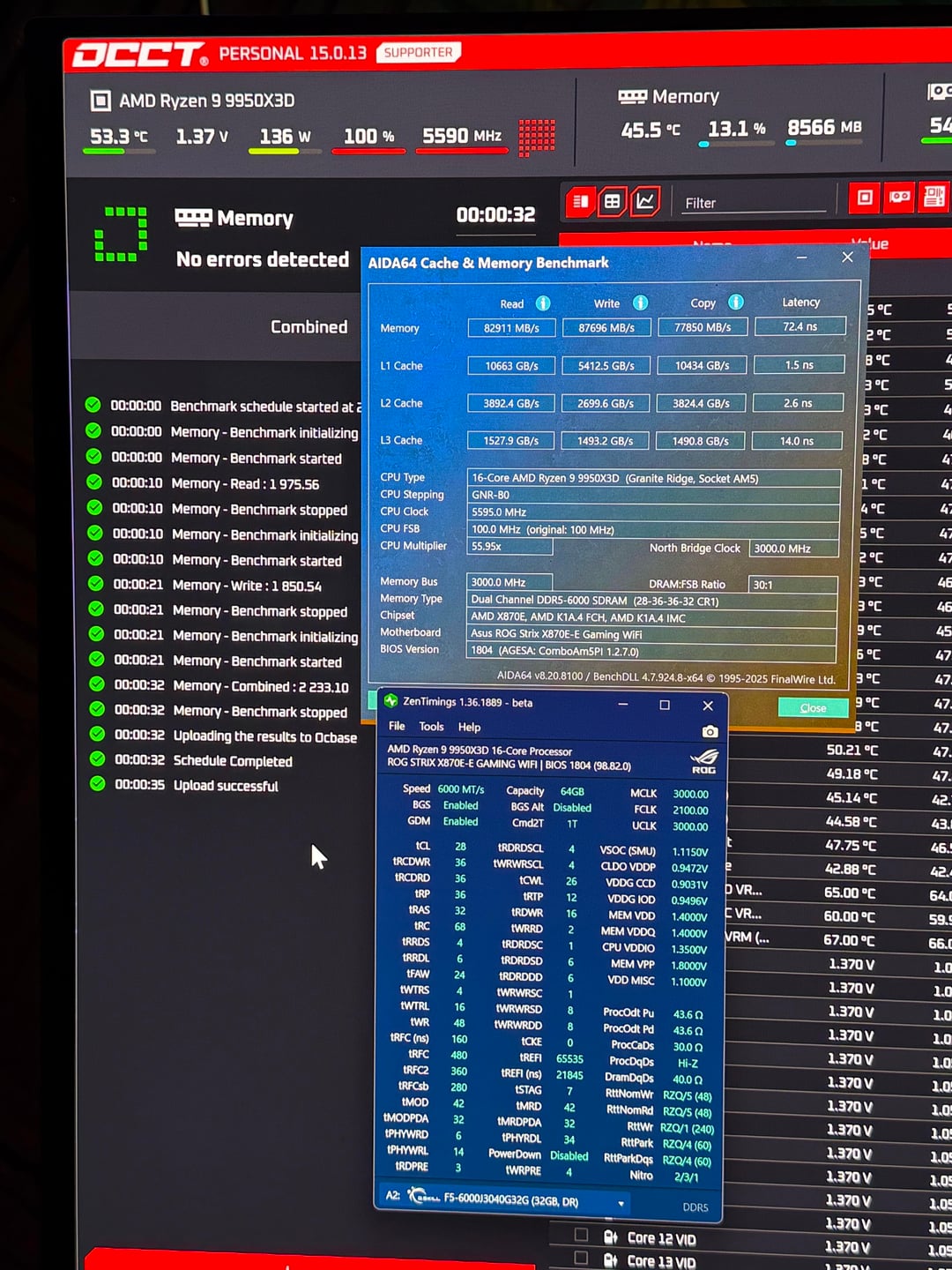
• 64GB G Skill Trident Z5 Neo RGB DDR5-6000 CL30 1.4V (I have it tightened pretty decently. CL 28-36-36-34-52)
• 1200W platinum PSU from be quiet!
• Gigabyte RTX 5080 Windforce sff
• my OS is on a Samsung 990 pro 1tb, I have most of my games on a 2tb Samsung 9100 pro and the rest of my games on a crucial T705 2tb
Anyway, my main areas of confusion:
• FCLK. All of the, like, ‘scholarly’ advice I find on google says pushing it above 2000 doesn’t have much real world benefit, increases latency yada yada, but most of what I’ve heard from actual people who are into overclocking says that pushing FCLK very much is worth it. From what I can tell, they’re correct. I score drastically better with FCLK 2100 and there is a perceivable boost in smoothness
• AI Tweaker > core tuning for gaming configuration. I see a lot of people use legacy and a lot of people use level 2. I use level 2 because I THINK that’s ideal in my case?
• AI Tweaker > core performance boost. I’ve heard that it NEEDS to be on for pbo to work and I’ve also read the pilots opposite???
• AI Tweaker > DDR timings > Bank Swap Mode = Swap APU or swap CPU? I see almost everybody use swap APU but to my understanding that doesn’t make sense for me since I disable integrated graphics in my bios, so I use swap CPU – yay or nay?
• AI Tweaker > precision boost overdrive. Some people say not to touch anything here, leave on auto. But some people, including the asus AI advisor, say to actually disable pbo in this menu if I’m using the advanced pbo (which I am). I usually leave it on auto because I feel like disabling it would override my advanced pbo. I dunno know
• AI Tweaker > VRM menu. Should I use cpu loadline calibration? I’ve never been able to tell if it makes a difference for me. And VRM spread spectrum? Disable or enable?
• AI Tweaker > Tweakers paradise. Should I disable clock spread spectrum? Most resources I’ve found say that I should, but I genuinely don’t understand what it does so I wanted to check here
• ASPM. Should I disable the native one and the other one? Most sources I’ve found say to so I always do but I don’t really feel like it helps
• Advanced > amd overclocking > precision boost overdrive. I realized early on that for some reason if I use motherboard pbo limits, it clamps PPT and EDC really hard. I’ve manually set
PPT: 270000
TDC: 180000
EDC: 240000
These seem like decent pbo limits to me, my temps stay good and it doesn’t clamp anymore as far as I can tell in Hwinfo64
• Scaler. This one has always been a bit of a head scratcher to me. From what I understand from the definition, it essentially controls how long your cpu can stay at a high boost clock? I tend to set it to x2 because that’s what makes sense in my head but I do tend to score better, at least in multithread OCCT, if I set it to x10
Curve optimizer. My biggest weak point as far as overclocking logic goes. I know since I have an X3D cpu, my job here will be a bit different than somebody who just has, like, a 9950X. To my understanding, CCD0 is more sensitive to aggressive CO offsets and CCD1 can handle more aggressive usually???
The main thing I wonder about: if, as long as the cpu is genuinely stable, does lower value always = better boost clock?
My CPU has been stable under every test I’ve ran with all core -30. I do per core now and the most aggressive I’ve attempted was -34 on core 8 (golden core) -32 on core 11 (silver) -28 on the average cores in CCD1, core 14 & 15 -22. CCD0 is similar in structure but a little less aggressive. -26 golden, -24 silver, -20 average, -15 for core 6 & 7.
The thing is, I think I notice that when I set really aggressive values, my boost clock isn’t as good as when I set medium aggressive. My best OCCT scores were when I did -24 on CCD0 golden, -20 on the silver, -15 on average and -10 on the weak ones. Then on CCD1 I had -28 golden, -26 silver, -22 average, -20 on core 13 and -15 on the last two.
This makes me feel like aggressive values don’t always equal better? Maybe since my silicone is so good my cpu won’t crash or be noticeably unstable at really aggressive settings but it will still be kinda choked out?
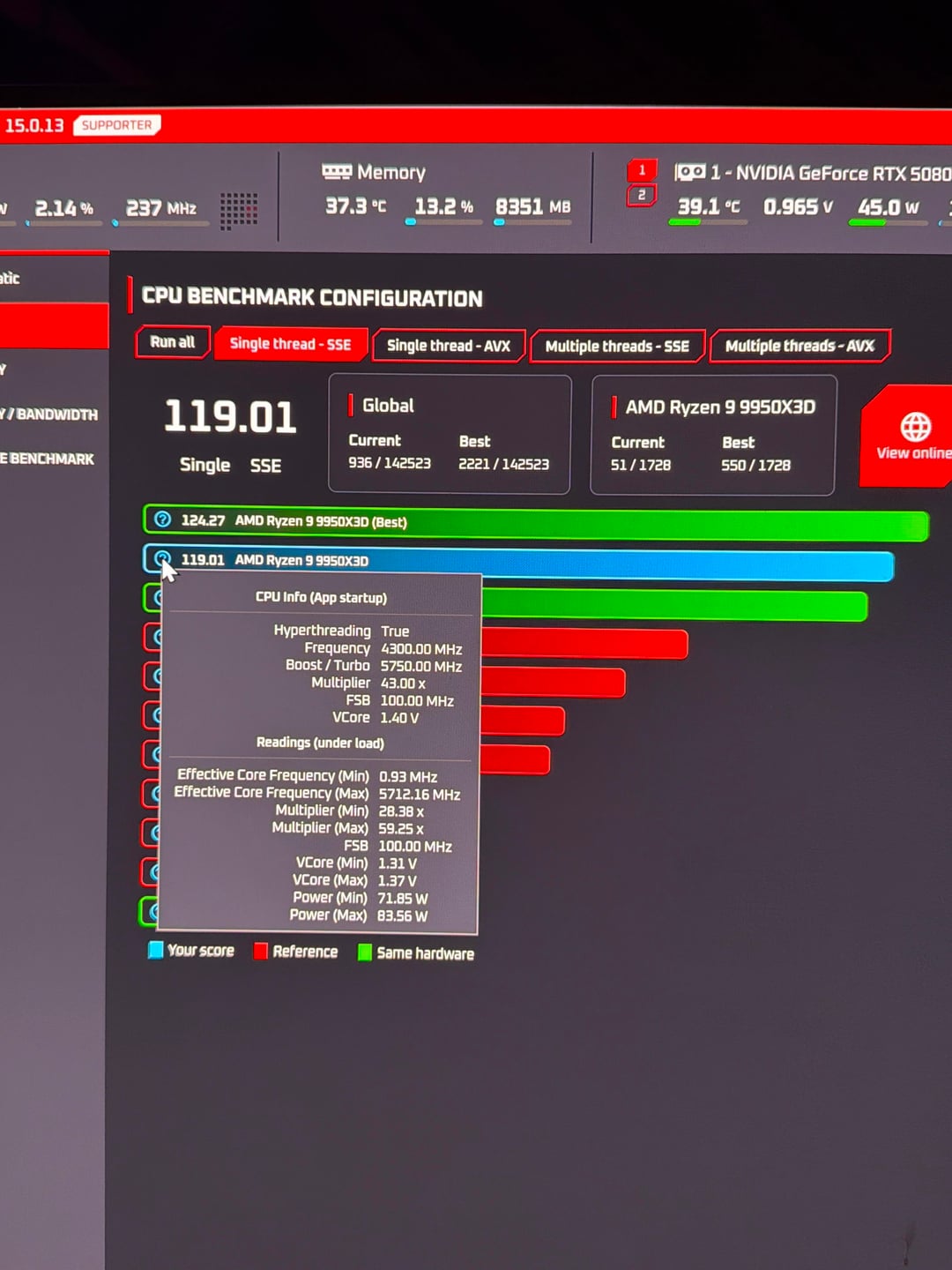
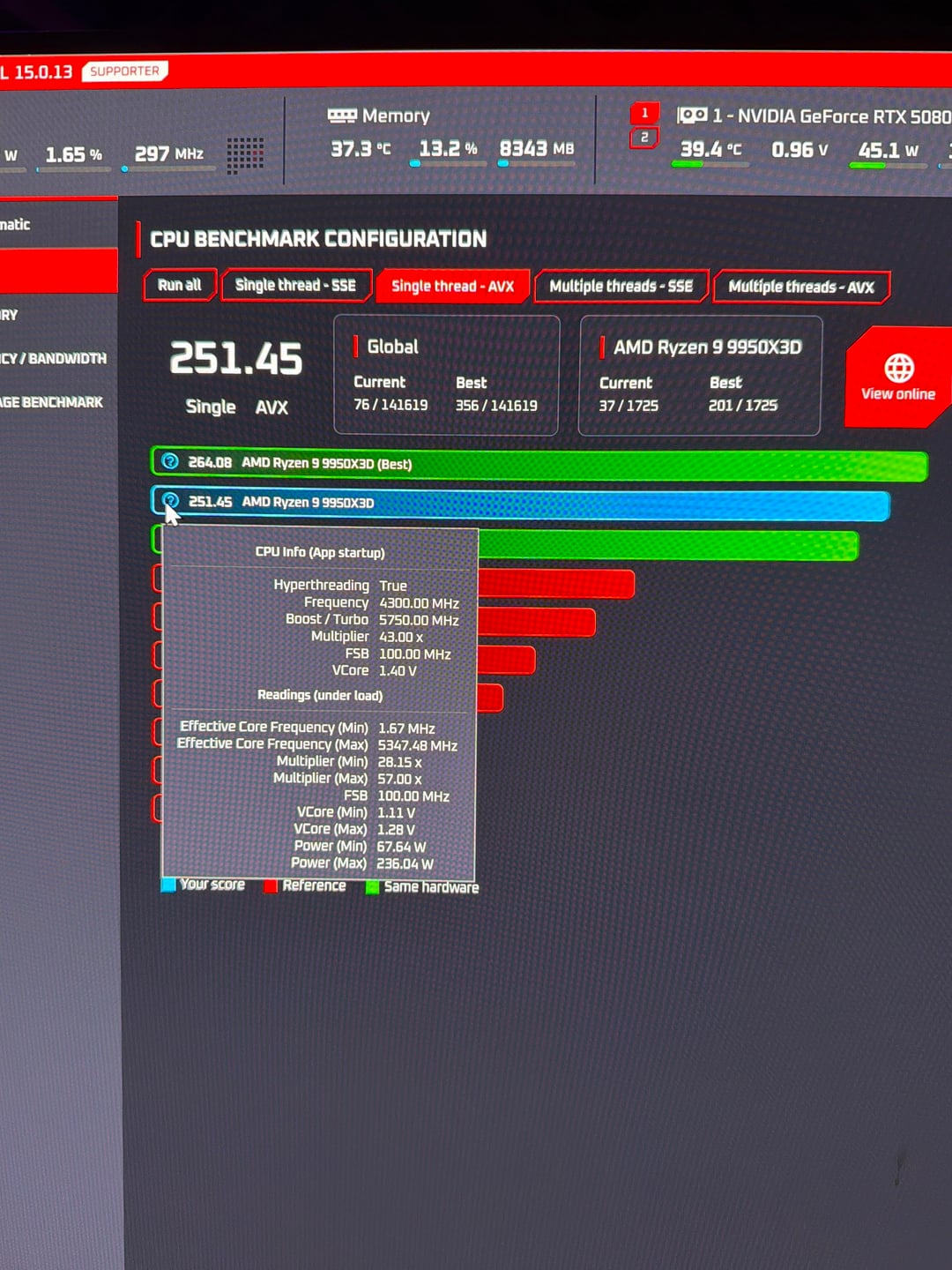
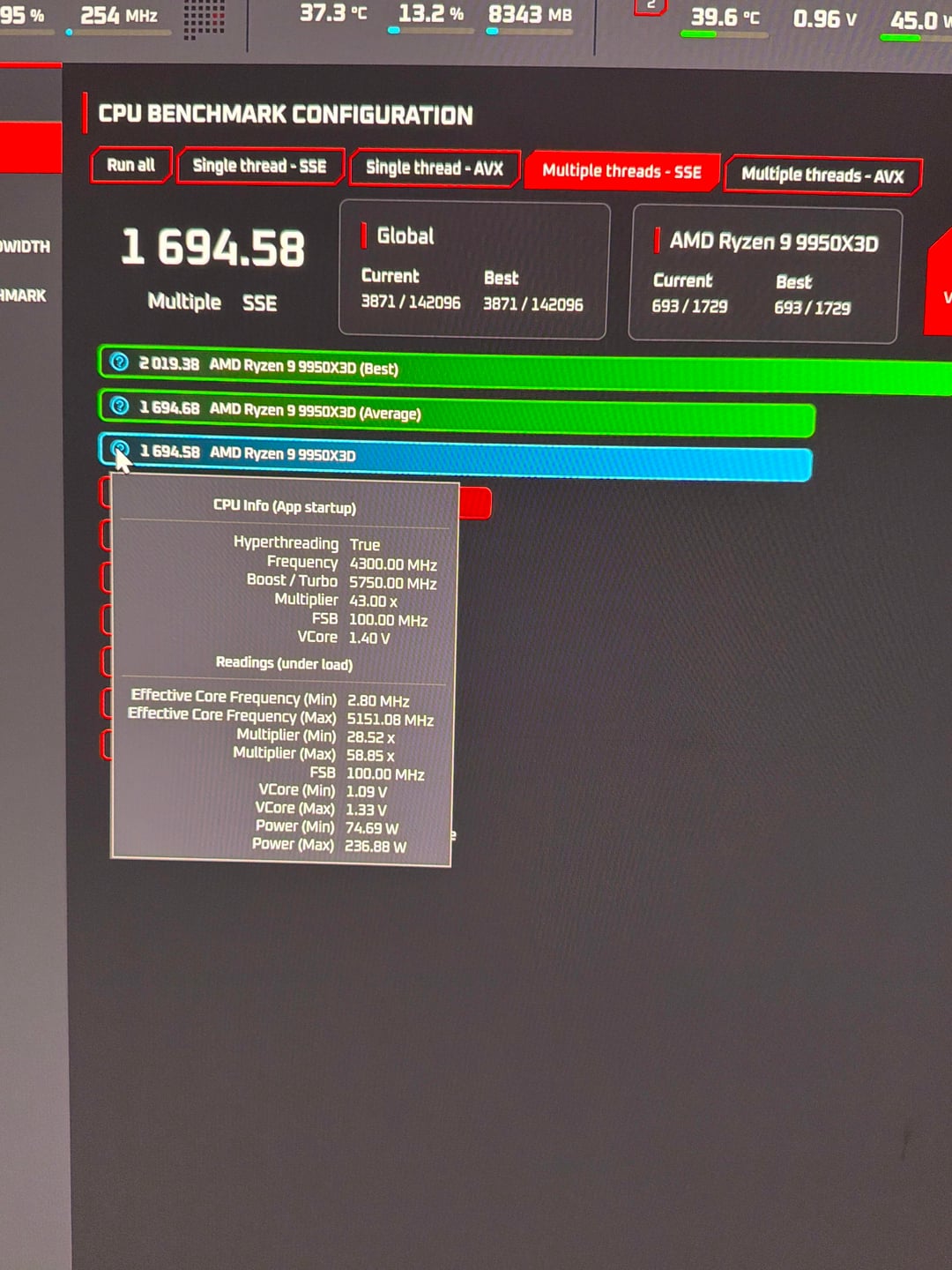
But even then, my “best” was still only 2400ish on multi and like, 135 single.
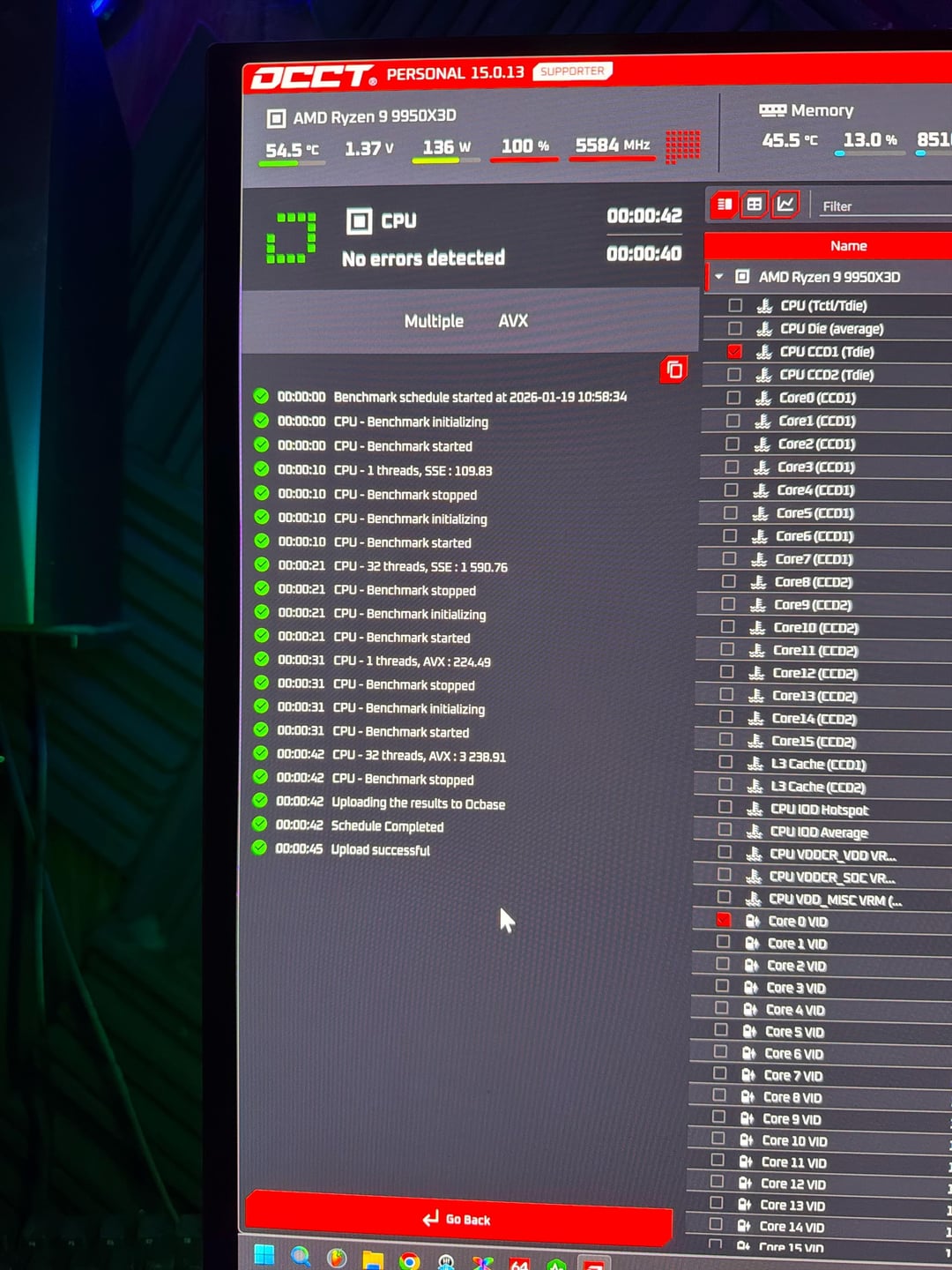
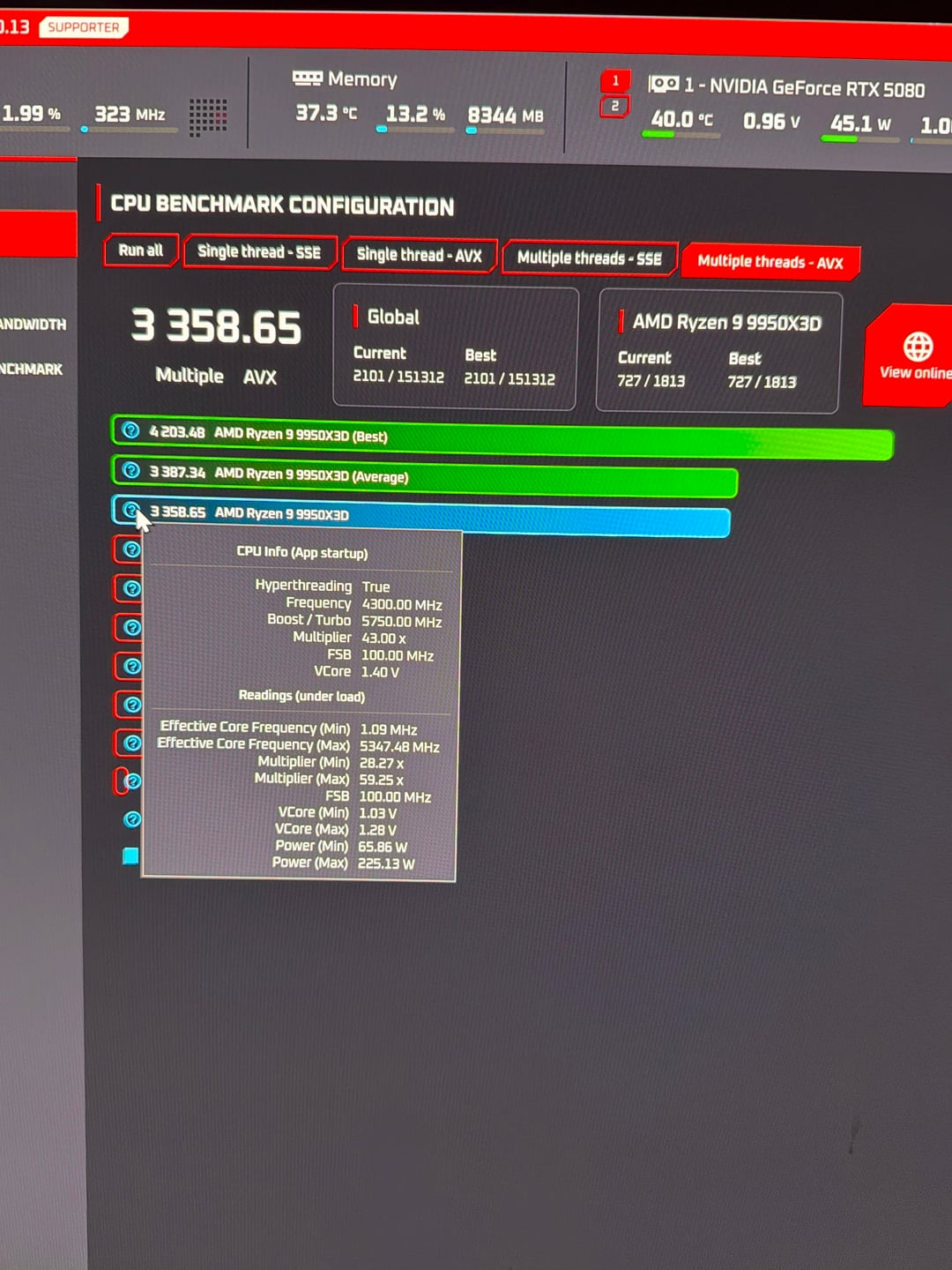
The first picture I’ve attached is my current occt scores. I have been getting almost exactly the same scores you see here for the last few days for some reason. I have no idea why, but there is clearly something instructing pbo to not take effect. Or maybe I have some occt setting misconfigured? Cause I normally score around 116-119 sse single, 1700 ish sse multi, 248ish avx single and 3400ish avx multi. The last few days, no matter what I change in my bios, I’ve been scoring exactly these. I just can not understand it
The next 4 pictures are the best occt scores that I’ve recorded. After that is my zentimings with aida64 and OCCT ram benchmarks.
I currently have my ram tightened, core performance boost on auto and core tuning level 2. In advanced amd overclocking I’m running disabled pbo limits to see if clamping was an issue, scaler x10, +200 boost clock max, -95 thermal throttle limit, -20 all core CO. I wanted to set it fairly aggressive without risking instability just to see if occt would budge. It won’t.
The only thing that changed within my PC that kind of aligns with when my OCCT benchmarks started locking up here was replacing my hyte y70 default gpu mount with a PCIE 5.0 riser.
Also added my current zen timings and aida64 ram score.
Sorry for the long read lol. I greatly appreciate anyone who takes the time to help out a noob in distress 😂🙏🏽
PS: I know benchmark scores don’t equate real world performance. My build is BEYOND solid for what I need it for (music production and gaming) benchmarking is just really fun and I think it’s high time I see a score that makes me be like “hell yeah lol”
ONE MORE THING THAT MIGHT ACTUALLY BE REALLY IMPORTANT: at the bottom-middle of my motherboard, there is a switch. It can be pushed to the left, middle, or right. I think this switch changes the pcie mode? Like one of the notches is “auto,” one is gen 4 and one is gen 3. Problem is I have no idea which notch is which, I can’t really find info on google about it. I asked ChatGPT and it said to put it to the right, but I THINK the left side is ‘Auto’ which is what my brain tells me is the right choice. But I obeyed ChatGPT lol so I think I have the switch set to pcie 4?