
Hello!
I know this is probably a bad spot to ask, but I am out of options here and I believe someone like you who deals with this on a daily basis can help me identify the problem and contact the shop as needed. I already tried techsupport subreddit and got no replies, so please, if it's not a problem, try to take a minute to read this.
A couple of days ago I noticed my games started inexplicably crashing without any errors. The game just sort of stutters for a second or so and quietly exits back to desktop. At first I thought it was the game being new, hence buggy (where winds meet), but then I noticed Hearthstone started doing the same.
The only thing I managed to dig out regarding the event was event viewer entry in administrative tasks stating:
Faulting application name: Hearthstone.exe, version: 34.2.3.35112, time stamp: 0x68d676cd Faulting module name: UnityPlayer.dll, version: 2022.3.62.28864, time stamp: 0x68d67958 Exception code: 0xc0000005 Fault offset: 0x002a1ce2 Faulting process id: 0x62C8 Faulting application start time: 0x1DC833C8D5BDAA2
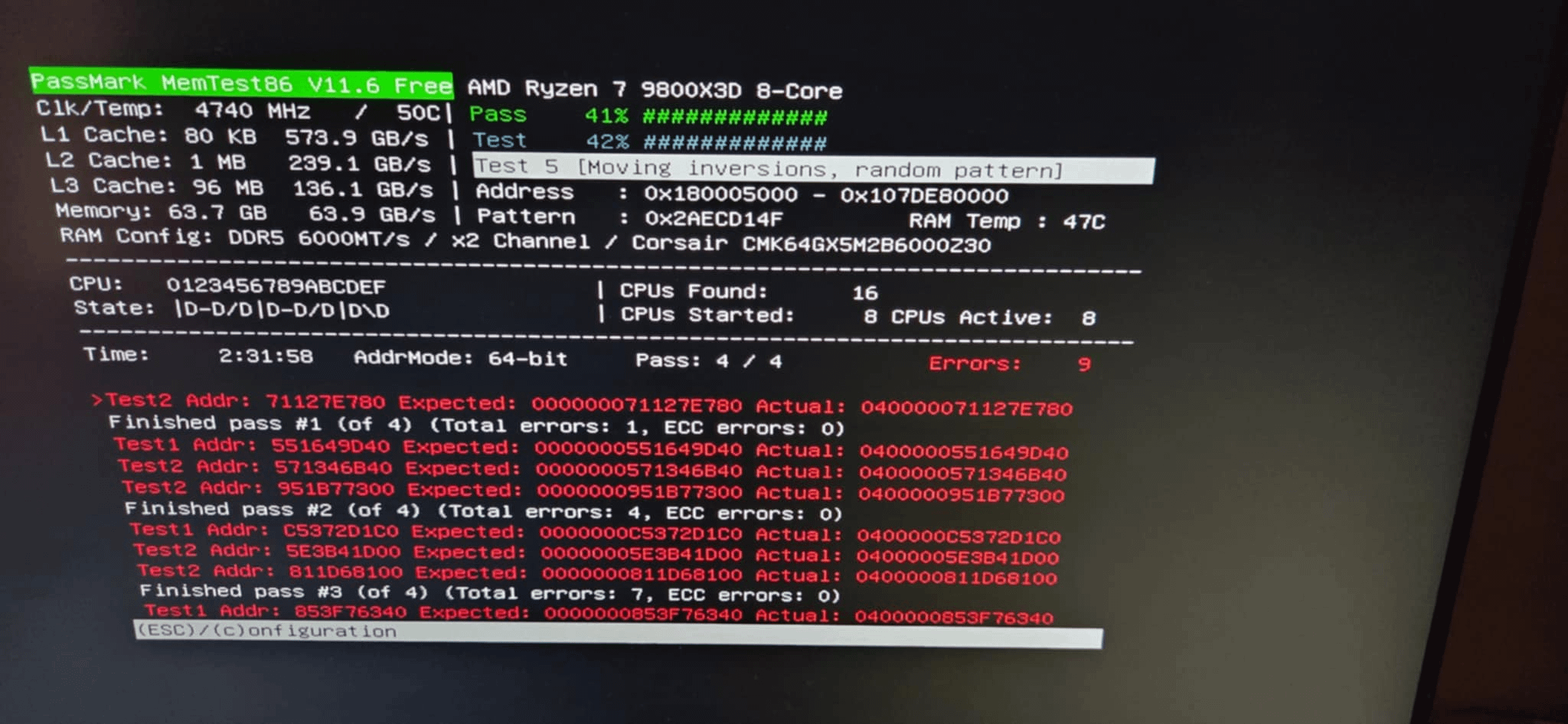
I decided to run memtest because I had a bad feeling and got these results. This was on EXPO 1.
After seeing the result, I updated the BIOS and changed to EXPO 2. (after doing some research, I found a couple of places saying EXPO 2 is recommended over 1)
I used the PC for a whole day and initially it all seemed better, but towards the end of the day I got 3-4 of these crashes in the span of an hour or so.
Just to make sure, I left memtest86 overnight on EXPO 2, but to my surprise, this morning it finished all 4 passes with zero errors. I let it run the tests again while I'm at work, so we'll see what I get today.
Does this sound like bad memory? Are there any other, more reliable tests I can run to pinpoint the issue? I am sorry for bugging you like this, but I know the PC shop will do everything in their power to try prove it's not an issue or my fault so I would like to gather all the evidence up front so I can prepare beforehand. Can I claim warranty on these sticks saying they aren't able to run at advertised speeds?
Again, sorry if it's not the right post for the sub, but I'm out of ideas. Thanks for reading and have a nice day!
If it helps, my rig:
– ASUS TUF X870 Gaming Plus Wifi (latest BIOS and firmware)
– Corsair Venceance 2x32GB 6000 CL30
– 9800X3D
– 3070Ti
– Windows 11 Pro, up to date