
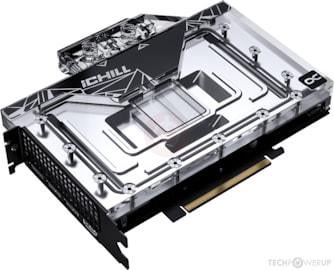
Hi, that's basically first post ever here at Reddit. I'm just very excited to share something I've done today which can be very useful to owners of this same card.
The exact card, for reference, is this one here: https://www.techpowerup.com/gpu-specs/inno3d-ichill-rtx-4080-frostbite.b9904
I've bought it mainly because I already had my custom water cooling loop in my PC prior to upgrading from a RTX 2070 Super. The price was very good considering that I didn't have to install a custom block in it, and the warranty including the stock block was also a nice plus.
The problem of the card is its BIOS. Despite being water cooled, it is locked at 100% TDP, which is stupid. Today I finally got the guts to flash its BIOS to the MSI Suprim version (https://www.techpowerup.com/vgabios/250849/msi-rtx4080-16384-221016-2), which allows up to +25% TDP. I've attempted to flash first to one of the Gainward models, which I've found some reports on Inno3D cards working well with that BIOS, but I didn't have a good experience with those. I've followed JayzTwoCents' tutorial in this video: https://www.youtube.com/watch?v=6XbDSYcQBvU&t=1175s. He uses nvflash with the option –overridesub to flash a BIOS that does not belong to your card. This initially worked but, for some reason, the Gainward BIOS did not allow me to increase the TDP, even though it indicates it should up to +18% in Tech Powerup's table. Then I flashed back to the original BIOS, but something was off. I couldn't flash it again to Gainward's one or any other, saying that the card's ID didn't match with the BIOS file and the override command would not work. At some point I couldn't even use NVidia's drivers properly. I almost panicked…
That's when I came across the patched (as far as I understand it's a patched version) of nvflash with a k at the end: nvflashk https://github.com/notfromstatefarm/nvflashk/releases. This thing is great. It warns you twice of the dangers of flashing (even though I did not find a single report of a recently bricked card online, but the danger is real). It warns you twice and asks for confirmation to which you should type YES in capital. Twice. Pretty scary. But in the end, when I tried using MSI Suprim's BIOS, it worked extremely well. I didn't have to even restart the system to start fiddling with it. After just half an hour at MSI Afterburner, I could squeeze a lot of extra points at 3D Mark.
My 3D Mark Speed Way highest score
With the stock BIOS, I reached a max of ~7700 points at the Speed Way benchmark. With the current settings, I got up to 8147! At stock conditions, for reference, it sits at around 7200, so now I've got almost 1000 points over. The best every reported score at 3D Mark is 8333, so I'm very satisfied. Let's see how this will reflect in real use in-game.
I've also ran a stress test at 3D Mark.
Everything seems very stable. The stress test did not run at the full capacity of my fans and water pump, as I wanted to simulate what would happen during normal use, I will try that later and see if there's a big difference.
A screenshot of MSI afterburner:
My system is:
Asus Dark Hero motherboard
Ryzen 5900X with a EK Velocity VRM block
Inno3D iChill RTX 4080 FROSTBITE flashed to an MSI Suprim BIOS
Custom cooling loop with one 360 and one 240 mm radiators.
One last thing I should still manage, but couldn't do yet, is monitor the temperature of the GPU hotspot. I couldn't see it during the tests, I will find a way to log them from Aida64.