

The description below is a bit of a weired UV method I use. I wasn't sure if I could share without risking criticism from the community. Nevertheless, in my case it works and allows me to keep the GPU clocks on the UV curve as stock curve. If anyone has another less complicated method then please share
Using the same method with a different curve approach I was able to get the base clocks below 200 Mhz (idle 180 mhz @ 32.0.15.7283 drivers; idle 22 Mhz @ new 32.0.15.7602 drivers)
Similar settings of three curves 2915-2930 Mhz@925mV, similar results in 3dmark [note: 32.0.15.7283 drivers]
P2 curve GPU clock minimum: 172 Mhz
P1 curve GPU clock minimum: 435 Mhz
P5 curve GPU clock minimum: 802 Mhz
UV method:
ctr left+ left click mouse to drag point to change the angle of the curve [repeated many Times on the right side of the curve]
Alt left+ left click mouse to drag point to lower the position of the whole curve [as many times as needed to be close to the stock curve position]
The curve is positioned to be close to the point to the target frequency at the desired voltage [in this example 3097Mhz@935mV].
Only left mouse click to position at the 935mV point [I help myself with the up/down arrows on the keyboard to adjust ]
Last step: position the cursor a little to the left of the required point on the curve, when holding left shift select the whole area to the right + hit Enter twice on a keyboard.
+ hit Enter twice on a keyboard.
Finally, hit Apply in MSI AF settings
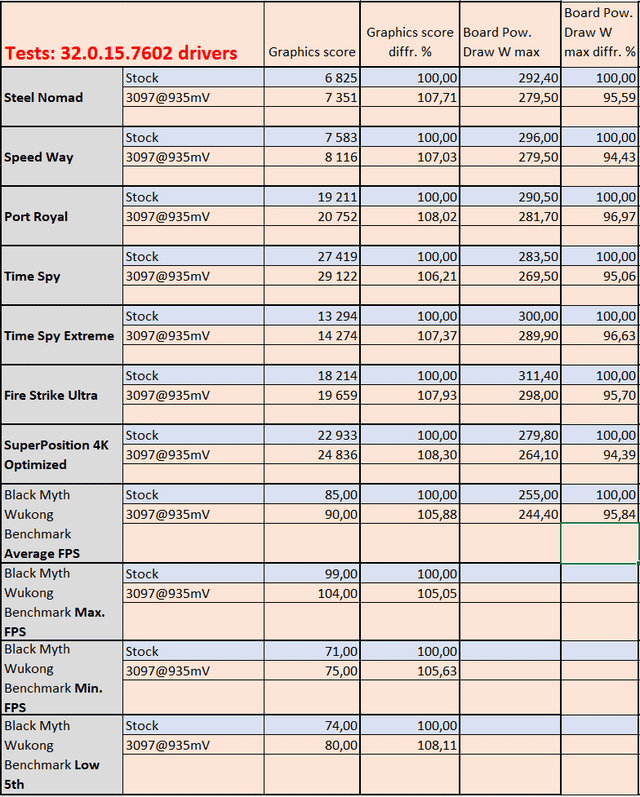
Conclusion: Stock vs UV 3097Mhz@935mV + 1500 Mhz mem PL100%
with about 5% less power consumption relative to the stock settings, I get an average 7% increase in performance.
p.s. and that's on broken 7602 drivers