
if you have instability issues I might be able to help you.
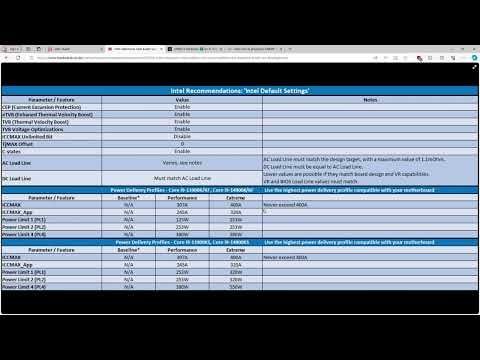
https://www.youtube.com/watch?v=k6pUZs_tuJo check this video out, it talks about intel's power limits but not only that, they're saying that intel is setting their AC LL and DC LL wrong.
TLDR: manually set in the bios the AC LL and DC LL fixed my problem
There could be a few things effecting your performance. it could be RAM, it could be bad default bios settings or it could be that your CPU is degrading.
here's what you should do to diagnose the problem:
- test your ram using memtest (DO THIS FIRST its a lot easier to diagnose a CPU problem if you know your ram is okay): run the test at least 3 times, but if you're really diligent run it for a couple hours
- test your CPU's processing capabilities by not only running cinnabench but as funny as this sounds run fortnite in DX12 if your GPU can handle it, when running fortnite see if it crashes during shader compilation (when you load in before a game) if it says out of video memory its probably just bad default bios settings
- test your CPU's thermals by doing a 30 minute cinnabench test (its normal for 12th 13th and 14th gen to run at 100 degrees but if it doesn't crash you're fine) (IF YOUR CPU IS RUNNING AT 80 DEGREES + WHILE IDLING YOUR CPU MIGHT BE DEGRADED)
Heres my suggested fix for what you should try:
- get the software called hardware info, and see what your AC LL and DC LL values are right now, if they aren't the same value (THIS IS BAD), go into the bios and match your DC LL to be the same as your AC LL and then do a stress test in cinabench, if it doesn't crash, go on to step 2 otherwise raise both the AC LL and DC LL by .1 (it should be worth mentioning that anything higher than 1.1 and your CPU might be degraded)
- launch fortnite and see if it crashes when you first start up, if it does increase AC LL and DC LL by .1, if it doesn't load into a match and see if it crashes during shader compilation (when you're first loading in) if it does, increase AC LL AND DC LL by .1 and if it doesn't run your game for awhile and see if its fixed now.
- Rejoice
ill be replying here in the comments incase anyone needs help