
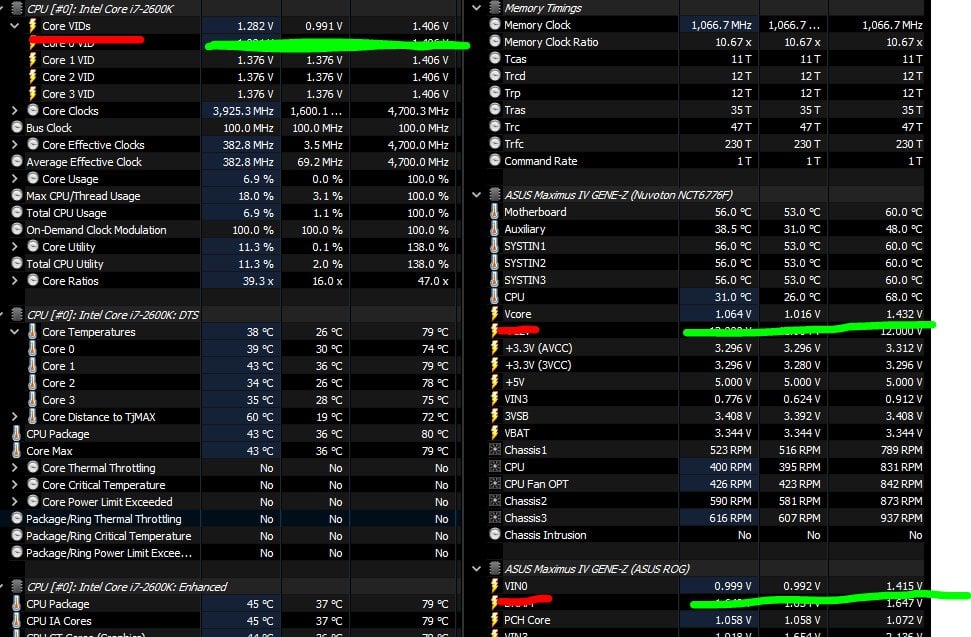
I've come up confused as to what my real Vcore actually is. I know that it is not my VID. I noticed there are two reading for my Vcore, or at least it looks like it.
Overclock is:
Asus Maximus IV Gene-Z
i7 2600k
4.7Ghz(CPU-Z reports @1.4v)
Offset Voltage (+0.025)
LLC setting is high (75%)
So what is the problem ?
HWINFO gives two voltages. Old forums don't seem to have this answer so far
HERE are the pics of HWINFO and CPU z showing 1.4v
There is Vcore, which under load peaks @ 1.42/3 V
However underneath that reading in HWINFO is another section of voltages. The top one being VIN0.
VIN0 seems to float around and above "Core VID" and always below Vcore.
At this stage i'm wondering if VIN0 is the real Voltage with the LLC being applied. So what I am seeing is Vdroop and LLC holding my Voltage down from spikes in vcore ? If so my voltage is a lot better than I thought and I can go for a 5Ghz run and I don't have a rubbish chip, never OC'd till recently lol
I'm really not sure which is the TRUE Voltage being applied to my CPU anymore.