
__Preamble__
With my poor aging system gradually falling behind in every modern game I want to play, I’ve been investigating how to squeeze every last drop of performance out of this lumbering beast.
My fairly unremarkable GA-F2A88X-D3HP is bottlenecked by it’s memory controller northbridge that adds 50-75ms memory latency. After years of tweaking around I found out that I have an older board revision where at best the NB clock limits the memory throughput to just above DDR3 spec, which is fine because I overpaid for some bad binned Ripjaws, 1600-10-10-30 for $175 in like 2016 or 2017. Can’t even do CR1 with any timings at any voltage with base clock at 1600, though I can get them to do over 1600-10-10-30 CR1 with a 1433 base clock and high BCLK.
I’ve squeezed every last drop out of the X4 860k, 4.4ghz on all 4 cores with no Turbo Boost seems to be the most powerful and stable. No combination of BCLK, voltages, or core clocks is stable over 4.3-4.4ghz and after all these years of watching errors I think core 3 is the limiting one. I bought this online at the cheapest price on ebay from god knows where and who knows what kind of bitcoin mining history it’s been through bless it’s soul.
__The Graphics Card__
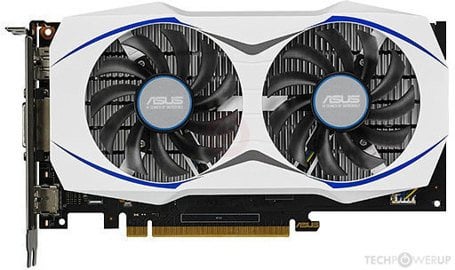
Enter [this baby](https://www.techpowerup.com/gpu-specs/asus-gtx-950-oc.b3557), 75w of screaming, throttling, stuttering madness. Asus crammed what normally would have been a 100w card into a PCIe-3.0 compliant form factor by using a new, smaller nanometer process to save power and just rolling with the fact they’re selling a Mustang with a brick under the gas pedal.
Now after downloading MSI Afterburner and staring at the various squiggles for a good while, I’ve noticed a few things. For one, this card can never draw more than about 80w under any condition, so changing the power setting is useless. In fact, lowering the power setting a few percent often allows higher core clocks, maybe because the card is staying farther from the hard PCIe limit. The Power Limit and Voltage Limit signals in the monitor show when the card is being limited.
And they are *always* on. Any clock setting results in constant power throttling, even +0mhz. In fact I’ve noticed the memory is gratuitously overclocked and very unnecessary, base clocks were hitting 3400mhz which basically just gave unnecessary power draw. Instant core clock improvements were seen proportional to reduced memory clocks – but for MSI Afterburner it had a hard limit of -502mhz which would only drop the clocks to about 2900mhz. This opened up significant power headroom and allowed base clocks to average much higher – 1000-1100 with base memory clocks, and 1200-1300 with lowered memory clocks.
__The Problem__
No amount of boosting voltage helps with core clocks, it’s generally bad for clocks because it seems to increase power draw disproportionately without helping clocks. The card seems happy to clock up to 2000mhz even with a +0mhz and normal mem clocks in MSI when it has enough power headroom, but in practice with complex graphics it lives in a state of constant power throttle which contributes to the general background noise of microstutter in this rickety system.
Now this leads to a tantalizing problem, one with big tradeoffs that I was very willing to take on. Here’s the thing, this card/system has been very good for… 30fps high res and texture settings on modern games (good base hardware held back by poorly implemented bottlenecks) but I’m trying to squeeze a bit more fun out of it by increasing FPS in shooters while I save up for a modern system. I can run Medium and High settings with almost the same performance but even on lowest settings after all my memory and CPU fandangling I’m getting like 15-30fps in Hell Let Loose, the worst audio stutter you can imagine, and it actually all seems to be boiling down to this poor throttled GPU.
__The Fix__
I’m perfectly willing to take the hit from lowered memory clocks in exchange for (hopefully) screaming high core clocks. I’ve never played online with high texture res anyways so low VRAM utilization should negate the (somewhat) lowered performance, in exchange I get to blast those blurry polygons at higher FPS, N64 style.
I did a lot of work so you don’t have to – it turns out MSI limits it’s allowed clocks based on BIOS, and after trying out many other overclocking options, it looks like MSI is actually the best for this system and modding the BIOS was the way to go. None of the other programs have the same degree of safety, features, and customization.
####DO THIS AT YOUR OWN RISK
I found this tutorial on how to rip the BIOS useful, the SIV program is key:
https://www.techpowerup.com/forums/threads/gpu-z-error-bios-reading-not-supported-on-this-device.290957/
After BACKING UP YOUR BIOS SOMEWHERE SAFE download this tool:
https://www.techpowerup.com/download/maxwell-ii-bios-tweaker/
In there I was able to make a new profile and set my memory base clock to 2401mhz.
After much consternation I found only this older version of nvflash works with my card on Windows 7 so that might be a factor for some of you:
https://www.overclock.net/threads/official-nvflash-with-certificate-checks-bypassed-for-gtx-950-960-970-980-980ti-titan-x.1521334/
After running that version I was able to successfully flash the card, reboot, and play with a 1000mhz reduction in memory speed.
Here’s an overview of the procedure:
* back up original bios
* modify in Maxwell II Bios Tweaker
* save modded BIOS
* open Device Manager, under Display Adapters right-click your card and hit Disable. This will reset you to the most basic VGA display mode
* open the Start Menu, type ‘cmd’, right click on it, Run As Administrator, and enter the following commands:
cd D:\location\of\nvflash [your nvflash location of course]
nvflash.exe –protectoff
nvflash.exe -6 “D:\path\to\GTX-BIOS.rom”
* restart after the procedure is complete. at this point you may save some time by re-enabling the card before restarting, I’m not sure. I had to restart twice, first time I had to scan for hardware changes before it found the card, prompting another restart.
__Results__
In MGSV just sitting around the card now idles at about 62w with a perfectly flat 1289mhz core which I’ve never seen before, nice. It started up at about 2401mhz for the memory and accepted MSI’s -500mhz bringing it down to 1901mhz at a steady 63 degrees.
After some more tweaking I’ve got it running stable at 1345mhz core, 2654mhz memory, about 73.5w power, 65 degrees tops. Not exactly amazing numbers but the best part – this is about as high as possible for a 99% perfect zero power-throttle experience, with zero downtime in the “no load” limit. Amazingly stable 45fps in multiple games.
-Some overclocking notes – core voltage seems mostly useless, raising it just results in slightly better core clocks but guarantees something overheats almost on a timer. It disproportionately increases the amount of power draw for almost no benefit.
-Core clocks can get high (I had mine running with +200 for short bits) but it’s seemingly never stable even with the lowered memory power draw. I’m running +133mhz with no issues and no core voltage boost. Temperature doesn’t seem to be a factor, at least the one MSI is showing.
-It seems like at least on my motherboard the base 100% wattage seems to be 70w, though the card is capable of pulling a stable 75w-ish at maximum, which translates to a Power Limit of 107% though I just have it at 105% (73.5w) for now. It seems as though 80w is the transient peak but isn’t stable.
-When tuning the core clock, start with the memory as low as possible to rule out it’s power draw as influence. I could raise it to +150 for several minutes but it would inevitably crash. Somewhere between 133 and 150 is my number but for now I’m happy.
-Voltage spikes from too-high of a clock seem to be the culprit – even slightly too high of a clock will ask for too much power and start power throttling. Any throttle spikes cause rapid instability from the card toggling power states which crashes the driver rapidly. Raising voltage to raise clocks only increases power draw and compounds the problem. Stability is achieved when the clock is as high as possible without causing any power spikes of it’s own.
-After the core clock is determined memory can be worked on. Raise the clocks until one of two things happen – either core clocks start to drop, or No Load condition starts to fire. In practice it seems as though moderately high memory clocks are possible, despite frequently power throttling if your core is dialed it seems as though the memory is much more flexible with a variable power supply and the frequent throttling does not cause the core to stall.
-At this point you have to make a decision – it seems as though the memory will safely self-limit when there’s not enough power, so you can easily get away by raising the clocks a huge amount to have snappy and responsive actions at the expense of some serious lagging and hitching caused by throttling when both the core and memory *require* a high wattage to function, OR you can sacrifice a tiny amount of latency and FPS in exchange for much improved stability in the face of complex gaming environments. I find low VRAM clocks really extend load times, only slightly hurt FPS, but hugely reduce stutter, whereas high VRAM clocks blaze away load times, only slightly help FPS, and add a lot of stutter.
__Afterthoughts__
Seeing as the performance of the card is so heavily power throttled, wouldn’t it be possible to remove the main fan and add an externally powered fan, therefor opening up more power headroom on the bus? Surely there must be a way to mod a slightly higher amount of power into the card somehow.