
4x ECC PC5-5600 CL46 ([spec sheet pdf](https://www.kingston.com/datasheets/KSM56E46BD8KM-32HA.pdf)) in an [Asus Pro WS W680-ACE IPMI](https://www.asus.com/us/motherboards-components/motherboards/workstation/pro-ws-w680-ace-ipmi/) with an [i9-14900k](https://www.intel.com/content/www/us/en/products/sku/236773/intel-core-i9-processor-14900k-36m-cache-up-to-6-00-ghz/specifications.html).No changes to CPU tuning yet. Cooler is an [NH-D12L](https://noctua.at/en/nh-d12l/specification), with a thermalright [contact frame](https://www.thermalright.com/product/lga1700-bcf-black/) and PTM7950. though for half of my “tuned” test I added an 8-inch portable house fan because my IPMI was giving me CPU package temperature warnings. I did not have the IPMI card installed for the first test, so not sure if could impact the results or CPU package temps were high in first test as well.
Comparing the stock settings and my “tuned” settings, everyting but the MT/s seems to have gotten worse. I ran Memtest86 before and after, and the duration of the test nearly doubled, and bandwidth more than halved.
||Memtest86 Duration|L1 (GB/s)|L2 (GB/s)|L3 (GB/s)|Memory (GB/s)|Reported Latency (ns)|
|:-|:-|:-|:-|:-|:-|:-|
|4788 MT/s (stock)|7:52:41|646.3|137.5|48.5|25.4|(didn’t screenshot)|
|5586 MT/s (“tuned”)|14:07:18|324.9|53.8|19.7|10.6|48.452|
The settings I changed are below. To my knowledge, ECC RAM does not include XMP profiles.
Boot > BIOS > AI Tweaker >
* DRAM Frequency: \[`AUTO`\] > \[`DDR5-5600MHz`\]
* DRAM VDD Voltage: `AUTO` \> `1.10000`
* DRAM VDDQ Voltage: `AUTO` \> `1.10000`
* Advanced DRAM Voltage >
* PMIC Voltages: \[`Auto`\] > \[`Sync All PMICs`\]
* DRAM VDD Voltage: `Auto` \> `1.10000`
* DRAM VDDQ Voltage: `Auto` \> `1.10000`
* DRAM VPP Voltage: `Auto` \> `1.80000`
* DRAM Timing Control >
* Primary Timings >
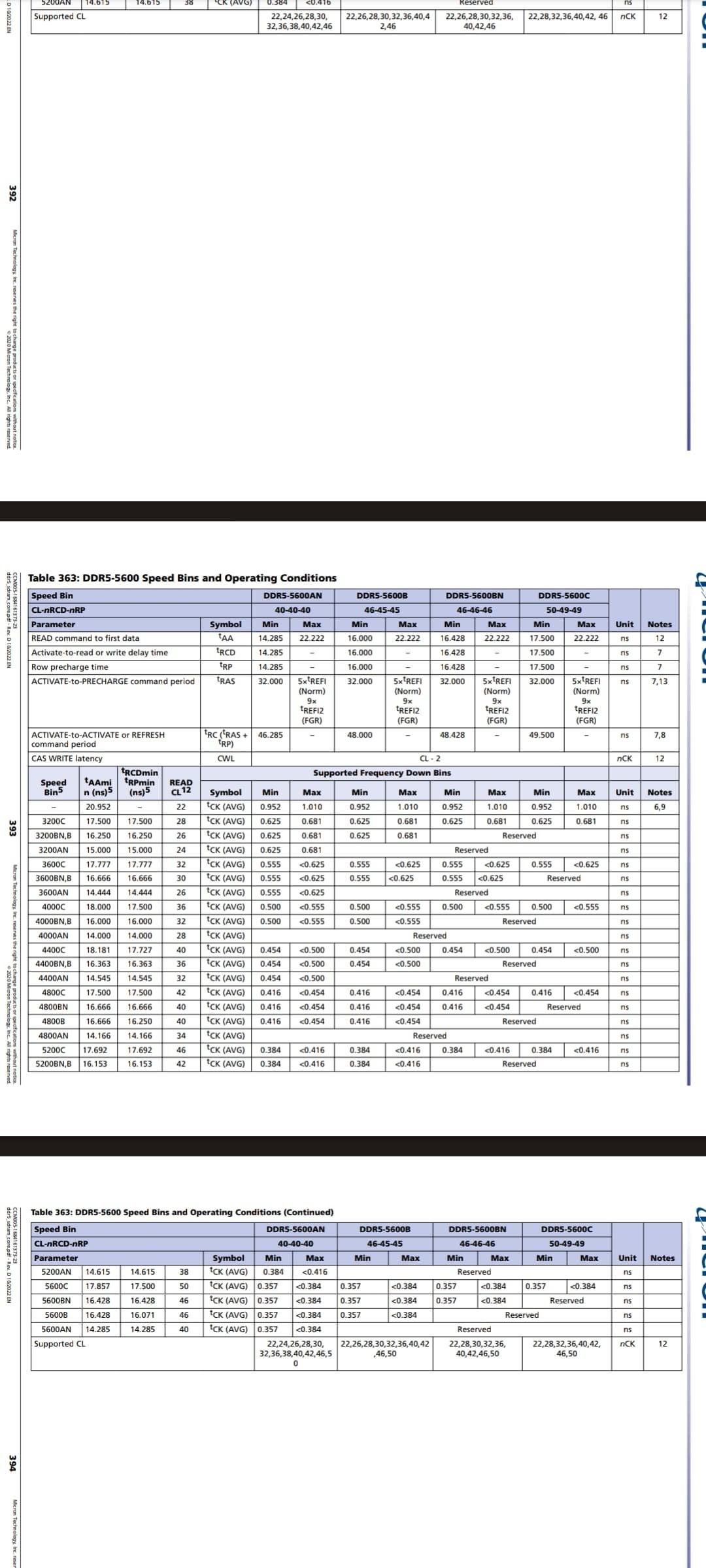
* DRAM CAS# Latency: `AUTO` \> `46` (tCL)
* DRAM RAS# to CAS# Delay Read: `AUTO` \> `45`
* DRAM RAS# to CAS# Delay Write: `AUTO` \> `45`
Certain subsets of this would boot, but freeze during memtest.
\[[this image](https://static-community.frame.work/original/3X/7/3/73c3d33dede6f57591a4e317a36d358b61e3d573.jpeg)\] has (apparently) the JEDEC standard timings for DDR5.
[RAM info screenshot](https://preview.redd.it/sbz012r30mcc1.png?width=1798&format=png&auto=webp&s=703f860c46b50a4cae5f4ab92e75b943c1f1f493)
What’s going on here? How can I fix this, or should I just return to everything in the BIOS to \[`Auto`\]?Some folks have reported losing memory channels or something if they overtighten the contact frame – could this be my issue? However the physical hardware was not modified between the two BIOS configurations.