
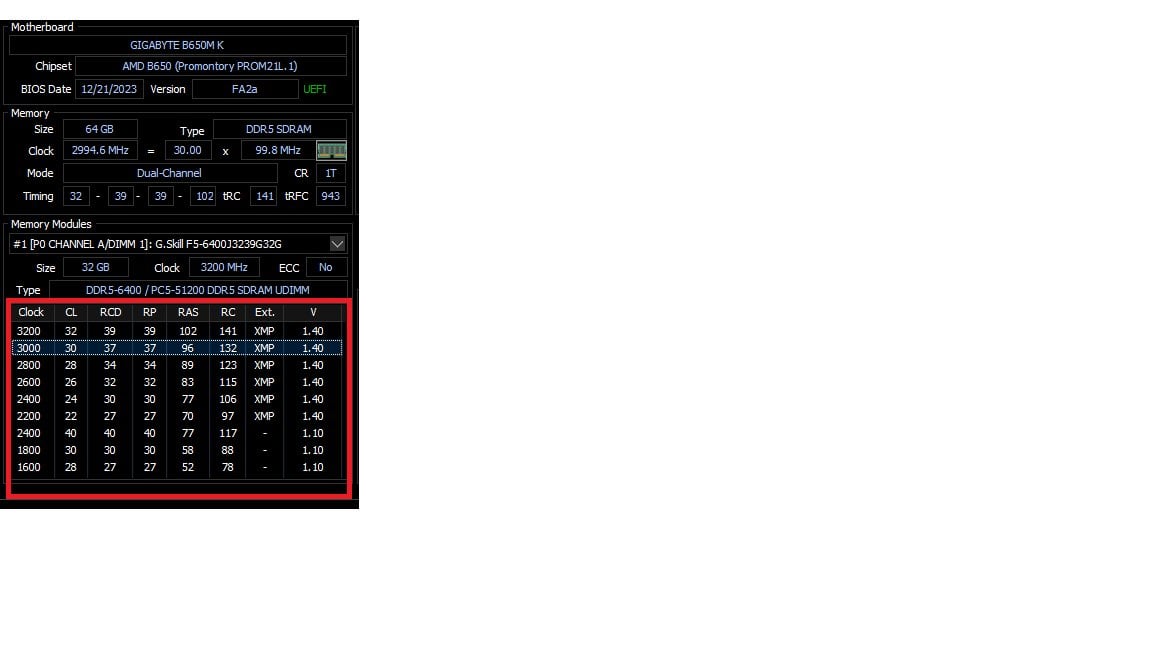
So… I’ve had to drop my 6400-rated DDR5 RAM down to 6000 so it is stable with my motherboard/CPU. What I’ve done is to use the XMP profile for 6400 and then just change the frequency, currently the timings are all still as they were for the 6400 XMP profile and I’d like to tighten them a little if possible.
What I’m wondering is… in the “memory modules” table in the system summary panel of HWinfo, is it showing suitable timings for each of the different speeds?
So if I’m now at 6000, should I be using the timings in the “3000” row as a starting point for my manual settings? Is that what this table is for?
[screenshot](https://postimg.cc/ZWT20LPJ)
1 Comment
Before you go down this rabbit hole, dig around in your BIOS for timing presets. Those look like a Hynix M-Die kit, so if you find presets for Hynix, try those first.
If your board doesn’t have that, move on to [Buildzoid’s guide](https://www.youtube.com/watch?v=dlYxmRcdLVw).