
During Playing Black Desert Online (This game is very hit or miss optimization BTW), I wanted to improve my FPS one day, so i decided to finally install MSI afterburner and undervolt my GPU cause i hear that helps with temps and energy usage, but I at the end of the day wanted MORE FPS and better smoother fan speed (which I did change and now my fan speed for my GPU is perfect and keeps it cooler so MSI is amazing)
However for one i dont know my SAFE undervolt/overclock speeds and would like suggestions on what i should have them at?
(I was peaking at around 83-84 degrees while at around 80%-100% USAGE BEFORE CLOCKING ANYTHING VIA GPU OR CPU)
Default Specs are = GPU RTX 2070 Super 8 Gigs
BASE CLOCK from Default Settings – 1605 MHZ / BOOST CLOCK from Default – 1770 MHZ (MSI Showing its idle sitting at 1200MHZ at desktop)
MEMORY CLOCK – 1750 14 gbps effective (this cant be right as my MSI afterburner showed default 7000 MHZ? maybe this is the actual value? Idk would help if i knew that too)
Oh also i have 2 sticks of 16 gigs of DDr4 RAM at 2400MHZ = 32 GIGS (BIOS settings wont allow me to turn on XMP…) not the full 2666 MHZ it should be at…. my BIOS im generally unable to find/turn on XMP if anyone knows ways around that would be amazing….
NOW my issue that i personally know is my hardwares issue right now is my CPU… that being
I7-9700 @ 3.00GHz (NO K)
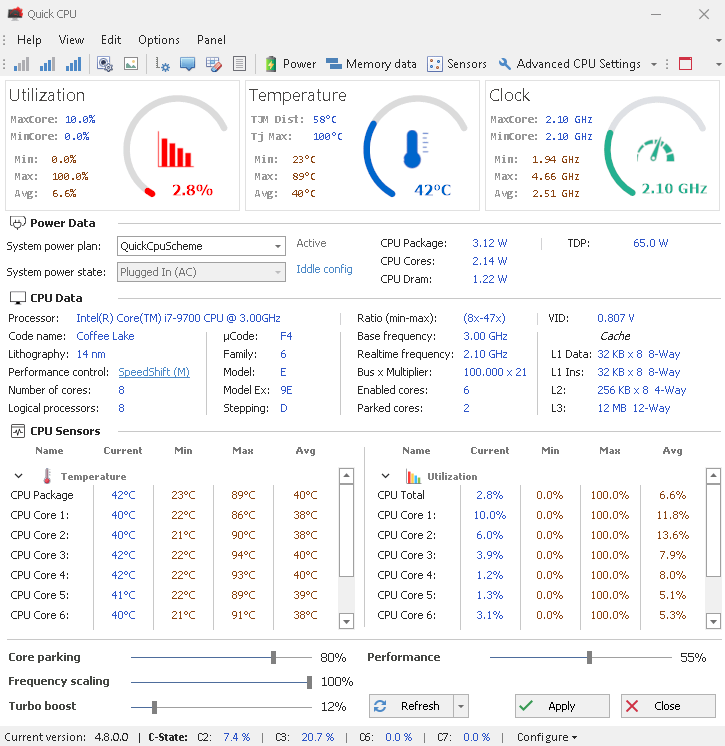
Now i recently found a software that can help to monitor CPU values and also undervolt/underclock the CPU, now using this program ALONGSIDE MSI afterburner is useful only because My BIOS settings are the ones your grandmother had when she used her PC due to Intel motherboards on OMEN Gaming PCs from 2019 all have 2000s BIOS…. unable to change XMP or anything related to CPU clocking unlike more modern day PCs with AMD, and other BIOS’s where they have many options in their BIOS to help with that, THAT PROGRAM BEING CALLED “QUICK CPU” If anyone would like to spread the word and help people who made use this program but dont know too much about it and not want to mess anything up, but this program allows me to undervolt / underclock or overclock for that matter my CPU (NOT A K AKA UNOVERCLOCKABLE) which i have not overclocked my CPU yet atleast i dont believe i have anyways, what the feature allows you to do is control your “parked” cores and your frequencys, so im curious if i can make my clock speeds sit around 2.00MHZ and max 4.70MHZ (as it does that already when at max loads) and i have my cores now parked at 6/2 (i was doing 8/8 unparked but i was afraid that might be too taxing on my CPU to be running at all times so just let it rest at 6/2 seems to have made no change) Now i know this is a lot of information at one time so ill just ask this….
What should i do if im getting now LOWER GPU usage and HIGHER CPU usage, my main reason for doing all of this was to try to fix my CPU bottleneck as im sure you noticed i have VS my GPU, should i reset everything to factory settings and recover my computer? Think that would be the only way to get to reset factory settings btw because im almost 99% sure this “Quick CPU” software CHANGES YOUR REGISTRY FOR YOU to allow you to even make all those changes to the CPU. Thoughts and Ideas guys im kinda stuck here dont know if i should undervolt/underclock my CPU and GPU or not.
My MSI afterburner settings are for my GPU this currently =
It shows my MSI Clock is currently sitting BELOW BASE CLOCK? Is this normal? Im under no load rn and only at my desktop basically so i dont expect it to try to go under a heavy load but is this normal or is my OC/UV not working? It Shows BASE is 1605 MHZ ( like my factory settings ) but the actual it shows it 1200 MHZ? Boosted its around what i said bellow which is around 1975 MHZ overclocked CURVE that is)
Core Clock is UNDERVOLTED at 975 V MAX then i did a “Curve” to only be maxed at that voltage and then its clock is at 1965 mhz MAX, Memory OVERCLOCKED ( i think) at +795 or 7795 total
AFTER doing all these changes to my CPU/GPU now my CPU is doing more work then my GPU (which is bad for my CPU and not the end goal i had sadly) and my GPU usage is lowered from 80-100 to around 40-60? Is this due to my GPU able to do more now yet it just doesnt have to via the game im playing or is it a issue causing it to not use more %? im Guessing its an issue?
(using the curve feature is what i saw a YT vid do to undervolt, is that good or bad or should i undervolt more or less in order to get my GPU usage back up?)
I dont know exactly what info people leave here for people to help figure things out but i tried leaving all i could, please help if you guys can ty <3
EDIT: Im noticing less of a stress on my CPU when installing this Quick CPU program and i undervolted my CPU Core to less then 10.00 MV and im playing with it around those numbers to see if that has any effect on its load, and i feel im messing up somewhere big time, i feel im undervolting and overclocking which is bad to do in tandem am i correct? Or is it okay to undervolt slightly while overclocking? Im also trying to sorta get a TLDR on if this Quick CPU program is the root cause, i think it is however if i dont use it and just use the Power Plan (ultimate performance) i notice my fans ramping up more (cant tell if its CPU or GPU however, could be GPU which would be good hence its using more GPU usage which is what i want rn) VS their power Plan somehow i can customize how much energy is uses VS performance, very odd and cool program but wnting to make sure its not messing up my hardware, if anyone has any knowledge on the software would be amazing as well, their website is useful but nothing like person to person ideas my CPU is running frequencys around 2.00 to 4.70 MHZ now MAX and around 4.70 all the time under max load, WITH ALL 8 CORES UNPARKED (currently 6/2 cause i feared all 8/8 unparked all times would be bad bad) (which i dont believe is anywhere near my CPUs normal settings btw) after changing a few settings with this “Quick CPU” program
Also im on Windows 10, and i recently am messing with hardware acceleration GPU scheduling on/off, i had these same issues with it off recently, and turned it on and still same issues, going to turn it OFF now tho due to just curious if it does anything good or bad or nothing at all
Picture of the Quick CPU software bellow, as you can see this software makes its OWN POWER PLAN, which i think is my root cause to using less GPU and more CPU because somewhere in these settings i have things to make my CPU have more load then normal, which i thought i needed to do when somewhat overclocking my GPU, however with my current settings the MAX utlztion at 100% is a big issue and trying to fix somehow, (these are not factory settings as this software i believe atleast edits your registry files basically changing the CPUs files on its own somewhat spooky business but software wouldnt be out there if it wasnt useful in someway…. a good way i hope … right?
[https://cdn.discordapp.com/attachments/799243072110067722/1187462462249894018/image.png?ex=6596f998&is=65848498&hm=2d8ff7221de2a4c5aedaa2b4283fde606932d3b9df867f99e6e96cbff10cfd63&](https://cdn.discordapp.com/attachments/799243072110067722/1187462462249894018/image.png?ex=6596f998&is=65848498&hm=2d8ff7221de2a4c5aedaa2b4283fde606932d3b9df867f99e6e96cbff10cfd63&)