
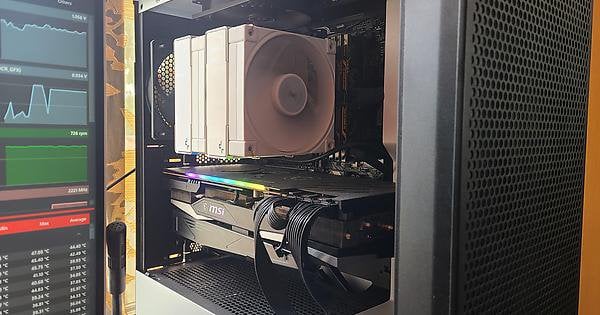
Hello, I’d like to ask for help in repasting and repadding my GPU, the MSI 6800xt gaming Z trio. [Pictured here in my case, the NZXT H510 flow.](https://imgur.com/Sx1pmsw) I’ve removed the glass panel to show a better view but normally it stays on.
I want to repaste and repad because [as seen here in the OCCT GPU stress test, the delta between my average GPU temp and hotspot is almost 30 °C](https://imgur.com/Mp3RmKh). Furthermore, these readings were taken with an undervolt to 1050mv and the glass side panel off! I went looking online and apparently this model has problems with hotspots because of the pad they used for the GPU die? And people recommend repasting and repadding to fix it.
I’ve come up with a plan to do this but I wanted to run it by this subreddit first in case I’m about to do something unnecessary or stupid. Here are the materials, tools and references I’m going to use moving forward:
* For the general disassembly instructions, [I plan to follow this youtube video](https://youtu.be/f7aK8ZSZM38?si=Gva14ZHIUzzmpAIi) where in the process of installing a waterblock he removes the cooler on an MSI 6800xt gaming X trio.
> It’s not exactly the model of my card but [according to this article](https://www.tomshardware.com/news/msi-radeon-rx-6900-xt-gaming-z), the only difference is the aluminum backplate and the higher boost clocks. What worries me though is that the article doesn’t mention another difference: The x trio has two 8 pins and the z trio has three 8 pins. I just hope there aren’t any other big differences moving forward.
* For the thermal paste,[ I plan to use the thermal grizzly kryonaut.](https://www.tomshardware.com/best-picks/best-thermal-paste)
* For the thermal pads, [I plan to replace them with UX pro thermal putty.](https://www.reddit.com/r/overclocking/comments/149udr4/igors_lab_thermal_putty_testing_outperforms_pads/)
> I don’t want to mess with measuring and cutting pads lol.
* For tools [I have this electronics repair kit.](https://imgur.com/ABVqFjm)
> An unknown here with these tools is how I’m suppose to remove the fan and rgb headers? Those are supposed to be fragile. [In the linked video](https://youtu.be/f7aK8ZSZM38?si=z4qaCZuEuyARLWtt&t=136), he uses some kind spatula thing. Maybe I can use some tweezers?
I haven’t bought the kryonaut nor the UX pro yet because I wanted this subreddit’s opinions first. Any advice, things to watch out for, resources for further reading, words of warning, chastisements for my ignorance? They’re all welcome. [You guys helped me out with my RAM a few months back](https://www.reddit.com/r/overclocking/comments/11iuhy3/my_oc_ram_throws_errors_only_when_it_is_heated_up/) and I’m hoping I can again ask help this time.
Other separate concern: There’s that “Warranty void sticker” on one of the leaf spring screws on my GPU. I know that in most countries the sticker isn’t enforceable and doesn’t matter but I live in the Philippines and consumer protections are a meme here. So if anyone can tell me how to remove it without damaging the sticker that’d be swell. Thank you again