
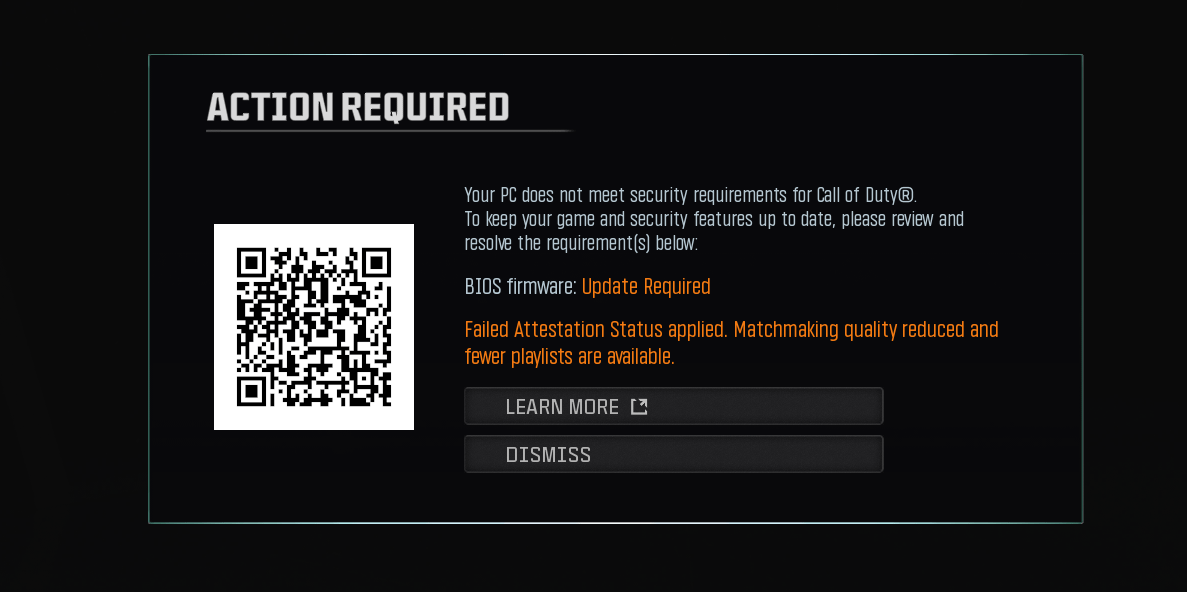
I'm having an issue with Call of Duty's Secure Attestation / RICOCHET on my ASUS G15DK.
PC specs:
- ASUS ROG Strix G15DK
- Ryzen 7 5800X
- ASUS G15DK motherboard
- BIOS version: 307
- BIOS date shown in BIOS: 07/22/2024
- AMD fTPM: Enabled
- TPM 2.0: Enabled / ready for use
- Secure Boot: Enabled
- CSM: Disabled
- BIOS Mode: UEFI
- AMD TPM Manufacturer Version: 3.87.0.5
The problem is that the COD Secure Attestation Wizard reports:
"BIOS Firmware Update Required"
I used to be able to play COD normally, so this started happening recently.
What I've tried:
- Enabled AMD fTPM
- Verified TPM 2.0 is enabled and working in Windows
- Enabled Secure Boot
- Verified Windows is booting in UEFI mode
- Disabled CSM
- Installed the default/factory Secure Boot keys after clearing them
- Updated the BIOS using ASUS EZ Flash
- BIOS update reported "Update successful"
- BIOS is now showing version 307
- Rechecked TPM after the BIOS update and it is still AMD 3.87.0.5
- Ran the COD Secure Attestation Wizard
- Checked
COD.Broker.Service, which exists and is set to Manual - The Attestation Wizard still says "BIOS Firmware Update Required"
I also tried running where enrollaik.exe in Command Prompt, but Windows couldn't find a path for it.
At this point I'm wondering if the issue is specifically the AMD fTPM firmware version 3.87.0.5 on the G15DK, rather than Secure Boot/TPM actually being disabled.
I've seen people mention a G15DK beta BIOS 321 that apparently fixes this issue, but I don't want to flash unofficial firmware or a BIOS intended for a different motherboard.
Has anyone with an ASUS G15DK + Ryzen 7 5800X and AMD fTPM 3.87.0.5 managed to fix this without using BIOS 321?
If BIOS 321 is actually the correct solution, where can I get the official ASUS version for the G15DK?