
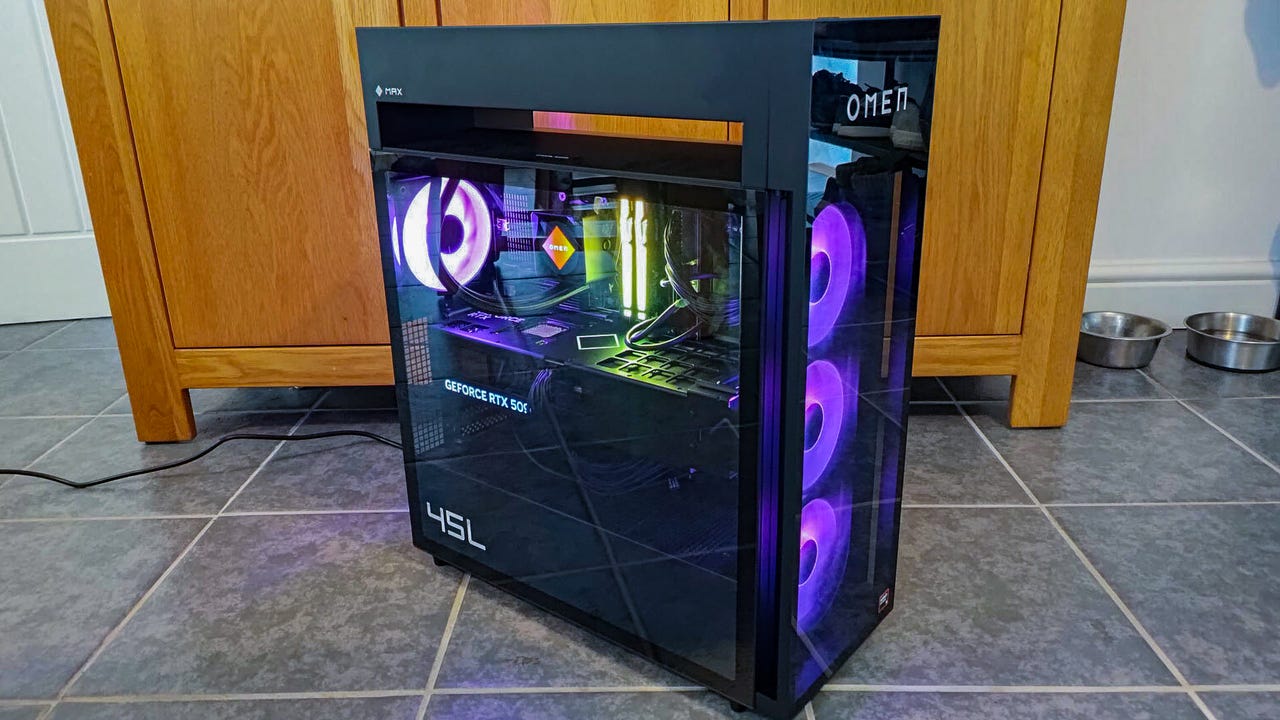
Go big or go home. That feels like the entire mantra of the HP Omen Max 45L’s design. It has an enormous RTX 5090 that’s somehow even larger in this configuration with its anti-sag bracket. It has boat loads of memory, plenty of storage, and a huge case that completely silos off the CPU cooling in a fashion reminiscent of those old Vapochill phase change units.
All of that comes at an enormous cost, though. This configuration is north of $6,000, and bizarrely it’s with a 12-core 9900X3D CPU, rather than the flagship 9950X3D or more-typical gaming kingpin, the 9800X3D.
Still, it looks good, plays good, and gives you plenty of scope for expansion. If you want a PC that can play anything and do it relatively cool and quietly, this may not be a bad buy in 2026 where just about anything is going to cost you a lot.
Purchasing Guide
The HP Omen Max 45L is available now starting at $3,199 at HP. That price gets you the base configuration with an AMD Ryzen 7 9700X, an RTX 5070, 32GB of DDR5 6000 MT/s memory, and 1TB of PCIe 5 storage. The configuration I reviewed here is priced at $6,500 outside of sales, and comes with an AMD Ryzen 9 9900X3D, an Nvidia RTX 5090, 64GB of DDR5, and 4TB of storage. Other configuration options include an AMD RX 9070 XT, as well as the 9800X3D or 9950X3D CPUs.
HP Omen 45L (2026) – Hands On PhotosDesign and Features
The HP Omen Max 45L is well named. This system is big and bold, with a domineering presence on or under your desk. Despite the LED lighting and glasswork being tastefully handled in the default configuration – HP reliably told us unicorn vomit was on hand if you want it – this system makes a statement. Its segregated cooling unit on the top looks different and it certainly stands apart from more traditional case styles, and increasingly common wraparound glass panelling of more showy designs.
However, this is no mere statement piece. HP has thought about the practicalities of such a system, and though it looks the part, it’s also versatile and relatively easy to get to grips with. The toolless side panels are a lovely touch, making them super easy to remove without needing to hunt for a screwdriver. Or at least, they should be. I found one of the toolless mechanisms stuck on my first attempt to open the side and several more after that. It eventually loosened up and we were all good, but I wonder if a knock in transit made it less compliant than it should be.

The motherboard is a bespoke HP 8E55 model with an AMD x870 chipset and a well rounded selection of USB inputs, SATA ports, and fan headers for if you want to expand the already impressive stock cooling configuration. There’s just a single PCIe x16 port and one PCIe x4 slot, which is likely plenty for most gamers. However, if you do want to add something to that x4 slot you may want to consider a riser cable or a smaller graphics card. With the oversized RTX 5090 in place that port is all but covered and there’s no chance of getting anything plugged in.
Similarly, the secondary M.2 SSD is located directly under the graphics card, making maintenance on that drive impossible without removing the GPU entirely. It’s not an enormous gripe, but if you’re going to have a bespoke motherboard, more accessible storage would be nice.
Rear I/O connectors offer a reasonable selection of USB-A, USB-C, and audio connectors, with a 2.5 Gigabit Ethernet port, too. I’ve had plenty of other boards with more expansive USB port offerings, though. I can imagine a scenario where I saturate the USB ports on this board and need to shuffle peripherals around. Would a few more USB 2.0 at least have been too much to ask? The backplate has enough negative space that there’s room for more.
Cable management is reasonably well handled, but not necessarily to the same standard as you might expect from such an expensive system. Although the majority of them are corralled behind the motherboard tray, there’s still a sizable spaghetti mess in front of it. None of them are labelled, and some are not even tightly pinned to cable tidies on the front. There’s a lot of single-use cable ties employed to tie them down too, meaning if you want to really reroute anything, you’re going to have to break out the scissors.
Like the motherboard, the PSU is bespoke too, some HP-branded 1,200W Gold efficiency ATX 3.1 unit. Both are made to standard ATX formats, though, so you can swap them out for another branded alternative in the future if you wish.
I like the cooling configuration with this system. Isolating the CPU radiator in the roof with its own intake and exhaust gives the system a unique look and ensures the CPU’s cooling is completely distinct from everything else in your system. It could achieve the same effect by just front-mounting the radiator, but then that warmer air would impact the temperatures of the GPU a little. This all equates to only a few extra frames per second and slightly quieter fans, but for a system of this size and price, I’ll take innovation on cooling for general quality of life in day to day use.
Software
This system doesn’t come with too much bloatware, although there is the expected collection of pre-installed apps and HP tools that you almost certainly won’t use. HP Smart printing services, HP diagnostics, and HP Support Assistant are all there, though the one pre-installed HP app you might actually use is the Omen Gaming Hub. This lets you monitor performance and temperatures, and gives you full customization over the AIO CPU cooler’s LCD panel, and RGB lighting on each of the system’s fans.
There’s also the Omen AI helper which can optimize component and in-game settings for maximum performance. Realistically, though, if you’re buying this configuration there shouldn’t be a game you can’t play at absolutely maxed out settings. Don’t sniff at DLSS and Frame Generation, though, as outside of ultra-competitive esports games those can really help your frame rate smooth out in even demanding, ray-traced games.
Performance
Unsurprisingly for such a powerful system, the HP Omen Max 45L had no trouble with any of the games and benchmarks I threw at it. Its 3DMark scores make just about every gaming desktop we’ve reviewed in recent months spit out their digital coffee – ray tracing, 4K resolution, none of it is trouble for the ultra-powerful combination of an RTX 5090 and Ryzen 9900X3D.
Cyberpunk 2077 still proves a challenge once you engage RT Overdrive mode, but with DLSS and frame generation enabled I almost reached 120 fps which feels ultra smooth and about as realistic-looking as you can get, even over five years on from the original game’s release. Metro Exodus: Enhanced Edition, still a challenge all these years later but an easy 100+ fps for a system like this.
HP Omen Max 45L Review Configuration Specs
RAM
Kingston Fury 64GB DDR5-6000 (2 x 32GB)
GPU
Nvidia GeForce RTX 5090 32GB
Storage
2 x 2TB Samsung MZVL82T0HBL1-00BH1 PCIe 4.0 SSD
Front ports
2 x USB-A 5 Gbps, 1 x USB-C 10 Gbps, twin 3.5mm headphone jacks
Rear ports
4 x USB-A 2.0, 2 x USB-A 5 Gbps, 1 x USB-C 10 Gbps, 1 x Thunderbolt 4, 1 x 2.5 Gigabit Ethernet, audio jacks.
Forza Horizon 5 looks buttery smooth with over 200 FPS even without frame generation, and with it I almost broke 300. You’d need a seriously fast gaming monitor to really take advantage of that, but if you have it, this PC will deliver it.
Total War: Warhammer III was similarly easy for this system, with a rock-solid 150+ fps average. Even Black Myth Wukong, a notoriously demanding game, was simple to break 100 fps. With frame generation enabled, too, we were able to take it over 160 fps – great for those with faster monitors who can really make the most of those higher frame rates.
Call of Duty 7 isn’t the best looking gaming in the world, but it’s demanding enough. Of course this system breezed through it, even at 4K with over 100 fps and close to 150 fps with frame gen enabled (though for a competitive game you’d likely leave that off to reduce input lag.)
Assassin’s Creed: Shadows proved the most demanding of the games tested, but even then I managed over 80 FPS with this system at 4K with everything maxed out. Frame generation nudged that into the 140s, making for a gorgeously smooth murdering experience.
Outside of gaming, the HP Omen Max 45L showed its productivity potential with a strong showing in Procyon’s Office benchmark, managing a score of 8,415. It’s not going to compete with the 16+ core productivity chips from AMD or Intel, but if you want to stream while you game, or edit videos when you aren’t playing, this PC is more than up to the task.
The HP Omen Max 45L is an impressively quiet system. The combination of strong system cooling and the cryo-chamber for the CPU radiator meant that even in some demanding games like Cyberpunk noise levels stayed very reasonable. In Assassin’s Creed: Shadows however, I did find myself reaching for the headphones, so this isn’t some silent gaming PC. Just one that’s quieter than most at this kind of size and level of hardware.