
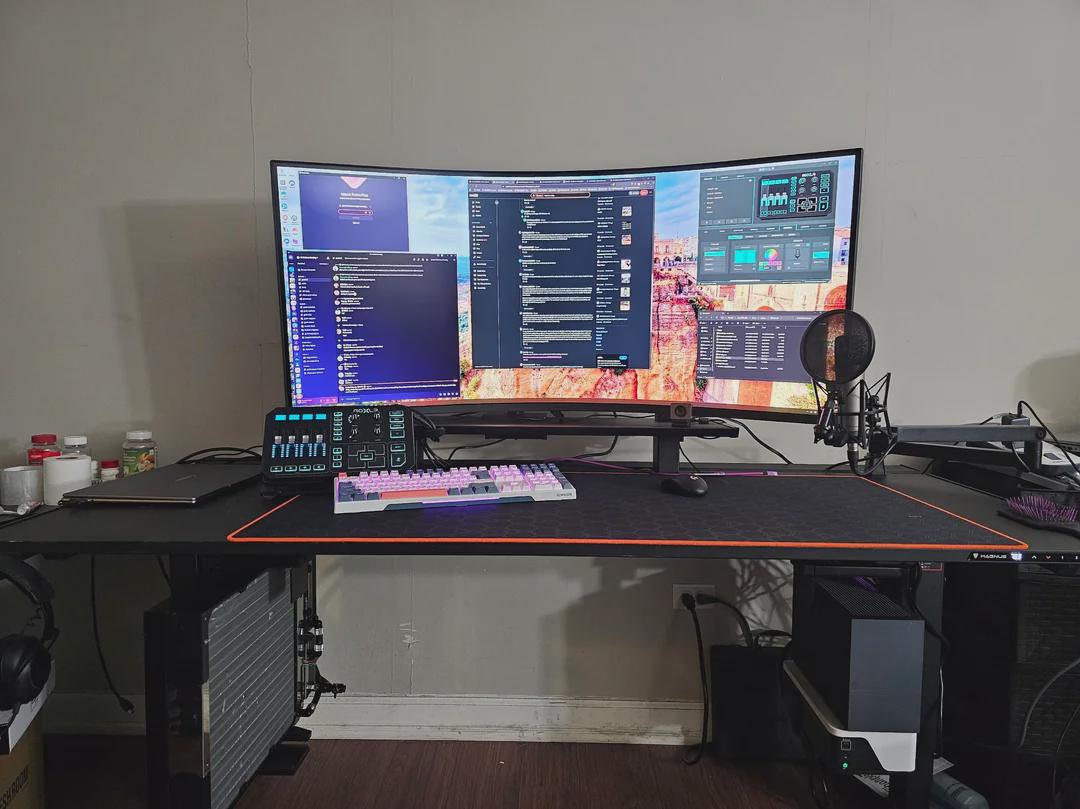
More images: https://ibb.co/album/GFQFLz
I was given the opportunity to try the new LG Ultragear Evo 52G930B – 52" 5k2k Gaming Monitor, and this is my first impressions, unboxing, thoughts on it's strengths & weaknesses, etc.
If you have questions that I don't answer in my write up, feel free to ask them and i'll try stuff as i can or do my best to help answer your questions.
Overall Thoughts
At 52" this is definitely on the large size (just 3 inches smaller than my tv, and according to a screensize comparison website, all of those three inches are only in vertical space, what would be letterbox bars in 21:9 content) for a monitor! But, if you have a big enough desk or a mounting solution that supports sitting at the optimal viewing distance, boy is it amazing to use!
Overall, I am happy with the 52G930B, and would definitely recommend it for most folks.
Unboxing / Setup
One spot for improvement i think in this monitor is the packaging/boxing. Other monitors I've owned typically come in a box that instead of being a top-load like this one is a front load, so you would set the box flat on a surface, lift the entire front of the box up, and the monitor would be face down in front of you and easy to attach the included (or your own) mount to. Because this was a top load, it made me worried about how to get the monitor out while maintaining the integrity of the box (I move a lot and like to keep the original packaging for safety)
Once out of the box, if you plan to mount this on any 3rd party monitor arms or wall mounts, be warned it is big and heavy. I needed a second person to attach it to me SecretLabs Magnus Heavy Duty Monitor Mount.
In the box you get the included monitor mount, in 2 parts. The base, and the pole. The LG 52" 5k2k monitor, of course. a MASSIVE power brick with a hefty power rating (360W!) in it's own smaller box (included an LTT screwdriver to show scale). And a little decorative cable area trim piece, to install to manage all your cables after you've plugged them in.
Due to the size, finding somewhere to safely set the foam curved piece down with the monitor on top can be challenging. Luckily i had a big desk and it worked fine 😀
Inputs / Outputs / Software
Total inputs are 2 HDMI, 1 DP, and 1 USB-C for image, and the USB-C is also used for data for the included USB 'hub' (2 USB A ports). A headphone port, for audio out. And then a barrel jack for power from the power brick.
For software, LG offers 2 different software options, the first is a software-based KVM solution to load on two PCs to control them individually with the mouse/keyboard plugged in to the monitor while in PBP/PIP mode, called Dual Controller. I didn't try this one, as it isn't super relevant for me. The second is their LG Switch software suite which i did try, misunderstanding some of the marketing on it thinking it would give me additional PBP/PIP modes. However, it is more akin to fancyzones or windows' built in window management options for auto-sizing of multiple windows. One feature of the LG Switch app which i wasn't a fan of (but you may like) is it has some type of predictive behavior in it to assume you want to snap your windows and will do so without you explicitly having to go into the app to tell it to do so. I'm not sure how i accidentally activated it, but i was not a fan of it, and the software didn't have much use for me anyways so I likely won't use it much.
Gaming
I provided a few screenshots in a handful of different style of games so you can see just how massive the space is to work with. Sitting about ~3 feet back from the monitor, it feels very comfortable, no difficulty seeing everything and the curve is nowhere near as noticeable as it is when laying flat.
In fast paced games like first person shooters, the extra FOV from such a massive display is immensely useful. I was getting more headshots as i was able to focus in tiny details at a further distance. 4k vs 5k, the extra space outside of the typical 16:9 window allows for more peripheral FOV and increasing the FOV settings to really see people that you would otherwise miss on a standard 4k monitor.
In 4X strategy games like Civilization VI, the amount of sheer data you can see on your screen at once means you'll spend less time panning the map and looking for stuff. This will make your turn timers significantly shorter.
In management style games, you can just see so much more going on, that you would normally have to pan around the map to see.
The 240Hz refresh rate allows me to take full advantage of the graphics i can push at it from a high end modern gpu (5080 in my case).
Productivity
For productivity, the 52G930B has so much screen reel estate that i no longer find myself snapping windows to various corners/sides of my monitors to maximize my ability to multitask/have multiple references open. Instead, I'm able to merely open the window and leave it in windowed mode somewhere in the huge desktop, and still fit more than enough windows in.
However, this productivity comes at a cost. On my desktop with my high end modern GPU, i can drive the native resolution no problem. But on my thin & lite with a built in intel arc GPU and my Dell work laptops, neither can drive the native resolution and are limited to 1440P 21:9 resolutions. Definitely check the maximum bandwidth output of your GPUs before considering buying one of these!
In addition, since this is a gaming monitor and not a productivity monitor, it's missing a handful of feature other high end productivity monitors might have built in like a dedicated KVM, or a webcam, or the like. Not a problem for me as the primary intent is to use it for gaming, but good to keep in mind!
Lastly, it has built in speakers which made my day! Sure, they aren't the highest quality speakers in the world, but they beat the built in speakers on my laptops, and no speakers on my desktop. Previously, I had cheap bluetooth speakers for my non-headphone audio setup. Now, I don't need additional peripherals on my desk to do the same thing, when i merely use the speakers for youtube or re-watching my favorite TV shows. When I want good audio, I'll use my high end headphones.
Wrap-Up
In al, the LG 562" 5k2k Gaming Monitor blows me away with it's capabilities and size. While it has a similarly serious pricetag, it's definitely worth it. While it may not be OLED, i find that i prefer it to the OLED monitor i used for a short period between my old setup (pictured) and this monitor. With an OLED. i had too much difficulties getting used to all of the OLED burn-in prevention safety features and it wasn't some earth-shattering difference in image quality for me. I'm perfectly happy without OLED. The only feature i wish it had like an OLED is the dimming capabilities. With the LF 52G930B, I don't notice any edge-lit panel lighting on dark screens like i did with my older monitors, it'd still be nice to get those true blacks. But Everything is a tradeoff, in life, and for me an OLED's tradeoffs aren't worth it for the perfect blacks. This monitor is definitely the one for me.
Rest of my Battlestation
https://pcpartpicker.com/user/GwenBD94/saved/NhxPgs
9850X3d
5080
32GB 5200
in a SFF + MO-RA custom watercooled loop hanging from opposite sides under my desk
Other images from the pc build: https://ibb.co/album/N9XGpq